> ## Documentation Index
> Fetch the complete documentation index at: https://docs.dialtu.com/llms.txt
> Use this file to discover all available pages before exploring further.
# Transfers in Salesflow
> Agent filters after a transfer, the Agent transferred event, and entry points for the receiving agent
Transfers feed Salesflow on **WhatsApp** and **SMS (Lumina)**. Messenger has no Salesflow, so transfers there don't move anyone.
## A conversation belongs to every agent that took part
After a transfer, the conversation counts for **every AI agent that took part in it** — the one that started it and each one it was transferred to.
That's why a transition or a stage event filtered **by agent** still matches after a transfer: a filter on the toll-tag agent keeps matching a conversation that the toll-tag agent handed to the tyres agent.
## The "Agent transferred" event
Static transitions can react to a transfer **the instant it happens**, instead of waiting for the conversation to end.
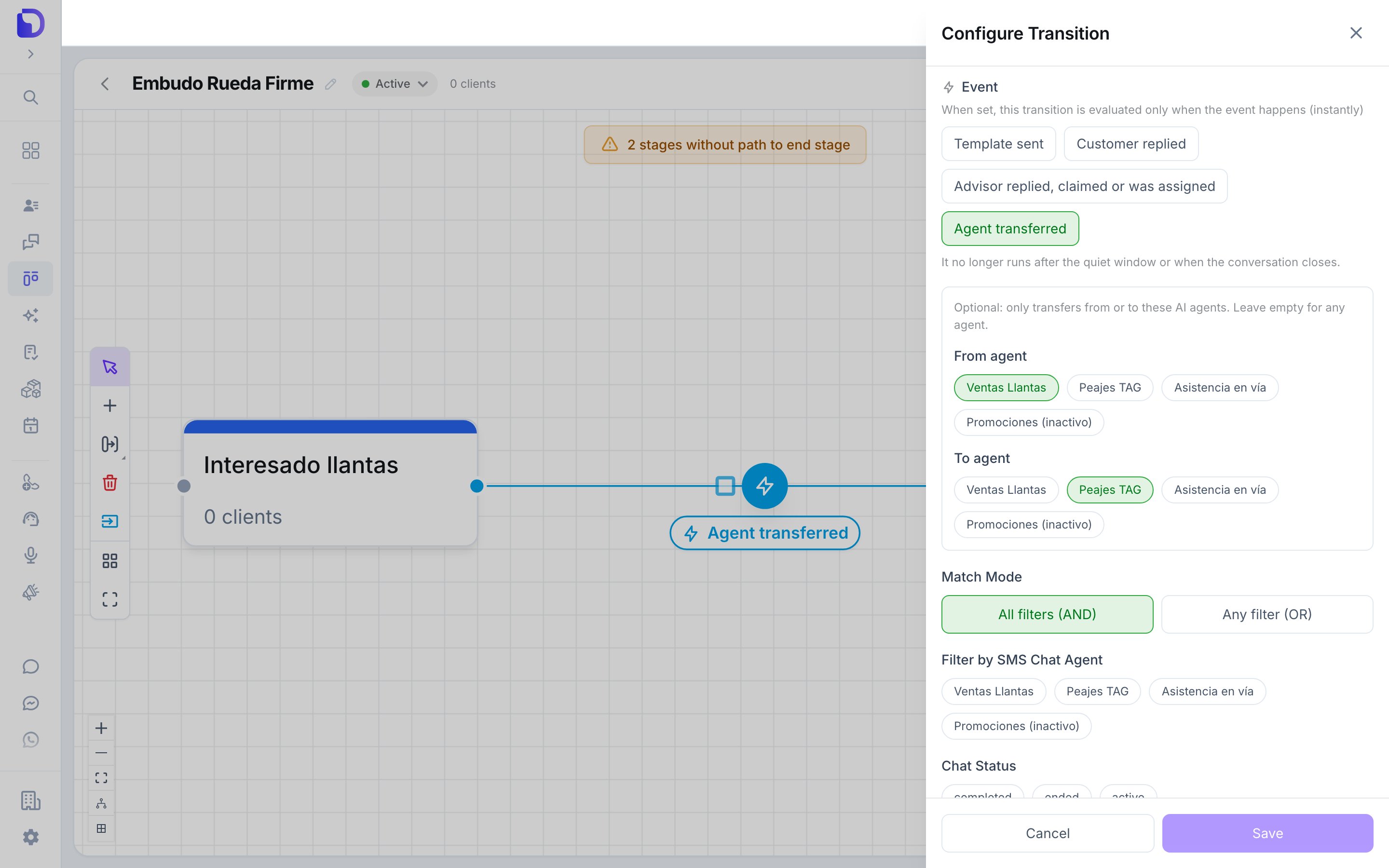
In the Flow view, click the transition line between two stages, then the round button that appears on it, to open **Configure Transition**. Choose **Static**.
**WhatsApp Chat** or **SMS Chat**.
In **Event**, select **Agent transferred**. As the field explains: *"When set, this transition is evaluated only when the event happens (instantly)."*
Two selectors appear: **From agent** and **To agent**. Leave both empty for any transfer.
*"Optional: only transfers from or to these AI agents. Leave empty for any agent."* On the SMS tab the hint adds *"Only Lumina SMS agents can transfer."*
 | Setting | Default | What it does |
| - | - | - |
| **Event → Agent transferred** | Off | Evaluates the transition when a transfer happens, for a customer in the source stage |
| **From agent** | Empty (any) | Only transfers made **by** these agents |
| **To agent** | Empty (any) | Only transfers made **to** these agents |
**Only committed transfers fire the event.** A failed transfer (topic mismatch, limit, inactive destination) fires nothing. A transfer that was later reverted already fired when it was committed.
The event goes in the **Event** field next to **Template sent**, **Customer replied** and **Advisor replied, claimed or was assigned**. Once an event is set, the transition no longer runs when the conversation closes.
## The receiving agent's entry points
A transfer also counts as a **conversation start for the new agent**. If the receiving agent feeds a pipeline through an entry point that triggers on conversation start, the customer enters that pipeline at the moment of the transfer — the same as if they had written to that agent directly.
This is how you build "specialist" pipelines: a tyres pipeline fed by the tyres agent picks up customers who started on the toll-tag agent and were transferred.
## What doesn't exist
* **Salesflow on Messenger.**
* **An "Agent transferred" trigger for stage events** — it's a transition event only.
* **A transfer event for failed or reverted attempts.**
## Next step
When a transfer doesn't do what you expected.
This documentation is built and hosted on [Mintlify](https://mintlify.com), a developer documentation platform.
| Setting | Default | What it does |
| - | - | - |
| **Event → Agent transferred** | Off | Evaluates the transition when a transfer happens, for a customer in the source stage |
| **From agent** | Empty (any) | Only transfers made **by** these agents |
| **To agent** | Empty (any) | Only transfers made **to** these agents |
**Only committed transfers fire the event.** A failed transfer (topic mismatch, limit, inactive destination) fires nothing. A transfer that was later reverted already fired when it was committed.
The event goes in the **Event** field next to **Template sent**, **Customer replied** and **Advisor replied, claimed or was assigned**. Once an event is set, the transition no longer runs when the conversation closes.
## The receiving agent's entry points
A transfer also counts as a **conversation start for the new agent**. If the receiving agent feeds a pipeline through an entry point that triggers on conversation start, the customer enters that pipeline at the moment of the transfer — the same as if they had written to that agent directly.
This is how you build "specialist" pipelines: a tyres pipeline fed by the tyres agent picks up customers who started on the toll-tag agent and were transferred.
## What doesn't exist
* **Salesflow on Messenger.**
* **An "Agent transferred" trigger for stage events** — it's a transition event only.
* **A transfer event for failed or reverted attempts.**
## Next step
When a transfer doesn't do what you expected.
This documentation is built and hosted on [Mintlify](https://mintlify.com), a developer documentation platform.