> ## Documentation Index
> Fetch the complete documentation index at: https://docs.dialtu.com/llms.txt
> Use this file to discover all available pages before exploring further.
# The calendar tool for agents
> What an AI agent may read and change on the calendar, the event title, and extra questions
A **Calendar Tool** gives a WhatsApp, SMS or voice agent (Aurora engine) a window onto the calendar. The agent reads real free slots — it never invents them — and books, moves or cancels on behalf of the customer it's talking to. Create it from the channel's tool library: **Chat → WhatsApp → Tools**, **Chat → SMS → Tools**, or the voice agent's tools page.
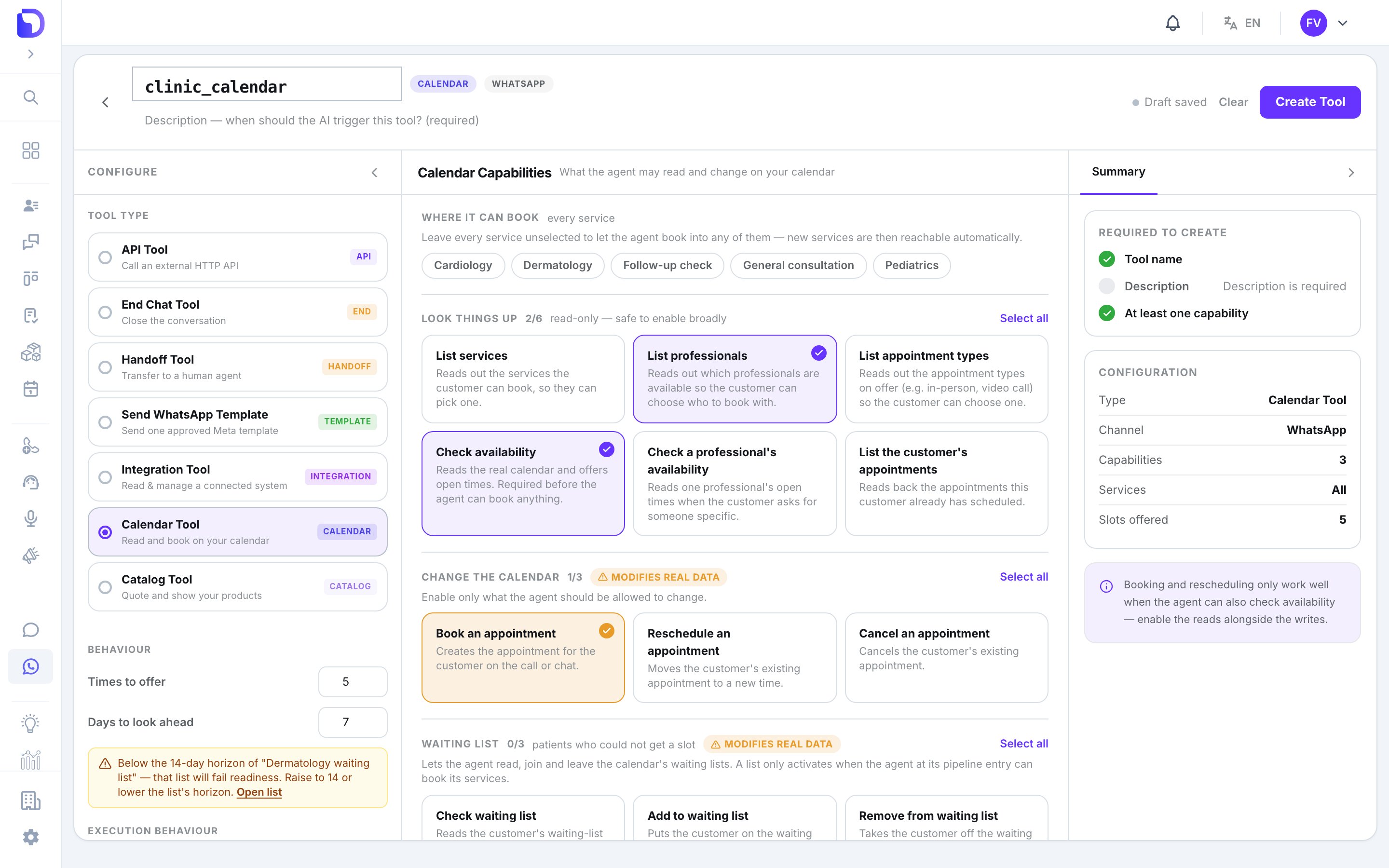 ## Capabilities
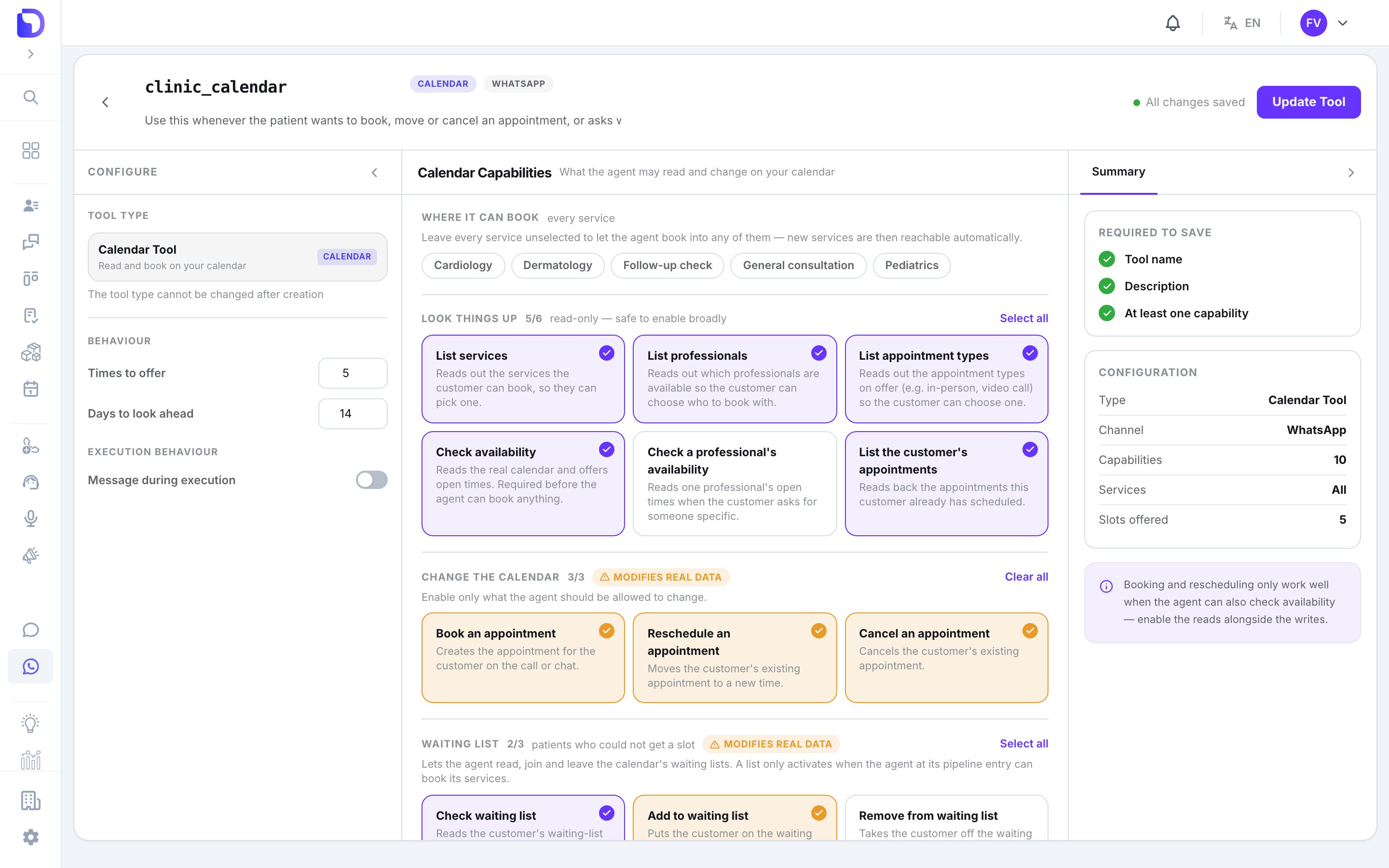 Tick what this agent may do:
| Group | Capabilities | Default |
| ----------------------- | --------------------------------------------------------------------------------------------------------------------------------------------------------- | -------------------------------------- |
| **Look things up** | List services · List professionals · List appointment types · Check availability · Check a professional's availability · List the customer's appointments | List professionals, Check availability |
| **Change the calendar** | Book an appointment · Reschedule an appointment · Cancel an appointment | Book an appointment |
| **Waiting list** | Check waiting list · Add to waiting list · Remove from waiting list | off |
*Booking and rescheduling only work well when the agent can also check availability.* Keep those together.
The agent only ever touches the calling customer's own appointments, matched by phone. Booking rules apply exactly as they do for a human.
## Behaviour
On the right rail:
| Setting | Range | Default |
| --------------------- | ----------------------------- | ------------- |
| **Slots offered** | 1–20 | 5 |
| **Days ahead** | 1–30 | 7 |
| **Where it can book** | every service, or a selection | every service |
If a waiting list this agent feeds has a longer horizon than **Days ahead**, the rail warns you.
## Event title and extra questions
Tick what this agent may do:
| Group | Capabilities | Default |
| ----------------------- | --------------------------------------------------------------------------------------------------------------------------------------------------------- | -------------------------------------- |
| **Look things up** | List services · List professionals · List appointment types · Check availability · Check a professional's availability · List the customer's appointments | List professionals, Check availability |
| **Change the calendar** | Book an appointment · Reschedule an appointment · Cancel an appointment | Book an appointment |
| **Waiting list** | Check waiting list · Add to waiting list · Remove from waiting list | off |
*Booking and rescheduling only work well when the agent can also check availability.* Keep those together.
The agent only ever touches the calling customer's own appointments, matched by phone. Booking rules apply exactly as they do for a human.
## Behaviour
On the right rail:
| Setting | Range | Default |
| --------------------- | ----------------------------- | ------------- |
| **Slots offered** | 1–20 | 5 |
| **Days ahead** | 1–30 | 7 |
| **Where it can book** | every service, or a selection | every service |
If a waiting list this agent feeds has a longer horizon than **Days ahead**, the rail warns you.
## Event title and extra questions
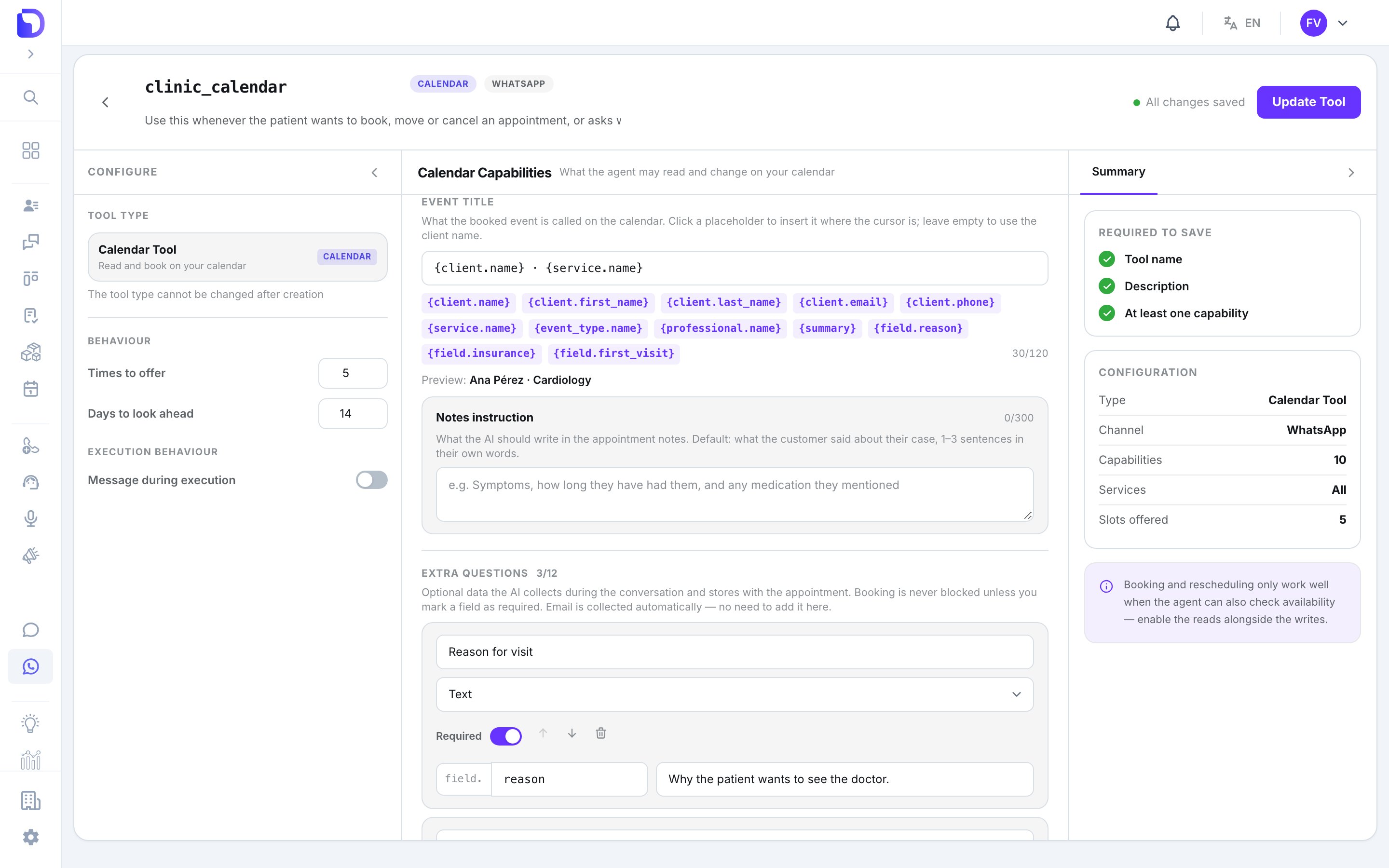 **Event title** — a template rendered into every appointment the agent books, up to 120 characters. Placeholders: `{client.name}` (default), `{client.first_name}`, `{client.last_name}`, `{client.email}`, `{client.phone}`, `{service.name}`, `{event_type.name}`, `{professional.name}`, `{summary}`, and `{field.}` for each extra question. **Summary instruction** tells the agent what to put in `{summary}`; **Notes instruction** what to write in the appointment's notes (default: what the customer said, in 1–3 sentences).
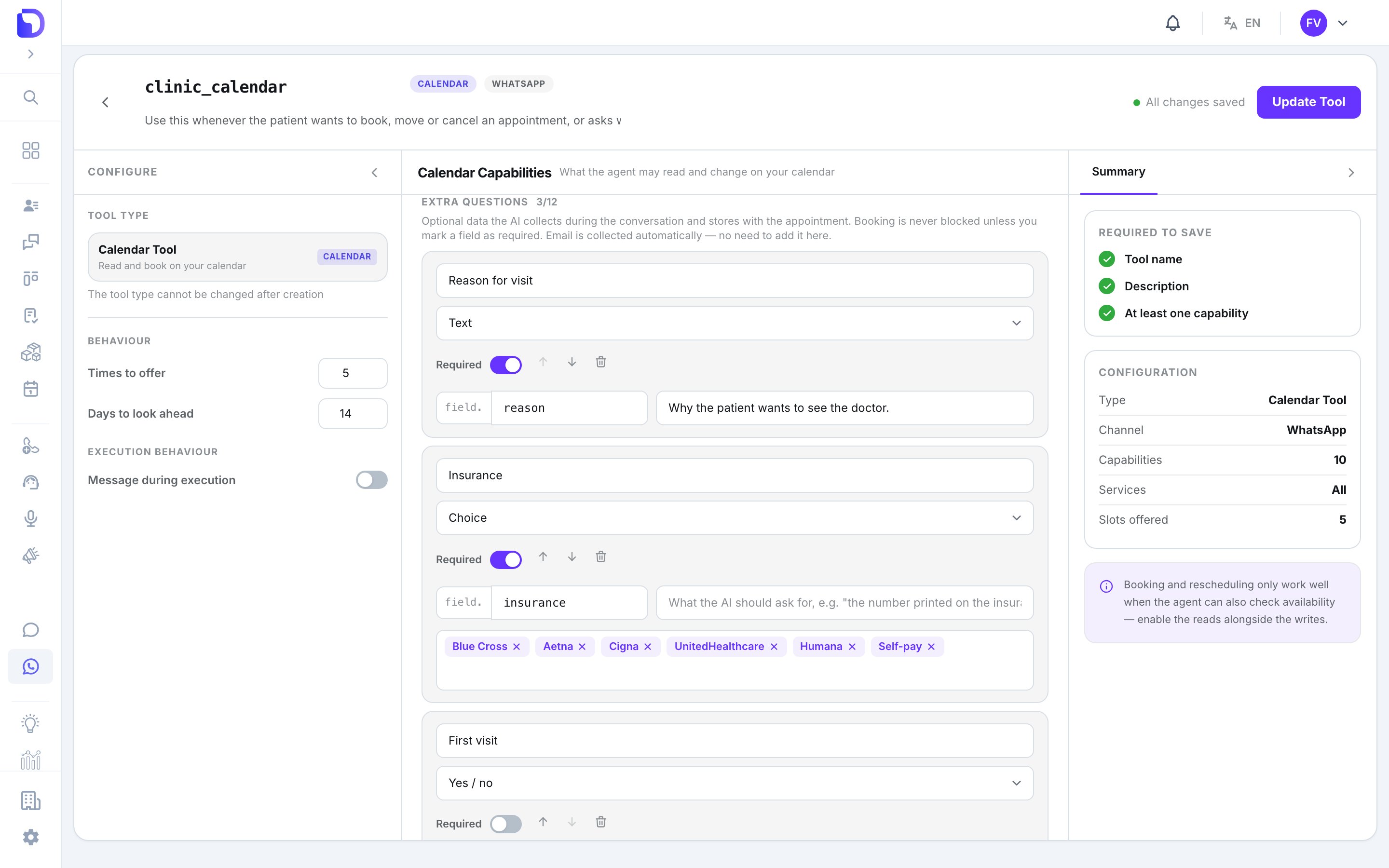 **Extra questions** — up to 12 fields the agent collects before booking:
| Property | Rules |
| --------------- | --------------------------------------------------------------------------------- |
| **Label** | ≤ 60 chars, shown in the appointment detail |
| **Key** | `a-z`, digits, `_`; must start with a letter; ≤ 40 chars; some names are reserved |
| **Type** | Text · Email · Phone · ID document · Yes-no · Choice (≤ 20 options) |
| **Description** | ≤ 300 chars — the hint the agent uses to ask |
| **Required** | A required answer can refuse the booking; an optional one never blocks it |
Answers appear on the appointment under **Appointment data**, and the booking is marked **AI · WhatsApp** (or SMS / call) with a **View conversation** link.
## What doesn't exist
* **Atlas building calendar tools** — Atlas can attach an existing one, not create it.
* **A calendar tool on the Solara voice engine.**
* **Booking for a different phone number** than the one in the conversation.
## Next step
When a booking doesn't land.
**Extra questions** — up to 12 fields the agent collects before booking:
| Property | Rules |
| --------------- | --------------------------------------------------------------------------------- |
| **Label** | ≤ 60 chars, shown in the appointment detail |
| **Key** | `a-z`, digits, `_`; must start with a letter; ≤ 40 chars; some names are reserved |
| **Type** | Text · Email · Phone · ID document · Yes-no · Choice (≤ 20 options) |
| **Description** | ≤ 300 chars — the hint the agent uses to ask |
| **Required** | A required answer can refuse the booking; an optional one never blocks it |
Answers appear on the appointment under **Appointment data**, and the booking is marked **AI · WhatsApp** (or SMS / call) with a **View conversation** link.
## What doesn't exist
* **Atlas building calendar tools** — Atlas can attach an existing one, not create it.
* **A calendar tool on the Solara voice engine.**
* **Booking for a different phone number** than the one in the conversation.
## Next step
When a booking doesn't land.