> ## Documentation Index
> Fetch the complete documentation index at: https://docs.dialtu.com/llms.txt
> Use this file to discover all available pages before exploring further.
# Introduction to the calendar
> What the Dialtu calendar is, what it can do, and how the screens are laid out
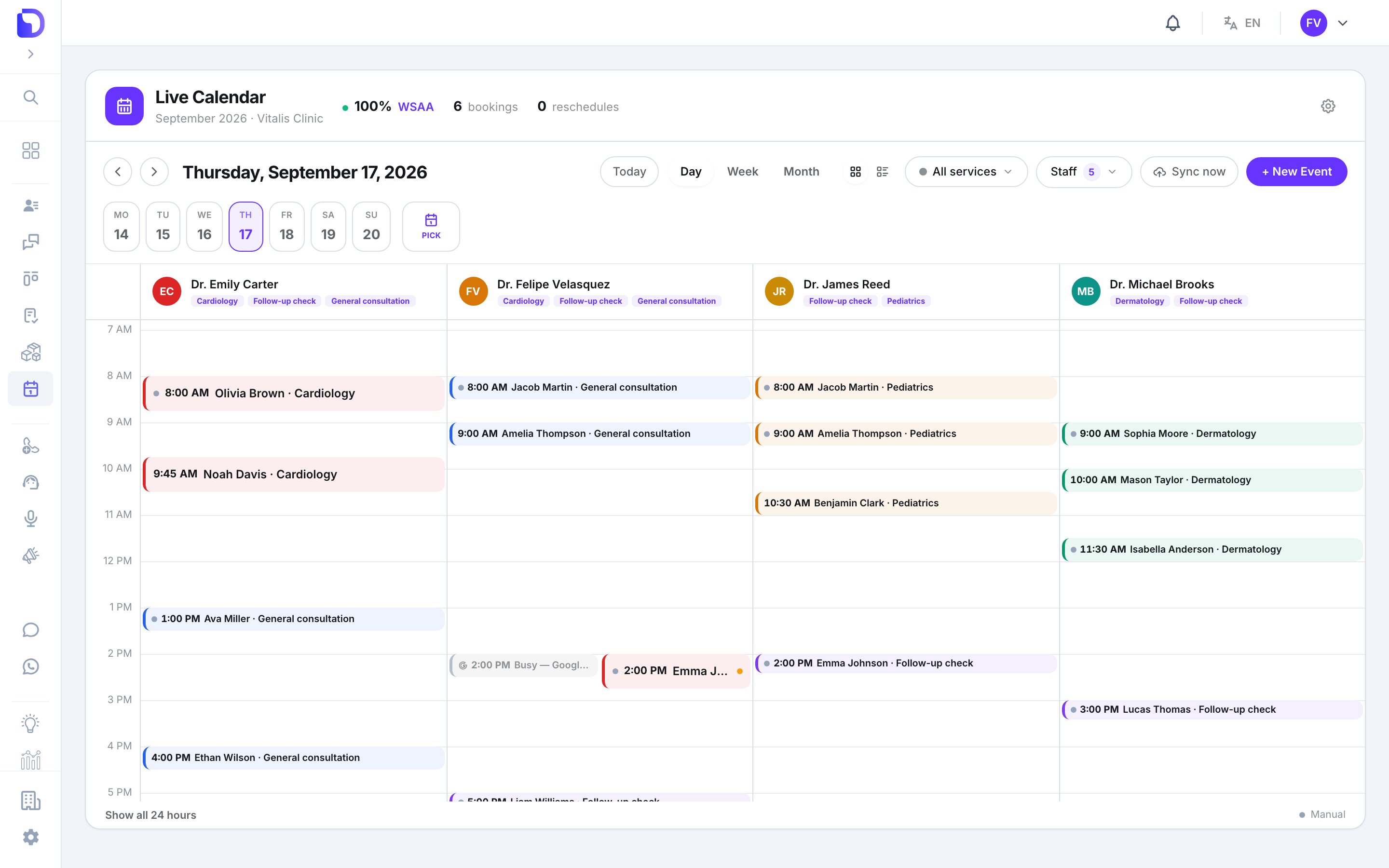
The calendar is where appointments live: your team books them by hand, your AI agents book them from WhatsApp, SMS or a call, and outside systems book them through the API. Every professional has their own hours, every service has its own rules, and one WhatsApp reminder goes out before each appointment.
 ## What the calendar can do
Day, week and month views, one column per professional, filters by service and staff.
Duration, colour, who can be booked, how bookings are distributed, and booking-window guardrails.
Weekly hours per service, breaks, and date-specific exceptions.
A calendar tool that lets a WhatsApp, SMS or voice agent check real slots and book, move or cancel.
One template, up to three send times, for every appointment.
Mirror bookings to a professional's Google Calendar and keep their Google busy time out of the slot grid.
## The screens
Everything is under **Calendar** in the sidebar (marked *Beta*):
| Menu | What's there |
| ---------------------------- | -------------------------------------------------------------------- |
| **Calendar → Agenda** | The calendar itself: views, filters, booking, moving and cancelling |
| **Calendar → Waiting Lists** | Patients who couldn't get a slot, and the lists that drain them |
| **Calendar → Settings** | **Profiles** (professionals), **Manage Services**, **Notifications** |
The gear icon on the agenda header is a shortcut to Settings.
## Who sees what
Three permissions under the **Calendar** module decide the experience:
| Permission | What it gives |
| ------------ | --------------------------------------------------------------------------------------------------------------------- |
| **Admin** | Everything: all calendars, settings, services, profiles, waiting lists, reassigning a booking to another professional |
| **View All** | Every calendar, book with auto-assign, manage only their own appointments and their own profile |
| **View Own** | Their own calendar only — no filters, no staff column, their own profile, availability and Google sync |
The built-in **Admin** role has Admin + View All; **Member** has View Own. Platform Admin and Super Admin bypass all checks. The calendar also has to be enabled on your plan — if **Calendar** isn't in the sidebar, that's the reason.
## What the calendar does NOT have
Worth knowing before you plan around it:
| Not available | Detail |
| --------------------------------------------- | ------------------------------------------------------------------------------------------- |
| **Recurring or multi-day appointments** | One appointment = one client, one professional, one start and end |
| **Group appointments** | No seats, guests or capacity per slot |
| **A public booking page** | Clients book through your AI agents, your team, or the API |
| **Editing an appointment after booking** | Title, notes, client and service are fixed; you can reschedule, confirm or cancel |
| **Email or SMS reminders** | Reminders are WhatsApp only |
| **Event types you can edit** | Three fixed appointment types: **In-Person**, **Video call**, **Call** |
| **Calendar-level working hours or slot size** | Hours live on each professional; slot size is the booking duration |
| **A usage or billing page** | The calendar itself doesn't consume credits; reminders go out as WhatsApp template messages |
## What's in this section
Views, filters, cards, drag to move, resize, and the appointment detail.
The New Event window, step by step.
Duration, colour, allocation strategy, members and booking rules.
Profiles, linking a Dialtu user or not, and personal booking rules.
Weekly hours, breaks and date-specific hours.
The WhatsApp reminder: account, template, send times.
Connect, what syncs in each direction, colours, disconnect.
Queue patients and let the list book them when a slot opens.
What an AI agent may read and change, the event title, and extra questions.
The things that actually go wrong, and what to do about each.
## Two things that surprise people
**A professional isn't bookable until they belong to a service and have hours.** A profile alone shows a *Not bookable* badge. Add them to a service, then set availability — in that order.
**Settings apply immediately.** There's no draft or publish step for services, profiles, availability or reminders — saving changes what your agents offer from the next conversation on.
## Next step
How to read and work the calendar every day.
## What the calendar can do
Day, week and month views, one column per professional, filters by service and staff.
Duration, colour, who can be booked, how bookings are distributed, and booking-window guardrails.
Weekly hours per service, breaks, and date-specific exceptions.
A calendar tool that lets a WhatsApp, SMS or voice agent check real slots and book, move or cancel.
One template, up to three send times, for every appointment.
Mirror bookings to a professional's Google Calendar and keep their Google busy time out of the slot grid.
## The screens
Everything is under **Calendar** in the sidebar (marked *Beta*):
| Menu | What's there |
| ---------------------------- | -------------------------------------------------------------------- |
| **Calendar → Agenda** | The calendar itself: views, filters, booking, moving and cancelling |
| **Calendar → Waiting Lists** | Patients who couldn't get a slot, and the lists that drain them |
| **Calendar → Settings** | **Profiles** (professionals), **Manage Services**, **Notifications** |
The gear icon on the agenda header is a shortcut to Settings.
## Who sees what
Three permissions under the **Calendar** module decide the experience:
| Permission | What it gives |
| ------------ | --------------------------------------------------------------------------------------------------------------------- |
| **Admin** | Everything: all calendars, settings, services, profiles, waiting lists, reassigning a booking to another professional |
| **View All** | Every calendar, book with auto-assign, manage only their own appointments and their own profile |
| **View Own** | Their own calendar only — no filters, no staff column, their own profile, availability and Google sync |
The built-in **Admin** role has Admin + View All; **Member** has View Own. Platform Admin and Super Admin bypass all checks. The calendar also has to be enabled on your plan — if **Calendar** isn't in the sidebar, that's the reason.
## What the calendar does NOT have
Worth knowing before you plan around it:
| Not available | Detail |
| --------------------------------------------- | ------------------------------------------------------------------------------------------- |
| **Recurring or multi-day appointments** | One appointment = one client, one professional, one start and end |
| **Group appointments** | No seats, guests or capacity per slot |
| **A public booking page** | Clients book through your AI agents, your team, or the API |
| **Editing an appointment after booking** | Title, notes, client and service are fixed; you can reschedule, confirm or cancel |
| **Email or SMS reminders** | Reminders are WhatsApp only |
| **Event types you can edit** | Three fixed appointment types: **In-Person**, **Video call**, **Call** |
| **Calendar-level working hours or slot size** | Hours live on each professional; slot size is the booking duration |
| **A usage or billing page** | The calendar itself doesn't consume credits; reminders go out as WhatsApp template messages |
## What's in this section
Views, filters, cards, drag to move, resize, and the appointment detail.
The New Event window, step by step.
Duration, colour, allocation strategy, members and booking rules.
Profiles, linking a Dialtu user or not, and personal booking rules.
Weekly hours, breaks and date-specific hours.
The WhatsApp reminder: account, template, send times.
Connect, what syncs in each direction, colours, disconnect.
Queue patients and let the list book them when a slot opens.
What an AI agent may read and change, the event title, and extra questions.
The things that actually go wrong, and what to do about each.
## Two things that surprise people
**A professional isn't bookable until they belong to a service and have hours.** A profile alone shows a *Not bookable* badge. Add them to a service, then set availability — in that order.
**Settings apply immediately.** There's no draft or publish step for services, profiles, availability or reminders — saving changes what your agents offer from the next conversation on.
## Next step
How to read and work the calendar every day.