> ## Documentation Index
> Fetch the complete documentation index at: https://docs.dialtu.com/llms.txt
> Use this file to discover all available pages before exploring further.
# Participants and group appointments
> Members and professionals on an appointment, group capacity and seats, and adding or removing people after booking
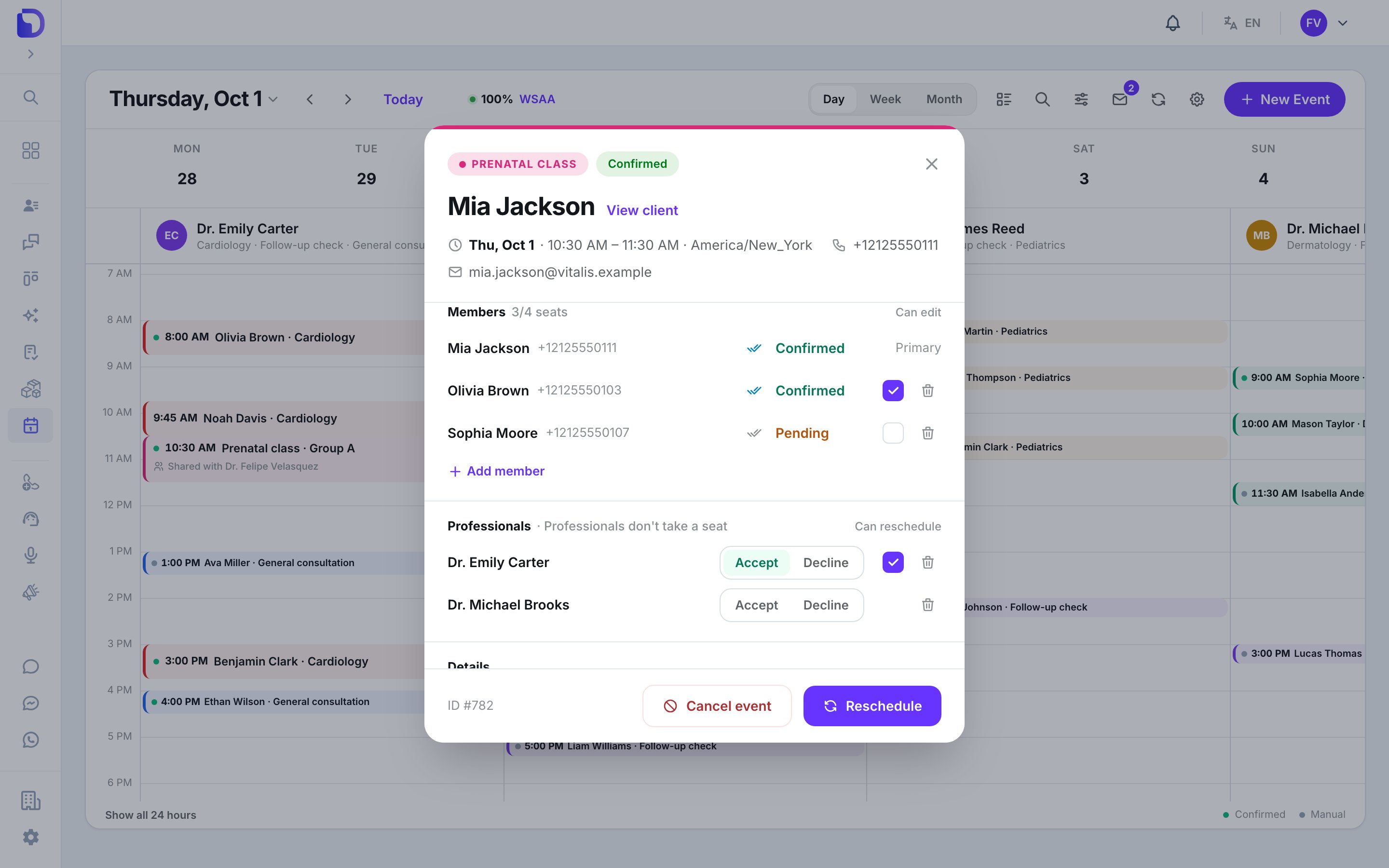
An appointment isn't limited to one client and one professional. It has **one organizer** — its main professional — and can carry more people: the client who booked, guests, group members, and other professionals. You see all of them in the appointment window, in two blocks: **Members** and **Professionals**.
 ## Members and professionals
| Who | Block | Takes a seat | What they are |
| - | - | - | - |
| **Booker** | Members, tagged **Primary** | Yes | The client the appointment was booked for. Can't be removed from their own appointment |
| **Guest** | Members | Yes | Another client added at booking or later |
| **Group member** | Members | Yes | A client who joined a group appointment — usually through an AI agent |
| **Co-professional** | Professionals | No — *Professionals don't take a seat* | Another professional invited to the appointment. See [Invitations](/en/calendar/invitations) |
Each member row shows their answer — **Confirmed**, **Pending**, **Declined** or **Maybe** — and delivery ticks for the WhatsApp messages they were sent.
## Book a group
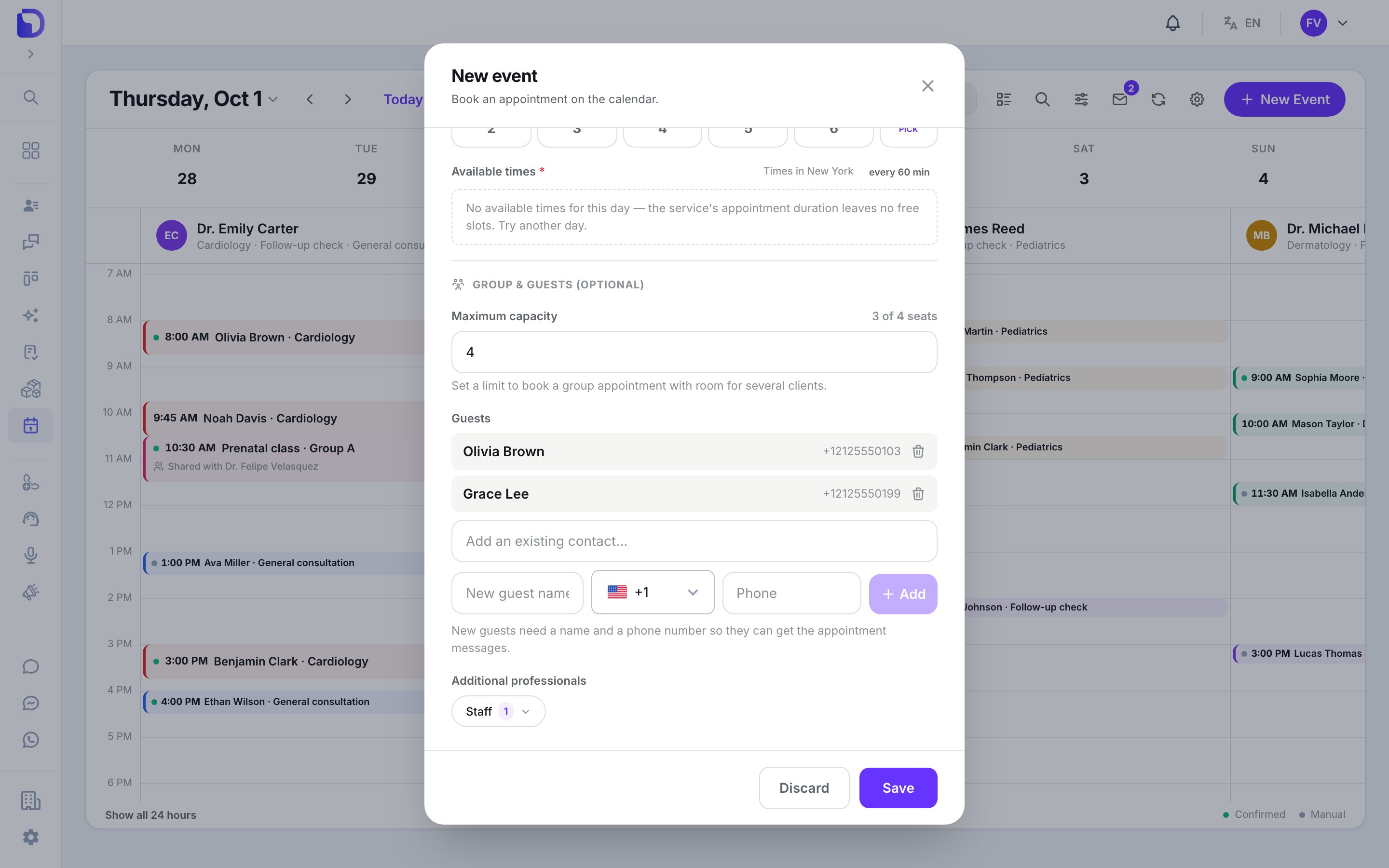
In **+ New Event**, open **Group & guests (optional)**:
**Maximum capacity** — **2** or more turns the appointment into a group with that many client seats. Leave it empty for a single client. *A group appointment needs a capacity of at least 2.*
Search an existing contact (*Add an existing contact...*) or type a **New guest name** and **Phone**. New guests need a phone *so they can get the appointment messages*.
**Additional professionals** lists the other members of the selected service. Each one gets an invitation.
Everything is booked together, or nothing is: *Some participants couldn't be added, so nothing was booked.*
## Members and professionals
| Who | Block | Takes a seat | What they are |
| - | - | - | - |
| **Booker** | Members, tagged **Primary** | Yes | The client the appointment was booked for. Can't be removed from their own appointment |
| **Guest** | Members | Yes | Another client added at booking or later |
| **Group member** | Members | Yes | A client who joined a group appointment — usually through an AI agent |
| **Co-professional** | Professionals | No — *Professionals don't take a seat* | Another professional invited to the appointment. See [Invitations](/en/calendar/invitations) |
Each member row shows their answer — **Confirmed**, **Pending**, **Declined** or **Maybe** — and delivery ticks for the WhatsApp messages they were sent.
## Book a group
In **+ New Event**, open **Group & guests (optional)**:
**Maximum capacity** — **2** or more turns the appointment into a group with that many client seats. Leave it empty for a single client. *A group appointment needs a capacity of at least 2.*
Search an existing contact (*Add an existing contact...*) or type a **New guest name** and **Phone**. New guests need a phone *so they can get the appointment messages*.
**Additional professionals** lists the other members of the selected service. Each one gets an invitation.
Everything is booked together, or nothing is: *Some participants couldn't be added, so nothing was booked.*
 Full walkthrough: [Book an appointment by hand](/en/calendar/new-event).
## Seats
* The header of **Members** reads *booked/max seats* — e.g. *3/4 seats*. The booker counts as a seat.
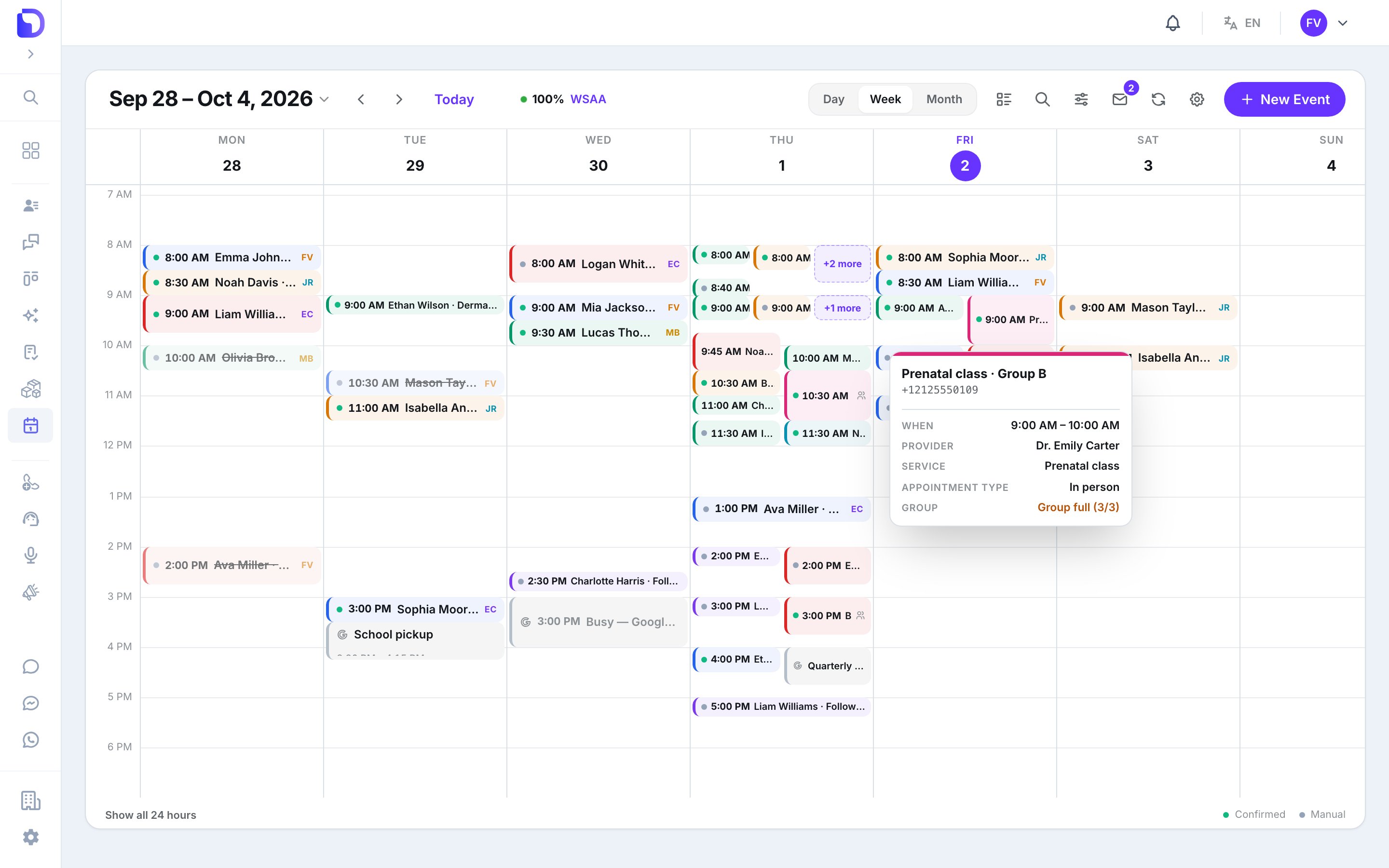
* On the agenda, a group card carries a *3/4* badge; hover reads *3 of 4 seats taken*. When every seat is taken: *Group full (3/3)*.
* **A member who declines frees their seat.**
* Adding someone to a full group is refused: *This appointment is full — no seats left.*
* Without a capacity there's no seat limit.
Full walkthrough: [Book an appointment by hand](/en/calendar/new-event).
## Seats
* The header of **Members** reads *booked/max seats* — e.g. *3/4 seats*. The booker counts as a seat.
* On the agenda, a group card carries a *3/4* badge; hover reads *3 of 4 seats taken*. When every seat is taken: *Group full (3/3)*.
* **A member who declines frees their seat.**
* Adding someone to a full group is refused: *This appointment is full — no seats left.*
* Without a capacity there's no seat limit.
 ## Add or remove people after booking
Open the appointment.
## Add or remove people after booking
Open the appointment.
 | Action | Where | Notes |
| - | - | - |
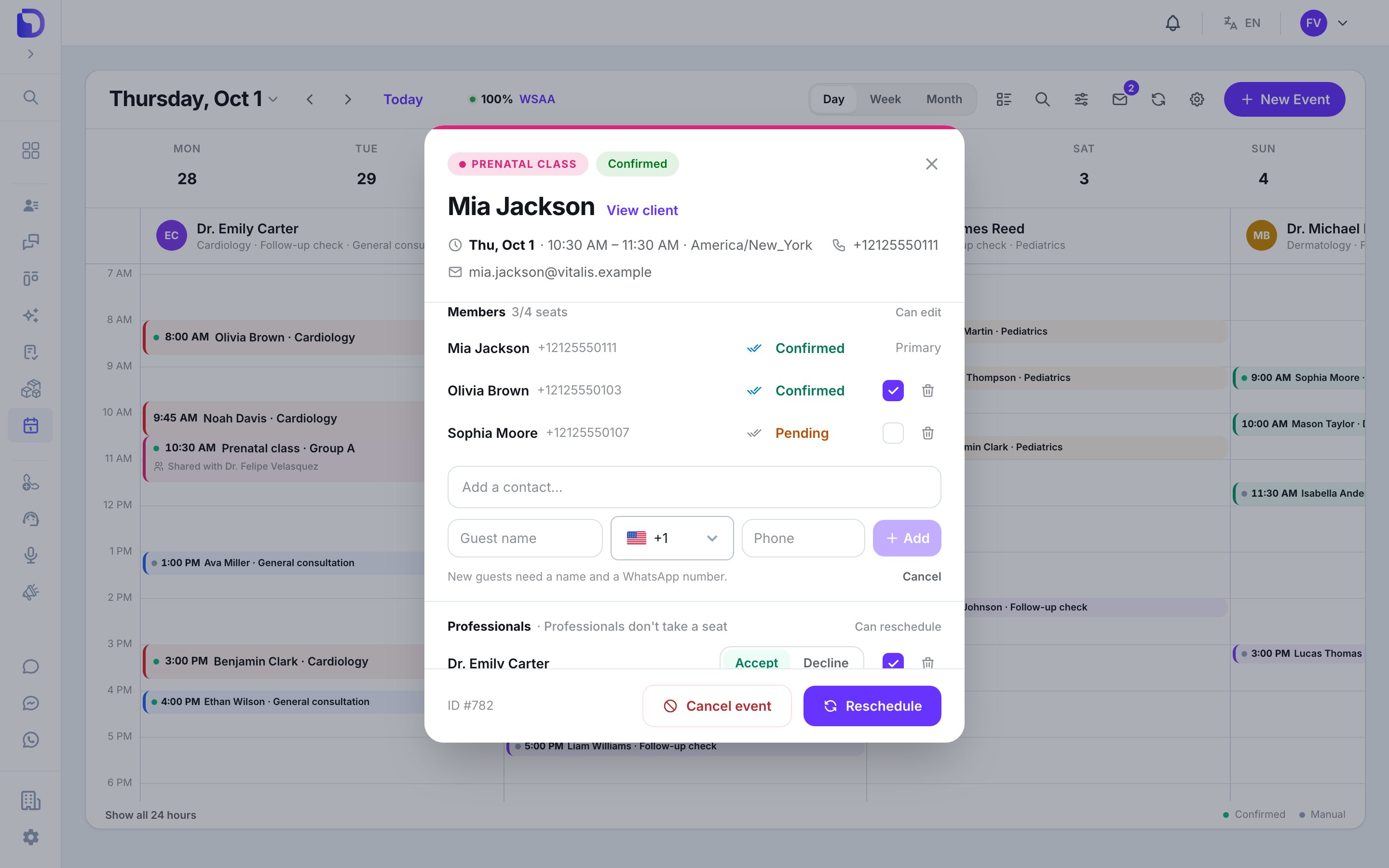
| **Add member** | Members | An existing contact (*Add a contact...*), or a **Guest name** + **Phone**. *New guests need a name and a WhatsApp number.* |
| **Invite a professional** | Professionals | Sends them an invitation. They must be free at that time: *That professional is not available at this time.* |
| Trash icon → **Remove** | Any row but the booker | Asks *Remove \{name} from this appointment?* → **Keep** or **Remove** |
Adding and removing people is for **organizers** — the appointment's main professional or a calendar Admin.
A new guest gets the appointment's confirmation message (if [confirmations](/en/calendar/notifications#confirmation) are on) when they join. People who declined or were removed get no further notices.
## Permissions on a row
| Checkbox | On | What it allows |
| - | - | - |
| **Can edit** | Guest and group-member rows (the booker's row reads **Primary**) | *Lets this person reschedule or cancel the appointment* |
| **Can reschedule** | Professional rows | *Lets this professional move the appointment to another time. They can't cancel it or change who attends.* It only works once they've accepted |
Only organizers change these checkboxes.
## Delivery ticks and answers
Each member row shows ticks for the last WhatsApp message sent to that person. Hover them for the kind — **Reminder**, **Reschedule notice**, **Cancellation notice**, **Confirmation** — and the state: *sent*, *delivered*, *read* or *failed* (with the error code).
**Sent isn't delivered.** One grey tick means WhatsApp accepted the message, not that it reached the phone. Check for two ticks before assuming the client got it.
The answer (**Confirmed**, **Declined**…) changes only when the person taps a button on a [confirmation message](/en/calendar/notifications#confirmation), or when they tell an AI agent they're leaving.
## What AI agents can do
With the matching [calendar tool](/en/calendar/agent-tool) capabilities:
| Capability | What it does |
| - | - |
| **List group sessions with free seats** | Reads out upcoming group sessions with room left and how many seats remain. *It never reveals who else is attending.* |
| **Join a group session** | Gives the customer a seat in the session they picked. Only works while there's room |
| **Let a guest leave an appointment** | Releases only the customer's own place. It never cancels the appointment for anyone else |
All three are on by default on a new calendar tool.
## What doesn't exist
| Not available | Detail |
| - | - |
| **Capacity per service** | Capacity is set on each appointment |
| **Recurring classes** | Each session is its own appointment |
| **A public page to join a group** | Clients join through an AI agent or your team |
| **Showing other attendees to the AI** | The agent never learns or reveals who else is booked |
| **Per-person times** | Everyone on the appointment shares one start and end |
## Next step
How co-professionals receive, accept and leave appointments.
This documentation is built and hosted on [Mintlify](https://mintlify.com), a developer documentation platform.
| Action | Where | Notes |
| - | - | - |
| **Add member** | Members | An existing contact (*Add a contact...*), or a **Guest name** + **Phone**. *New guests need a name and a WhatsApp number.* |
| **Invite a professional** | Professionals | Sends them an invitation. They must be free at that time: *That professional is not available at this time.* |
| Trash icon → **Remove** | Any row but the booker | Asks *Remove \{name} from this appointment?* → **Keep** or **Remove** |
Adding and removing people is for **organizers** — the appointment's main professional or a calendar Admin.
A new guest gets the appointment's confirmation message (if [confirmations](/en/calendar/notifications#confirmation) are on) when they join. People who declined or were removed get no further notices.
## Permissions on a row
| Checkbox | On | What it allows |
| - | - | - |
| **Can edit** | Guest and group-member rows (the booker's row reads **Primary**) | *Lets this person reschedule or cancel the appointment* |
| **Can reschedule** | Professional rows | *Lets this professional move the appointment to another time. They can't cancel it or change who attends.* It only works once they've accepted |
Only organizers change these checkboxes.
## Delivery ticks and answers
Each member row shows ticks for the last WhatsApp message sent to that person. Hover them for the kind — **Reminder**, **Reschedule notice**, **Cancellation notice**, **Confirmation** — and the state: *sent*, *delivered*, *read* or *failed* (with the error code).
**Sent isn't delivered.** One grey tick means WhatsApp accepted the message, not that it reached the phone. Check for two ticks before assuming the client got it.
The answer (**Confirmed**, **Declined**…) changes only when the person taps a button on a [confirmation message](/en/calendar/notifications#confirmation), or when they tell an AI agent they're leaving.
## What AI agents can do
With the matching [calendar tool](/en/calendar/agent-tool) capabilities:
| Capability | What it does |
| - | - |
| **List group sessions with free seats** | Reads out upcoming group sessions with room left and how many seats remain. *It never reveals who else is attending.* |
| **Join a group session** | Gives the customer a seat in the session they picked. Only works while there's room |
| **Let a guest leave an appointment** | Releases only the customer's own place. It never cancels the appointment for anyone else |
All three are on by default on a new calendar tool.
## What doesn't exist
| Not available | Detail |
| - | - |
| **Capacity per service** | Capacity is set on each appointment |
| **Recurring classes** | Each session is its own appointment |
| **A public page to join a group** | Clients join through an AI agent or your team |
| **Showing other attendees to the AI** | The agent never learns or reveals who else is booked |
| **Per-person times** | Everyone on the appointment shares one start and end |
## Next step
How co-professionals receive, accept and leave appointments.
This documentation is built and hosted on [Mintlify](https://mintlify.com), a developer documentation platform.