> ## Documentation Index
> Fetch the complete documentation index at: https://docs.dialtu.com/llms.txt
> Use this file to discover all available pages before exploring further.
# Waiting lists
> Queue patients who couldn't get a slot, and let the list book them when one opens
A **waiting list** watches one or more services. Every 10 minutes it looks for free capacity inside its horizon; when it finds some, it pushes the next clients into a Salesflow pipeline, where a WhatsApp or SMS agent offers them the slot. A client who books leaves the list; one who doesn't answer in time gives the seat back. **Calendar → Waiting Lists**.
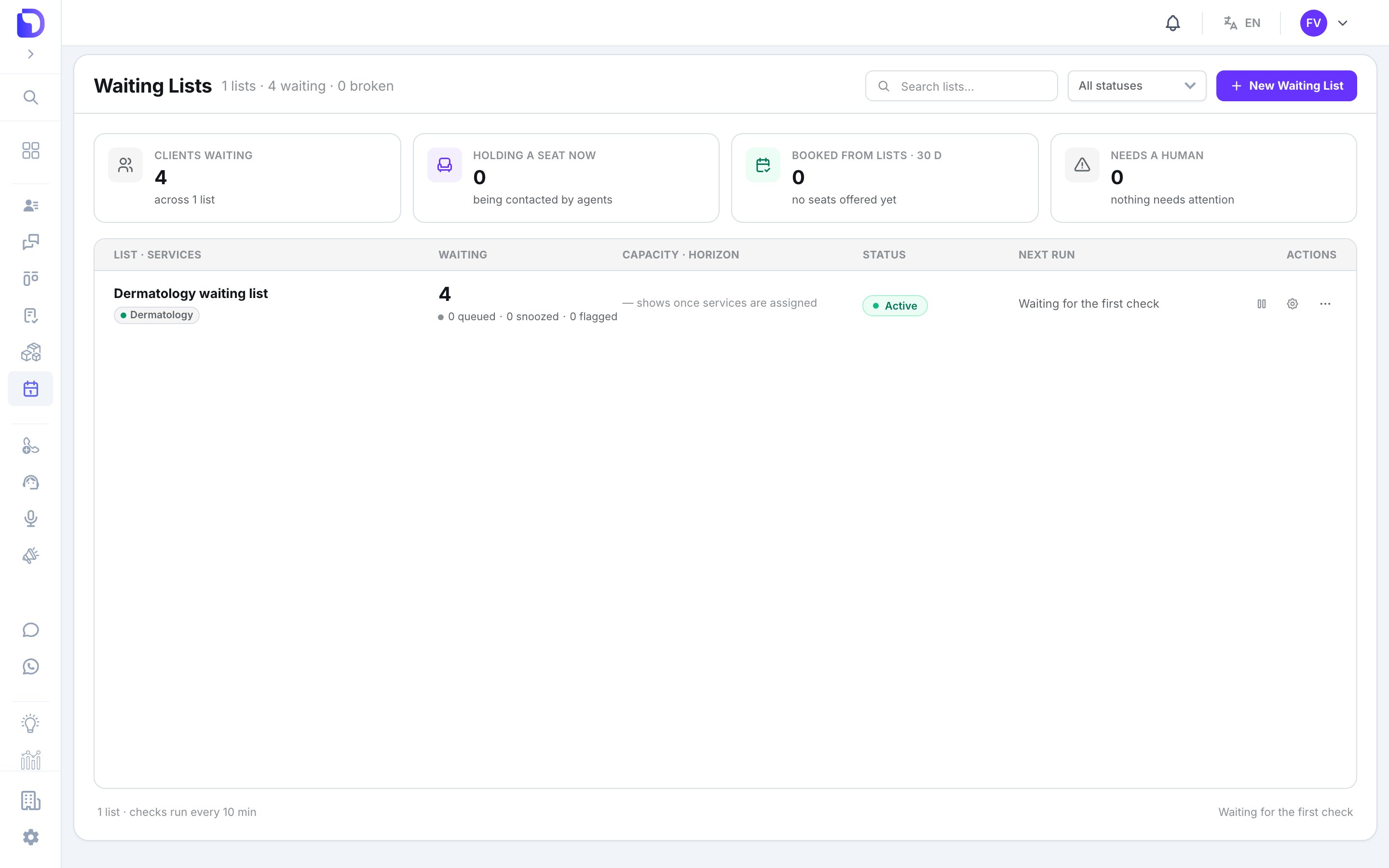 The index shows **Clients waiting**, **Holding a seat now**, **Booked from lists · 30 d** and **Needs a human**, plus each list's status: *Active*, *Paused*, *Broken* or *Needs setup*.
## Create a list
**New Waiting List** offers three presets:
| Preset | Horizon | Seat timeout | Attempts |
| ------------------------------ | ------- | ------------------ | -------- |
| **One list per department** | 14 days | 24 h | 3 |
| **Single high-demand service** | 7 days | 6 h (cooldown 4 h) | 3 |
| **Blank** | 14 days | 48 h | 5 |
The index shows **Clients waiting**, **Holding a seat now**, **Booked from lists · 30 d** and **Needs a human**, plus each list's status: *Active*, *Paused*, *Broken* or *Needs setup*.
## Create a list
**New Waiting List** offers three presets:
| Preset | Horizon | Seat timeout | Attempts |
| ------------------------------ | ------- | ------------------ | -------- |
| **One list per department** | 14 days | 24 h | 3 |
| **Single high-demand service** | 7 days | 6 h (cooldown 4 h) | 3 |
| **Blank** | 14 days | 48 h | 5 |
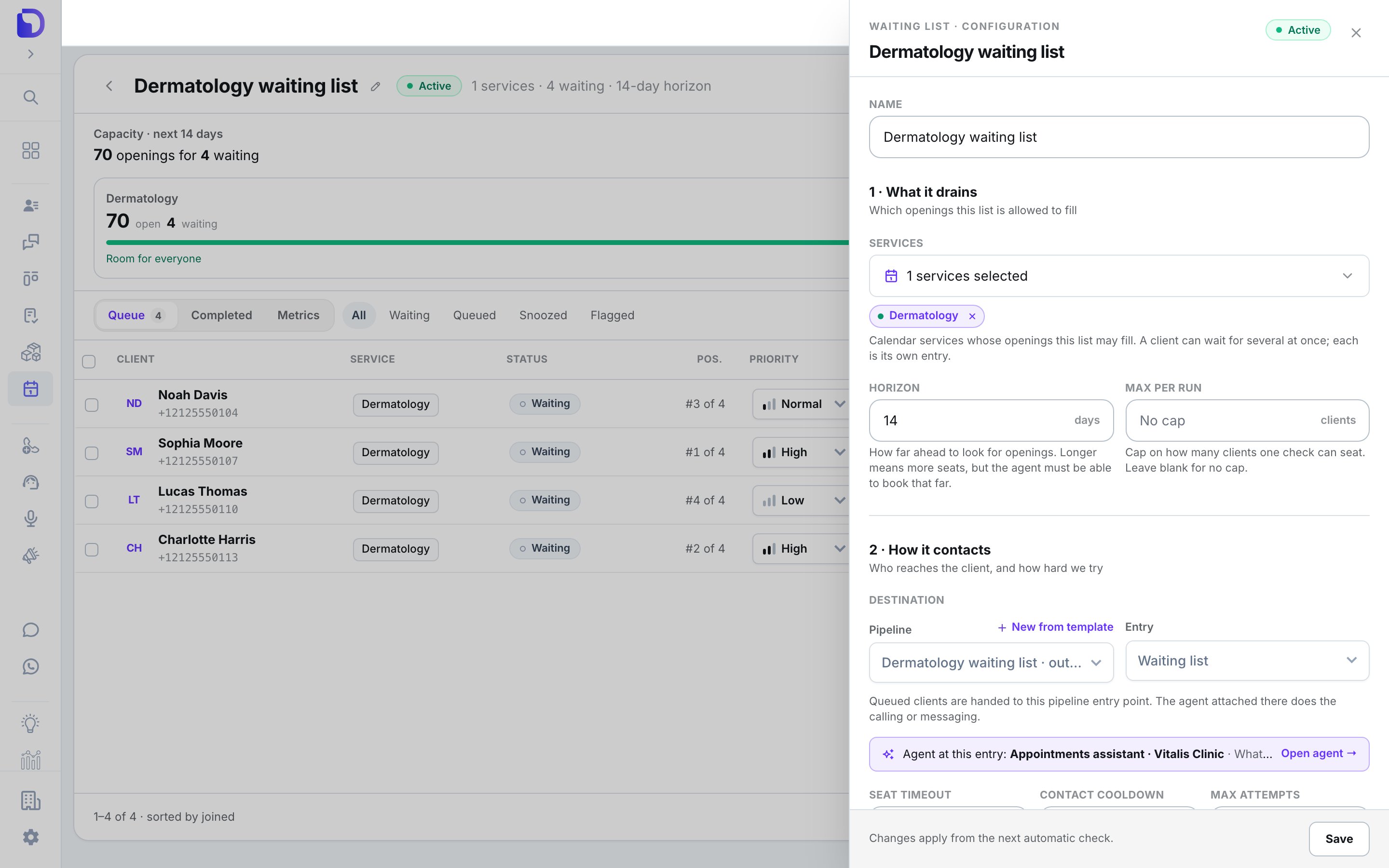 | Setting | What it does |
| -------------------------- | ---------------------------------------------------------------------------------- |
| **Services** | Which services' capacity the list drains |
| **Horizon** | How many days ahead it looks (1–30) |
| **Max per run** | Cap on clients pushed per sweep |
| **Destination** | The Salesflow pipeline and entry node that contact them — or **New from template** |
| **Contact hours** and days | When clients may be contacted |
| **Seat timeout** | How long a client holds an offered seat before it's released |
| **Contact cooldown** | Minimum gap between two contacts to the same client |
| **Max attempts** | Seats offered before the client is flagged *Needs a human* |
**Readiness** checks run live: a blocking finding stops **Activate**; an advisory one lets you **Activate anyway**.
## The queue
| Setting | What it does |
| -------------------------- | ---------------------------------------------------------------------------------- |
| **Services** | Which services' capacity the list drains |
| **Horizon** | How many days ahead it looks (1–30) |
| **Max per run** | Cap on clients pushed per sweep |
| **Destination** | The Salesflow pipeline and entry node that contact them — or **New from template** |
| **Contact hours** and days | When clients may be contacted |
| **Seat timeout** | How long a client holds an offered seat before it's released |
| **Contact cooldown** | Minimum gap between two contacts to the same client |
| **Max attempts** | Seats offered before the client is flagged *Needs a human* |
**Readiness** checks run live: a blocking finding stops **Activate**; an advisory one lets you **Activate anyway**.
## The queue
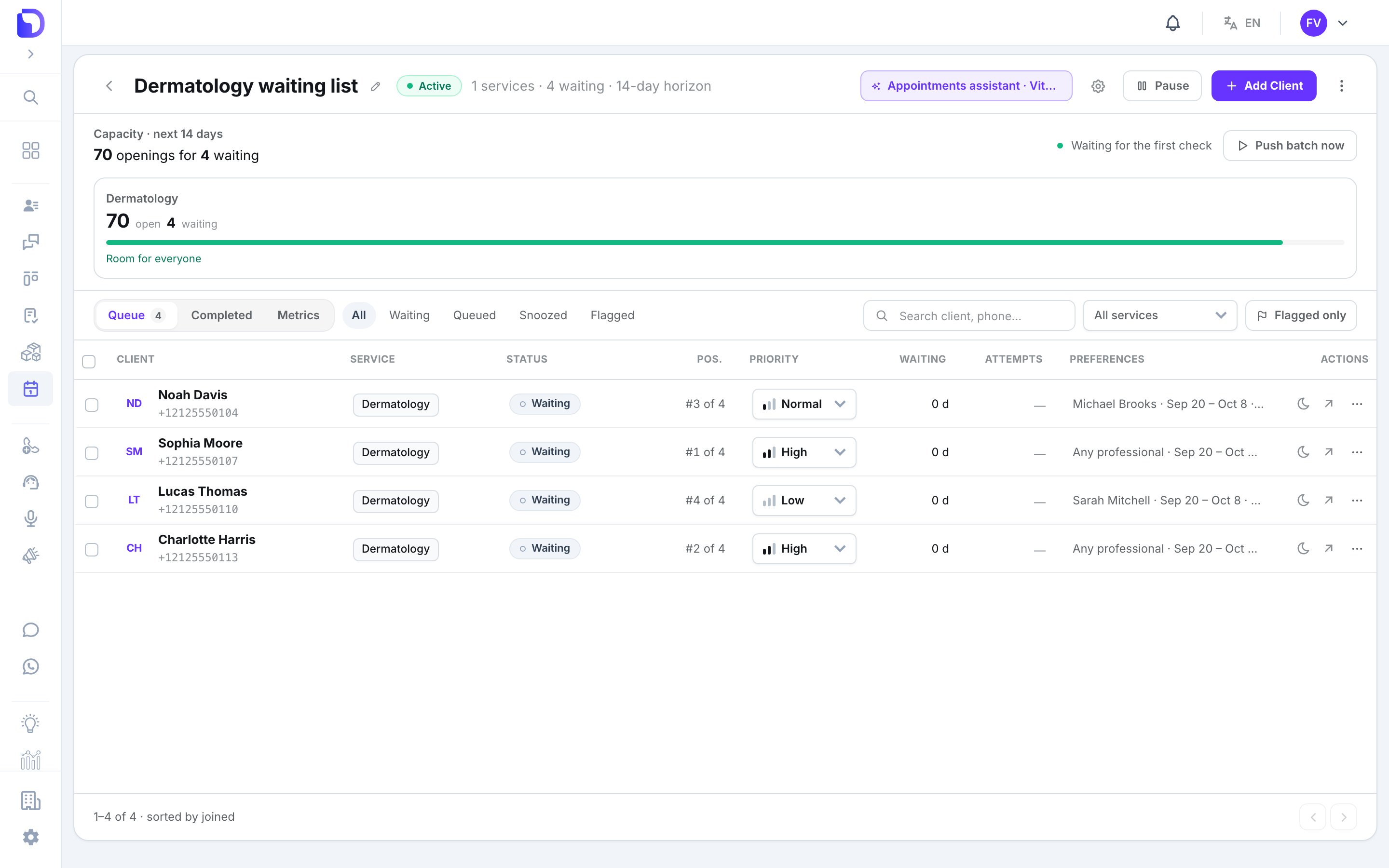 Tabs **Queue / Metrics / Completed**; the capacity strip shows what the horizon holds and **Push batch now** forces a sweep.
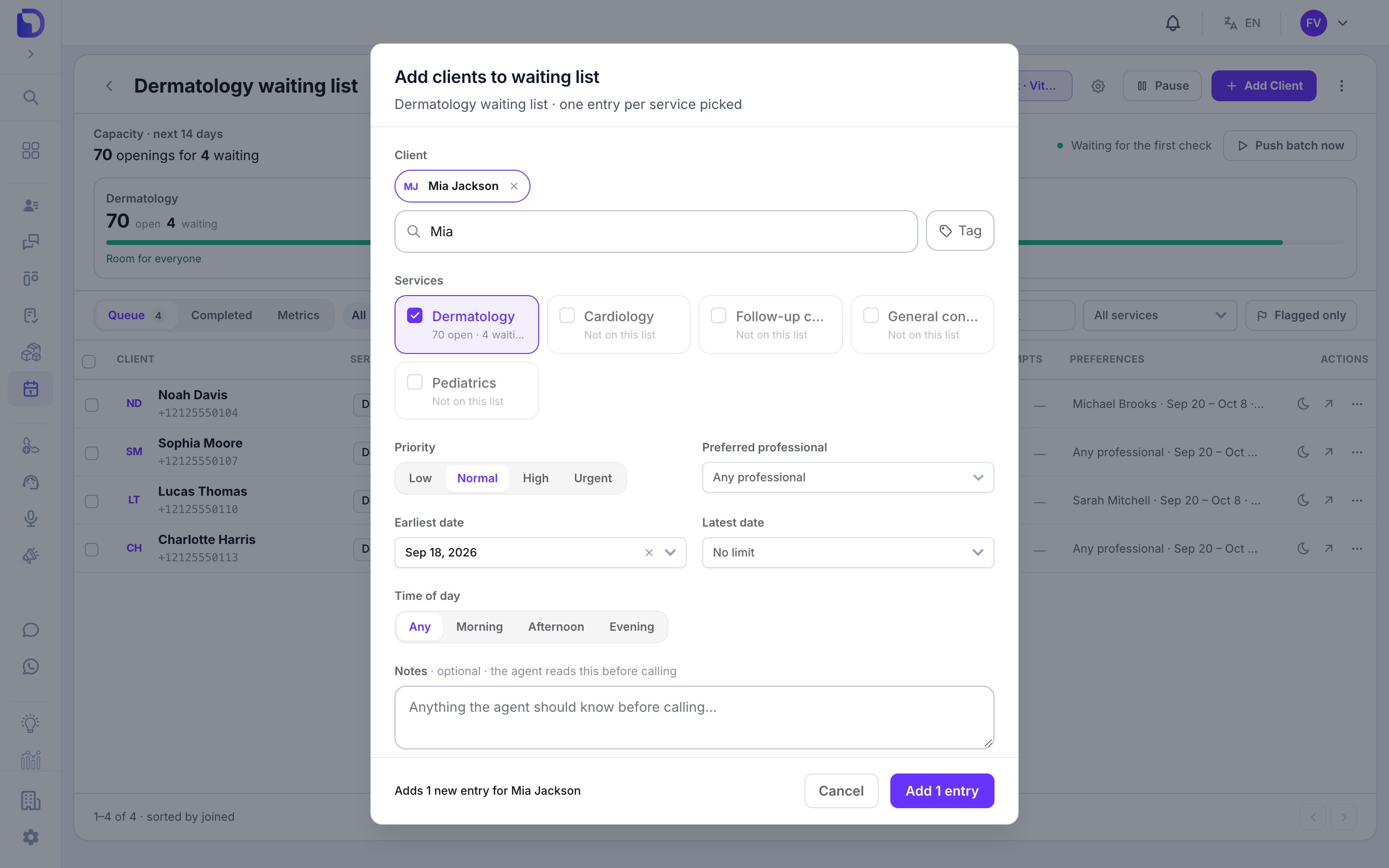 **Add Client** — search or create a contact, choose services, **Priority** (Urgent / High / Normal / Low), **Preferred professional**, **Earliest / Latest date**, **Time of day** (Any / Morning / Afternoon / Evening), **Notes**. **Import from spreadsheet** takes a CSV or XLSX up to 2 MB and 2,000 rows.
Row actions: **Snooze** (1 week / 1 month / 3 months / custom), **Wake now**, **Edit preferences**, **Unflag**, **Remove**.
AI agents add clients too — the calendar tool's **Add to waiting list** capability. See [The calendar tool for agents](/en/calendar/agent-tool).
## Who can do what
| Action | Needs |
| ---------------------------- | -------------------------------------------------------------- |
| Add, edit, remove clients | **Calendar** Admin, or View All + **Salesflow** manage clients |
| Configure or activate a list | **Calendar** Admin + **Salesflow** edit structure |
| View Own users | read-only |
## Next step
Let an AI agent book, move and cancel.
**Add Client** — search or create a contact, choose services, **Priority** (Urgent / High / Normal / Low), **Preferred professional**, **Earliest / Latest date**, **Time of day** (Any / Morning / Afternoon / Evening), **Notes**. **Import from spreadsheet** takes a CSV or XLSX up to 2 MB and 2,000 rows.
Row actions: **Snooze** (1 week / 1 month / 3 months / custom), **Wake now**, **Edit preferences**, **Unflag**, **Remove**.
AI agents add clients too — the calendar tool's **Add to waiting list** capability. See [The calendar tool for agents](/en/calendar/agent-tool).
## Who can do what
| Action | Needs |
| ---------------------------- | -------------------------------------------------------------- |
| Add, edit, remove clients | **Calendar** Admin, or View All + **Salesflow** manage clients |
| Configure or activate a list | **Calendar** Admin + **Salesflow** edit structure |
| View Own users | read-only |
## Next step
Let an AI agent book, move and cancel.