> ## Documentation Index
> Fetch the complete documentation index at: https://docs.dialtu.com/llms.txt
> Use this file to discover all available pages before exploring further.
# WhatsApp numbers for notifications
> Where each person's notice number lives, who can edit it, and how it combines with the number set on a Handoff tool
Every user can have a **WhatsApp for notifications** number. It's where the [handoff notice](/en/handoff-notices/setup) reaches them when an AI agent assigns them a conversation.
## Set it for your team
**Settings → User Management → Users** has a **WhatsApp for notifications** column.
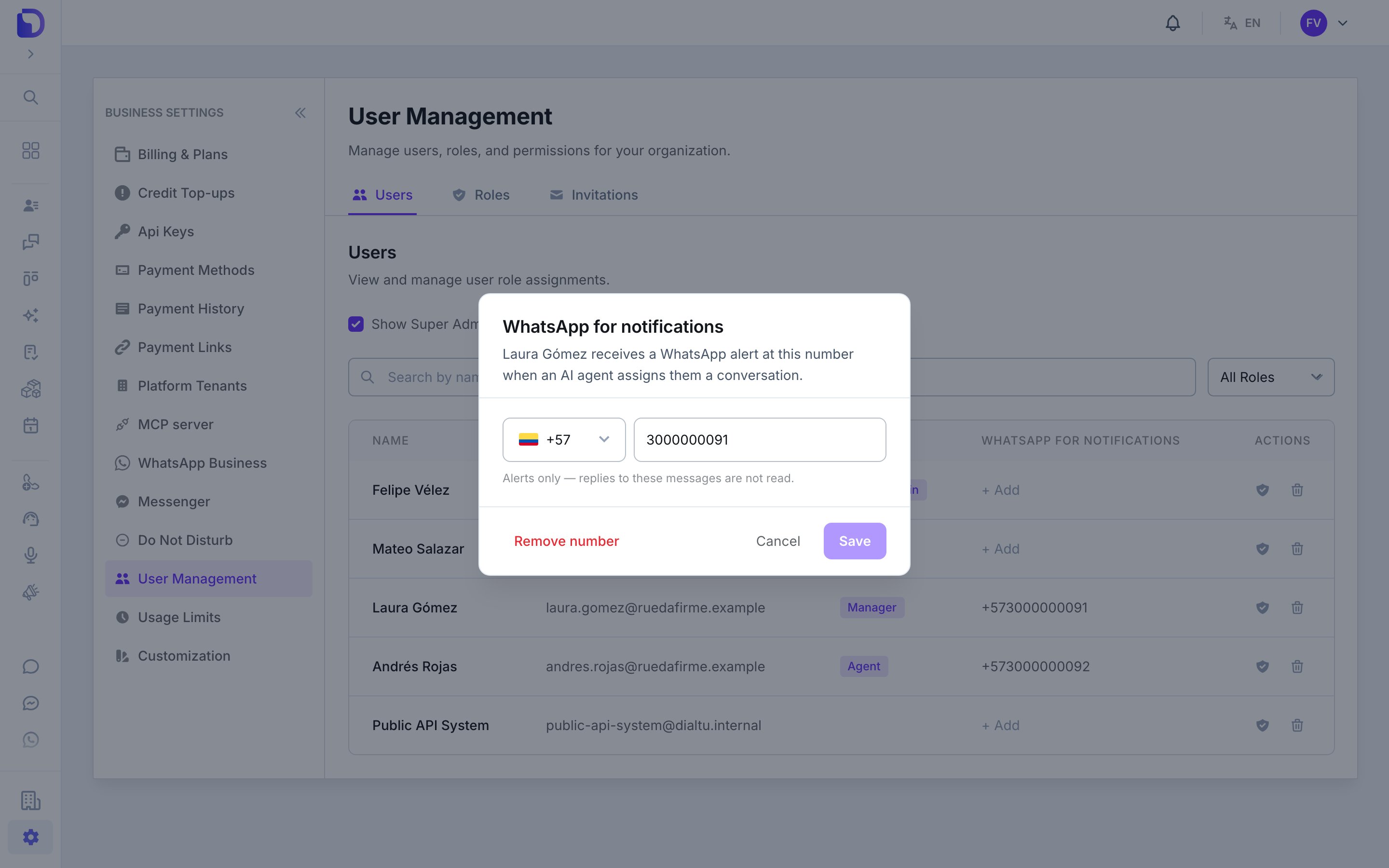
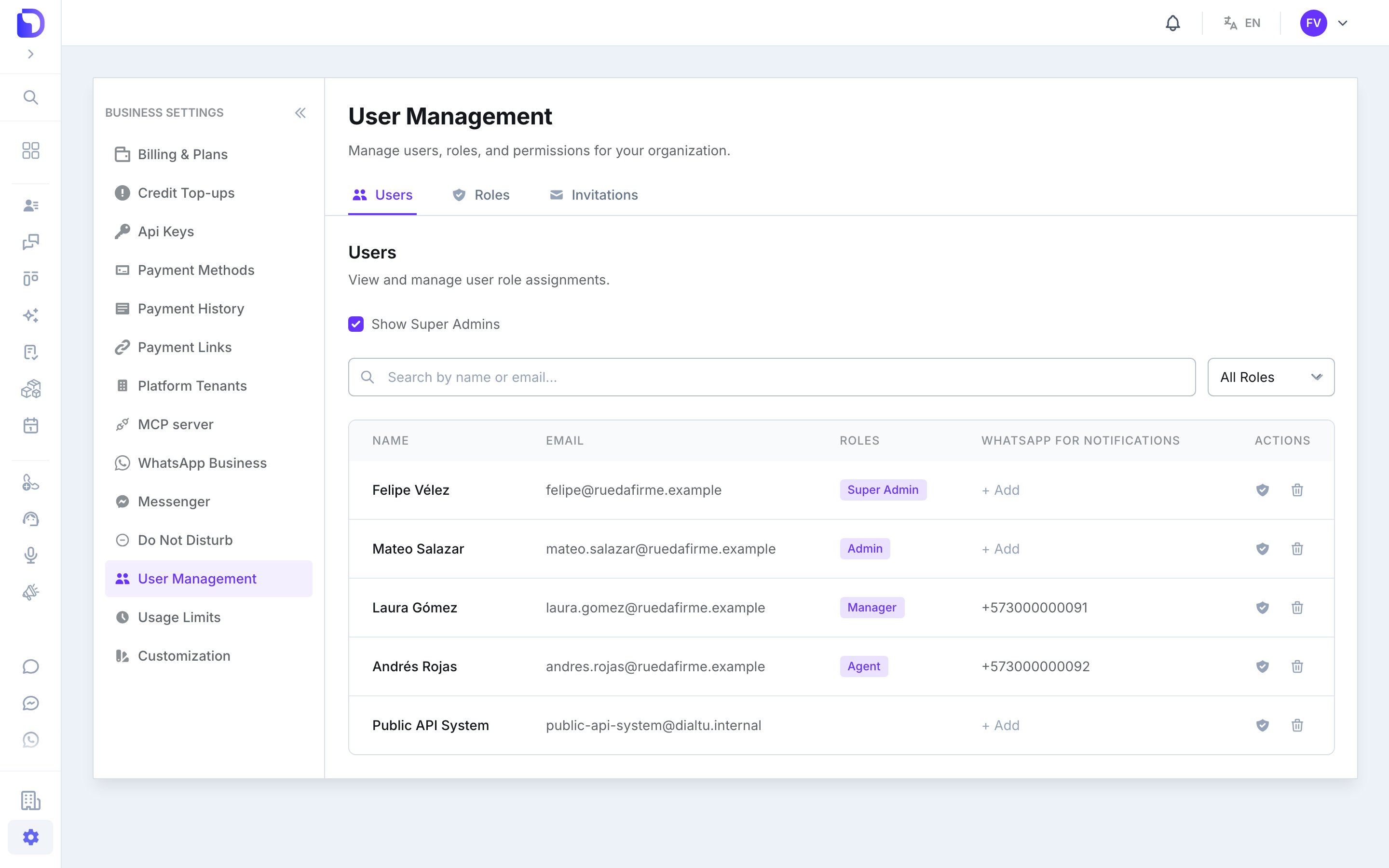 Click the number in the column (or **+ Add** when it's empty), or use **WhatsApp for notifications** in the row's menu.
Pick the country code and type the number — for example **+57** and `3001234567`. The window explains: *"Ana receives a WhatsApp alert at this number when an AI agent assigns them a conversation."*
You'll see *WhatsApp number saved*. To clear it, use **Remove number**.
Click the number in the column (or **+ Add** when it's empty), or use **WhatsApp for notifications** in the row's menu.
Pick the country code and type the number — for example **+57** and `3001234567`. The window explains: *"Ana receives a WhatsApp alert at this number when an AI agent assigns them a conversation."*
You'll see *WhatsApp number saved*. To clear it, use **Remove number**.
 ## Set your own
Users who can't manage other users see a **Your WhatsApp for notifications** card at the top of the same page instead. They can add or change their own number there.
When it's empty, the card says: *"Not set — you will not get WhatsApp alerts when an AI agent assigns you a conversation."*
## Who can edit what
| Permission | What you can do |
| - | - |
| **User management — write** | Edit any user's number from the column or the row's menu |
| Without it | Edit only your own number, from the **Your WhatsApp for notifications** card |
## Format
* **E.164**, starting with `+` and the country code: `+573001234567`, `+15551234567`.
* Type it without spaces or dashes in the user window. (In a Handoff tool's pool, spaces are tolerated and removed on save.)
* A number without the country code is refused: *"Enter a valid number with its country code."*
## How it combines with the Handoff tool
A Handoff tool's assignment pool has its own **WhatsApp for notifications** field per person. The notice uses, in order:
1. The number set **on the tool** for that person — *"This number is used for this tool instead of the profile one."*
2. Otherwise, the number on their **user profile** (this page).
3. Otherwise, nobody is notified, and the conversation gets the note *"WhatsApp notice to the assignee not sent: the assignee has no WhatsApp number for notifications"*.
Set numbers here, on the profile, so every Handoff tool picks them up. Use the per-tool override only for exceptions — a shared team phone for one channel, for example.
**Alerts only.** *"Alerts only — replies to these messages are not read."* Messages from a notification number never create a client and never start the AI.
## What doesn't exist
* **A WhatsApp username** instead of a number — planned.
* **Several numbers per person.**
* **Notification by email or SMS** — the notice is WhatsApp only.
## Next step
When the notice doesn't arrive, or the template is stuck.
This documentation is built and hosted on [Mintlify](https://mintlify.com), a developer documentation platform.
## Set your own
Users who can't manage other users see a **Your WhatsApp for notifications** card at the top of the same page instead. They can add or change their own number there.
When it's empty, the card says: *"Not set — you will not get WhatsApp alerts when an AI agent assigns you a conversation."*
## Who can edit what
| Permission | What you can do |
| - | - |
| **User management — write** | Edit any user's number from the column or the row's menu |
| Without it | Edit only your own number, from the **Your WhatsApp for notifications** card |
## Format
* **E.164**, starting with `+` and the country code: `+573001234567`, `+15551234567`.
* Type it without spaces or dashes in the user window. (In a Handoff tool's pool, spaces are tolerated and removed on save.)
* A number without the country code is refused: *"Enter a valid number with its country code."*
## How it combines with the Handoff tool
A Handoff tool's assignment pool has its own **WhatsApp for notifications** field per person. The notice uses, in order:
1. The number set **on the tool** for that person — *"This number is used for this tool instead of the profile one."*
2. Otherwise, the number on their **user profile** (this page).
3. Otherwise, nobody is notified, and the conversation gets the note *"WhatsApp notice to the assignee not sent: the assignee has no WhatsApp number for notifications"*.
Set numbers here, on the profile, so every Handoff tool picks them up. Use the per-tool override only for exceptions — a shared team phone for one channel, for example.
**Alerts only.** *"Alerts only — replies to these messages are not read."* Messages from a notification number never create a client and never start the AI.
## What doesn't exist
* **A WhatsApp username** instead of a number — planned.
* **Several numbers per person.**
* **Notification by email or SMS** — the notice is WhatsApp only.
## Next step
When the notice doesn't arrive, or the template is stuck.
This documentation is built and hosted on [Mintlify](https://mintlify.com), a developer documentation platform.