> ## Documentation Index
> Fetch the complete documentation index at: https://docs.dialtu.com/llms.txt
> Use this file to discover all available pages before exploring further.
# Credits and the shared pool
> How the pool works, how allowances work, and why they are not the same thing
By the end of this page you'll know where your credits actually live, what happens when you
give an organization credits, and what to do when something runs out.
## Two balances, not one
This is the part everyone gets wrong, so it's worth getting straight before anything else.
| | **Your pool** | **An organization's allowance** |
| ------------- | ----------------------------------------------------- | --------------------------------- |
| What it is | Real, prepaid credits you bought from Dialtu | A **spending ceiling**. Not money |
| When it moves | Only when an organization actually consumes something | Never — it's a number you set |
| Charged at | Dialtu's **wholesale** rate for you | Your **retail** rate for them |
**Granting an allowance does not move credits out of your pool.** It raises a ceiling. The
pool is only drawn down later, as the organization actually uses the service.
So an organization showing 5,000 credits has not cost you anything yet.
Every piece of usage produces **two entries**: the organization's allowance drops at your
retail price, and your pool drops at Dialtu's wholesale price. The gap between them is your
margin.
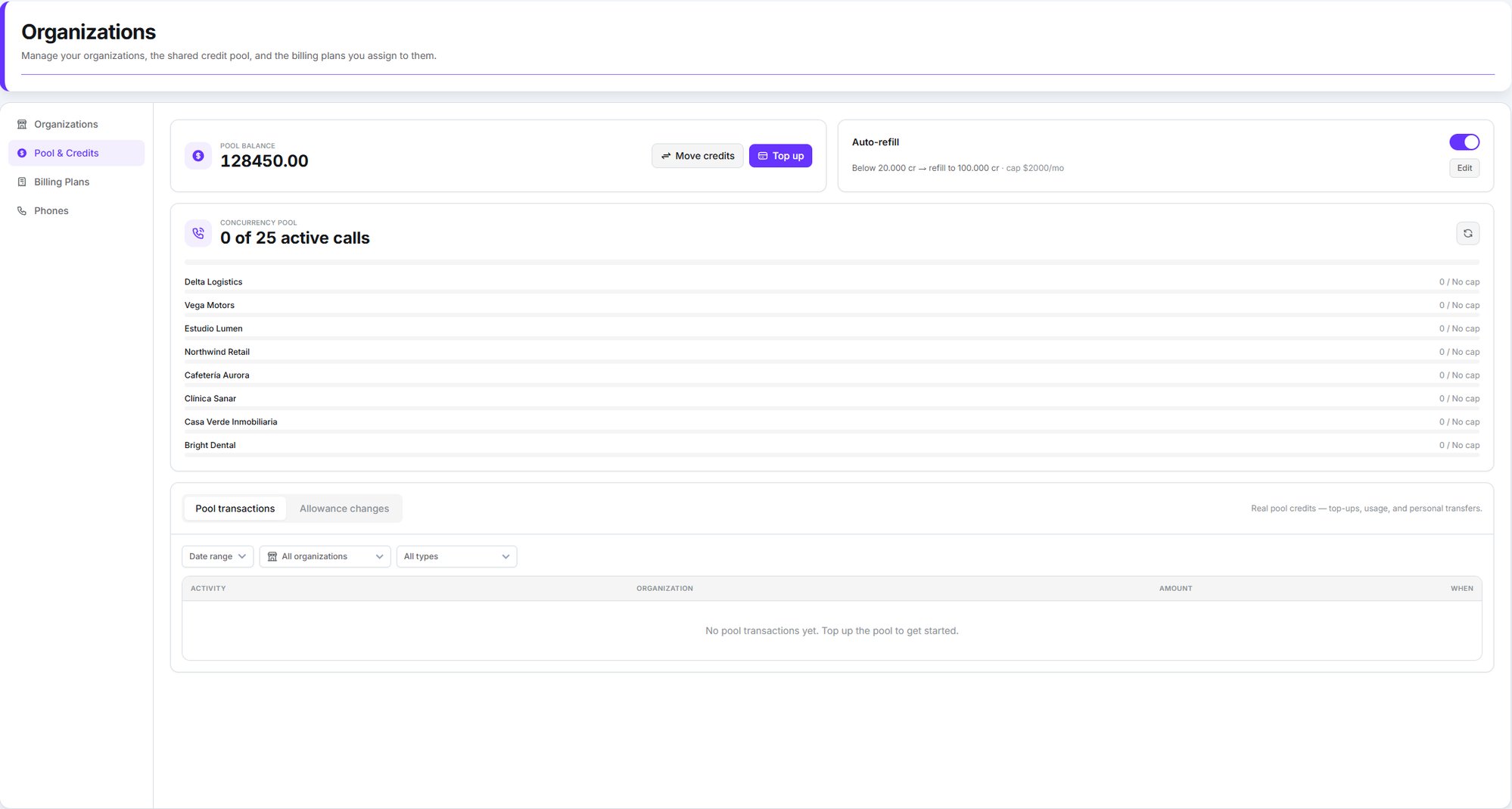 **Two numbers, both called credits.** The **Credits in pool** figure on the *Organizations*
tab is the sum of what you've granted your organizations — not your pool balance.
Your real pool balance is the big number at the top of **Pool & Credits**. That's the one to
watch.
## Topping up your pool
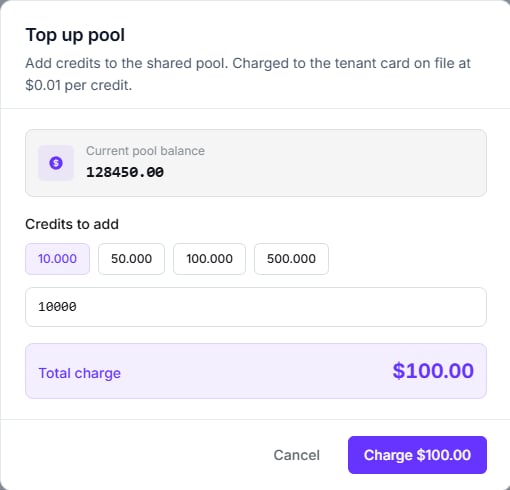
**Organizations → Pool & Credits → Top up**.
Credits cost **\$0.01 each**, and you can buy between **100** and **5,000,000** at a time —
with preset chips for 10,000, 50,000, 100,000 and 500,000. The charge goes to your card on
file, and the pool is credited once Stripe confirms the payment, usually in under five seconds.
If your card asks for 3-D Secure, you'll get the challenge inside the modal. And if the
confirmation is slow, the modal closes with *"Payment captured — the pool balance will update
shortly"*: the money is taken and the credits follow. Don't pay twice.
**Two numbers, both called credits.** The **Credits in pool** figure on the *Organizations*
tab is the sum of what you've granted your organizations — not your pool balance.
Your real pool balance is the big number at the top of **Pool & Credits**. That's the one to
watch.
## Topping up your pool
**Organizations → Pool & Credits → Top up**.
Credits cost **\$0.01 each**, and you can buy between **100** and **5,000,000** at a time —
with preset chips for 10,000, 50,000, 100,000 and 500,000. The charge goes to your card on
file, and the pool is credited once Stripe confirms the payment, usually in under five seconds.
If your card asks for 3-D Secure, you'll get the challenge inside the modal. And if the
confirmation is slow, the modal closes with *"Payment captured — the pool balance will update
shortly"*: the money is taken and the credits follow. Don't pay twice.
 Bank transfer is also possible, but it isn't self-serve — contact Dialtu and the credits are
applied to your pool manually.
### Auto-refill
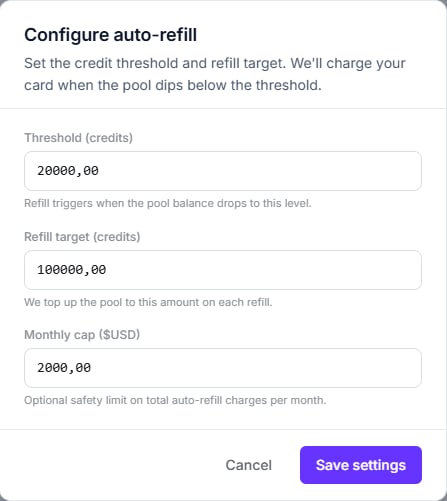
So the pool never runs dry mid-conversation, set an automatic top-up:
| Field | What it does |
| --------------------------- | ------------------------------------------------ |
| **Threshold (credits)** | Below this, we charge your card |
| **Refill target (credits)** | We top the pool back up to here |
| **Monthly cap (\$USD)** | A hard limit on how much we'll charge in a month |
The threshold must be **lower** than the target, and both have to be set. Once the monthly cap
is reached, the charge is skipped and an **Auto-refill capped** entry appears in your activity
feed — worth watching for, because from that point the pool only goes down.
Saving the configuration dialog **switches auto-refill on**, whatever the toggle on the card
was showing. To turn it off, use the toggle rather than the dialog.
Bank transfer is also possible, but it isn't self-serve — contact Dialtu and the credits are
applied to your pool manually.
### Auto-refill
So the pool never runs dry mid-conversation, set an automatic top-up:
| Field | What it does |
| --------------------------- | ------------------------------------------------ |
| **Threshold (credits)** | Below this, we charge your card |
| **Refill target (credits)** | We top the pool back up to here |
| **Monthly cap (\$USD)** | A hard limit on how much we'll charge in a month |
The threshold must be **lower** than the target, and both have to be set. Once the monthly cap
is reached, the charge is skipped and an **Auto-refill capped** entry appears in your activity
feed — worth watching for, because from that point the pool only goes down.
Saving the configuration dialog **switches auto-refill on**, whatever the toggle on the card
was showing. To turn it off, use the toggle rather than the dialog.
 ### Moving your own credits in
If you already hold credits on your personal balance, **Move credits** shifts them between
that balance and the pool, in either direction. It's a transfer of credits you already own, so
there's no charge and no card involved.
## Giving an organization credits
From the **Organizations** tab, the menu on each row offers three actions:
Raise the ceiling by an amount you choose.
Same thing, pre-filled with the plan's monthly amount.
Lower the ceiling. Can't go below what they've already got left.
### Moving your own credits in
If you already hold credits on your personal balance, **Move credits** shifts them between
that balance and the pool, in either direction. It's a transfer of credits you already own, so
there's no charge and no card involved.
## Giving an organization credits
From the **Organizations** tab, the menu on each row offers three actions:
Raise the ceiling by an amount you choose.
Same thing, pre-filled with the plan's monthly amount.
Lower the ceiling. Can't go below what they've already got left.
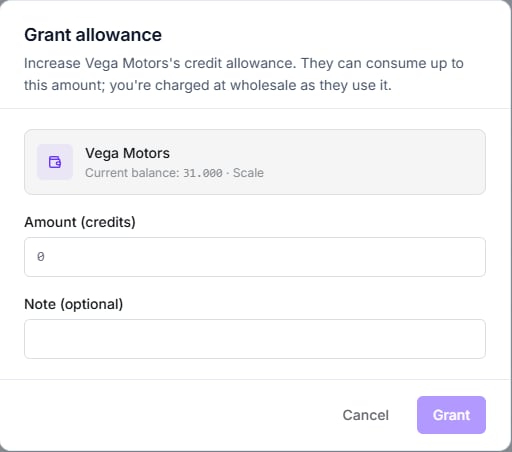
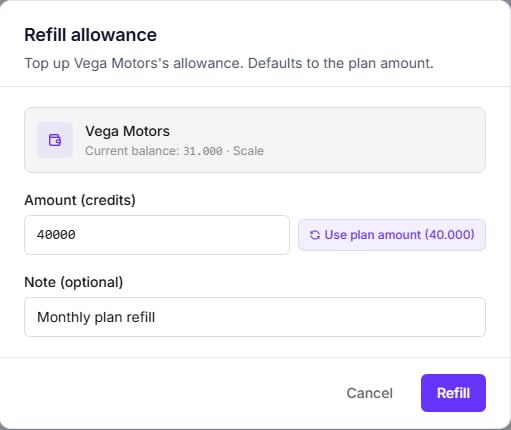
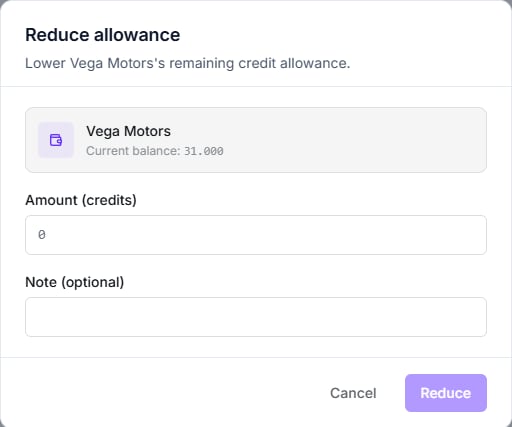 **You need a default payment method on file to grant an allowance.** Without a card saved on
your account, the grant is refused — even though granting doesn't charge you anything.
### The monthly reset
If an organization has **Auto-refill monthly** switched on, a plan assigned, and an active
status, its allowance is **reset** to the plan's included credits each cycle.
**This is a reset, not a top-up.** Unused credits do not carry over — the balance is
overwritten. A one-off grant you made mid-cycle is wiped at the next reset too.
Organizations that are suspended, or have no plan, are skipped by the reset entirely.
## When credits run out
New AI work stops for that organization: voice calls, WhatsApp and SMS replies, Atlas,
Salesflow's orchestrator, Insight briefs and contact memory all check the allowance before
they run.
The balance can dip slightly negative if a job was already in flight. To restore service,
grant or refill their allowance — or wait for the monthly reset.
Your organizations **keep working**. Dialtu does not cut them off mid-conversation.
Instead the usage is recorded as **Usage — pool exhausted** in your activity feed, you're
notified, and the amount is owed. New voice calls may be blocked pre-flight, but anything
already running settles.
Notification emails are rate-limited to one per day, so treat the first as the warning.
## Reading the activity
The Pool & Credits tab carries **two separate feeds**, and the distinction matters:
| Feed | What's in it |
| --------------------- | ------------------------------------------------------------------------------ |
| **Pool transactions** | Real credits — top-ups, usage, and transfers to and from your personal balance |
| **Allowance changes** | The virtual ceilings you've granted, refilled or reduced |
Both filter by date range, by organization, and by what produced the charge — Voice, SMS,
WhatsApp, Atlas, Insight, Salesflow AI, or top-ups and transfers. Usage is grouped **per
organization per day**, with a breakdown by feature.
**You need a default payment method on file to grant an allowance.** Without a card saved on
your account, the grant is refused — even though granting doesn't charge you anything.
### The monthly reset
If an organization has **Auto-refill monthly** switched on, a plan assigned, and an active
status, its allowance is **reset** to the plan's included credits each cycle.
**This is a reset, not a top-up.** Unused credits do not carry over — the balance is
overwritten. A one-off grant you made mid-cycle is wiped at the next reset too.
Organizations that are suspended, or have no plan, are skipped by the reset entirely.
## When credits run out
New AI work stops for that organization: voice calls, WhatsApp and SMS replies, Atlas,
Salesflow's orchestrator, Insight briefs and contact memory all check the allowance before
they run.
The balance can dip slightly negative if a job was already in flight. To restore service,
grant or refill their allowance — or wait for the monthly reset.
Your organizations **keep working**. Dialtu does not cut them off mid-conversation.
Instead the usage is recorded as **Usage — pool exhausted** in your activity feed, you're
notified, and the amount is owed. New voice calls may be blocked pre-flight, but anything
already running settles.
Notification emails are rate-limited to one per day, so treat the first as the warning.
## Reading the activity
The Pool & Credits tab carries **two separate feeds**, and the distinction matters:
| Feed | What's in it |
| --------------------- | ------------------------------------------------------------------------------ |
| **Pool transactions** | Real credits — top-ups, usage, and transfers to and from your personal balance |
| **Allowance changes** | The virtual ceilings you've granted, refilled or reduced |
Both filter by date range, by organization, and by what produced the charge — Voice, SMS,
WhatsApp, Atlas, Insight, Salesflow AI, or top-ups and transfers. Usage is grouped **per
organization per day**, with a breakdown by feature.
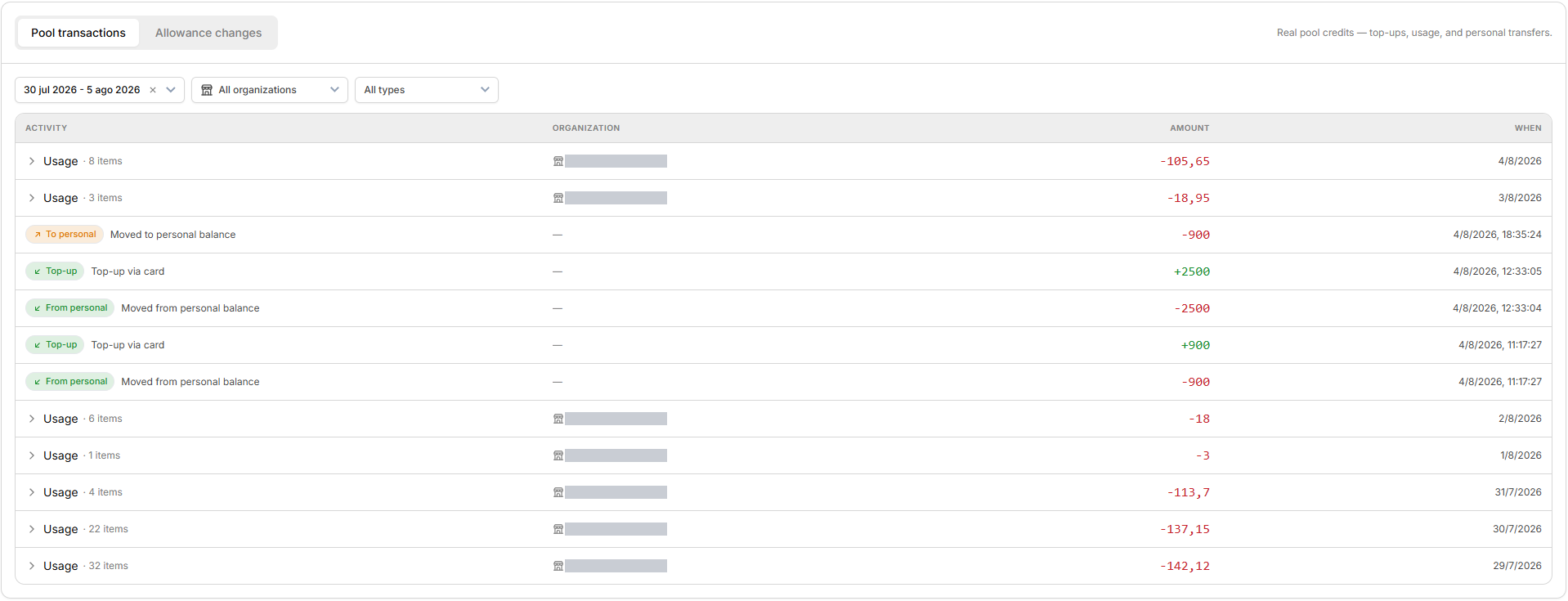 A **Usage** row is a whole day's consumption for one organization, collapsed. The arrow on the
left expands it into a per-feature breakdown. Rows with a dash in the organization column are
pool-level movements that belong to no single client — top-ups and transfers to and from your
personal balance.
**There's no export.** The feed can't currently be downloaded as CSV or Excel, and there's no
cross-organization analytics report — analytics are always scoped to a single workspace.
## What the organization sees
Almost none of the above. Inside their own workspace they get a **read-only** *Plan & Activity*
page under Settings: their plan name, monthly credits, credits available, when the allowance
next refreshes, and their recent activity.
They cannot buy credits, change plan, or see your pool. The page tells them to contact their
administrator — which is you.
## Next step
Set the prices your organizations pay.
A **Usage** row is a whole day's consumption for one organization, collapsed. The arrow on the
left expands it into a per-feature breakdown. Rows with a dash in the organization column are
pool-level movements that belong to no single client — top-ups and transfers to and from your
personal balance.
**There's no export.** The feed can't currently be downloaded as CSV or Excel, and there's no
cross-organization analytics report — analytics are always scoped to a single workspace.
## What the organization sees
Almost none of the above. Inside their own workspace they get a **read-only** *Plan & Activity*
page under Settings: their plan name, monthly credits, credits available, when the allowance
next refreshes, and their recent activity.
They cannot buy credits, change plan, or see your pool. The page tells them to contact their
administrator — which is you.
## Next step
Set the prices your organizations pay.