> ## Documentation Index
> Fetch the complete documentation index at: https://docs.dialtu.com/llms.txt
> Use this file to discover all available pages before exploring further.
# Phone numbers
> Numbers belong to you, and you lend them to organizations
Phone numbers sit in **your** pool, not in your clients' accounts. You assign one to an
organization so it can make and receive calls, and you can take it back.
 ## Getting a number
**You request numbers from Dialtu — there's no self-serve purchase**, for you or for your
organizations. Your clients can't buy their own; every number comes through you.
Write to [**support@dialtu.com**](mailto:support@dialtu.com), or use the support channel your
plan includes, with the country and area code, whether it's for voice, SMS or both, and how
many you need. The number appears in your **Phones** tab once it's ready.
**You pay exactly what any Dialtu customer pays for that number.** Being a partner doesn't
change the price — there's no wholesale rate on numbers and no markup you can apply. The
monthly fee, any one-off setup fee, and the per-minute and per-message carrier costs are the
standard rates for that country.
The credits come out of your account when the number is provisioned, and the monthly fee
recurs from then on. Cancelling a number is also a support request.
Countries, carriers, and the three costs a number carries.
## Assigning and reclaiming
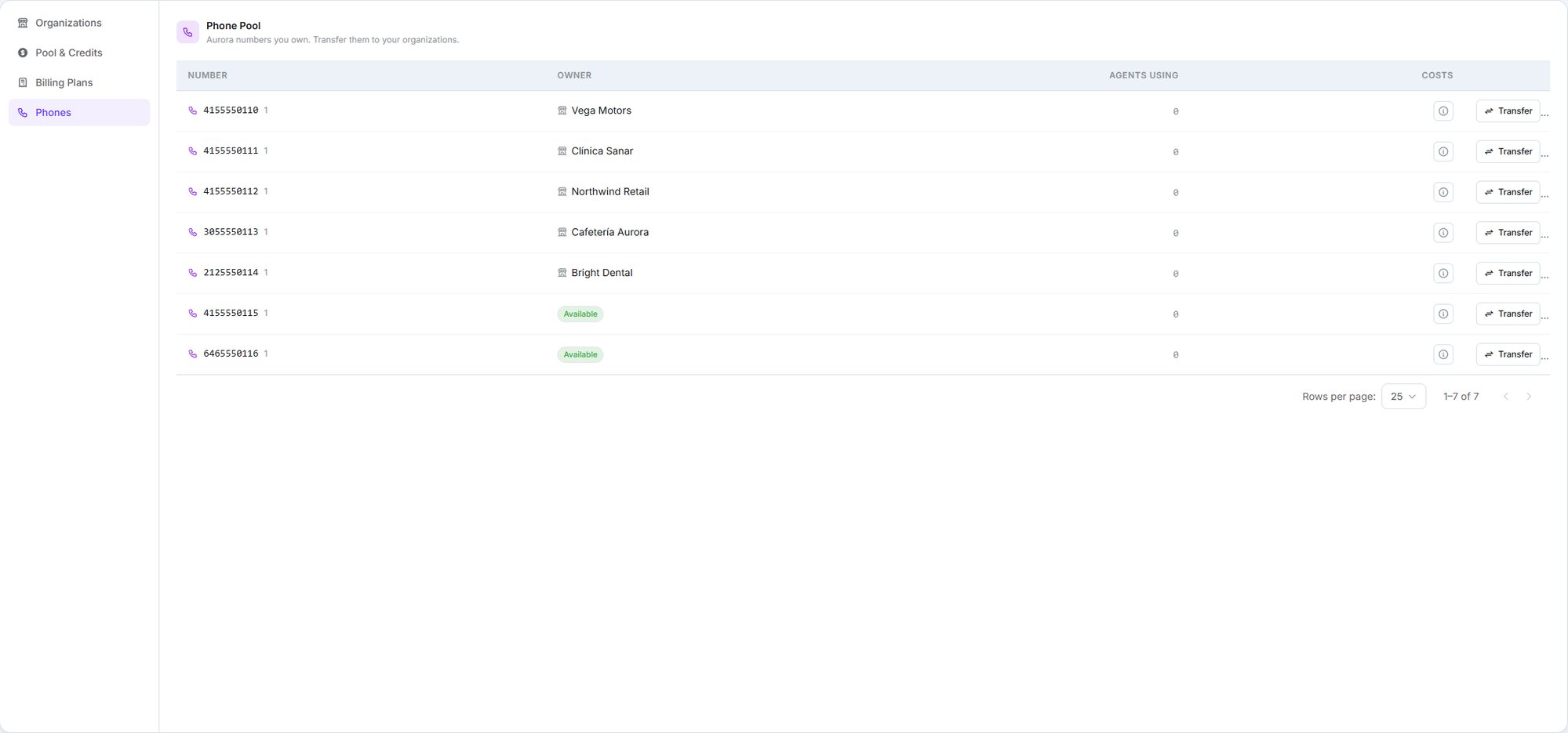
**Organizations → Phones.** Each number shows where it sits — **Available** if unassigned, or
the organization holding it — plus how many agents are using it and a link to its rates.
**Transfer** moves it to any of three destinations:
Keep it for yourself.
Hand it back. Only offered if it currently has an owner.
Any active organization except its current one.
## Getting a number
**You request numbers from Dialtu — there's no self-serve purchase**, for you or for your
organizations. Your clients can't buy their own; every number comes through you.
Write to [**support@dialtu.com**](mailto:support@dialtu.com), or use the support channel your
plan includes, with the country and area code, whether it's for voice, SMS or both, and how
many you need. The number appears in your **Phones** tab once it's ready.
**You pay exactly what any Dialtu customer pays for that number.** Being a partner doesn't
change the price — there's no wholesale rate on numbers and no markup you can apply. The
monthly fee, any one-off setup fee, and the per-minute and per-message carrier costs are the
standard rates for that country.
The credits come out of your account when the number is provisioned, and the monthly fee
recurs from then on. Cancelling a number is also a support request.
Countries, carriers, and the three costs a number carries.
## Assigning and reclaiming
**Organizations → Phones.** Each number shows where it sits — **Available** if unassigned, or
the organization holding it — plus how many agents are using it and a link to its rates.
**Transfer** moves it to any of three destinations:
Keep it for yourself.
Hand it back. Only offered if it currently has an owner.
Any active organization except its current one.
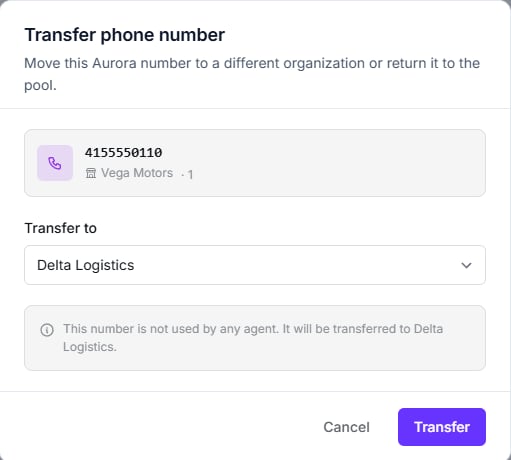 **The dialog tells you what will break.** If any agents are using the number, it lists them by
name and organization before you confirm — that list is the whole reason to open it. When
nothing depends on the number, you get the quiet confirmation shown above instead.
**There's no second confirmation.** Clicking Transfer executes immediately, even when agents
are shown as affected. The change takes effect at once.
## You pay for numbers, not your clients
**Monthly and setup fees for phone numbers are always billed to you**, under your own
workspace — never to the organization holding the number.
That's deliberate: numbers are yours. Recovering the cost from your client is part of what you
charge them, outside the platform.
## Rates
Call and message rates for numbers are **platform-managed and pass-through** — you can view
them, but unlike your [billing plans](/en/organizations/billing-plans) you can't mark them up
inside the product.
The rates modal states this directly: *"Rates are managed by the platform and are not editable
here."*
## Two things to watch
The number stays assigned to an organization that no longer appears in your list. Move it
back to your pool **before** you delete.
There's no sharing a number between two organizations. If two clients need to be reachable,
they need a number each.
## Next step
Who gets into which organization, and what they can do there.
**The dialog tells you what will break.** If any agents are using the number, it lists them by
name and organization before you confirm — that list is the whole reason to open it. When
nothing depends on the number, you get the quiet confirmation shown above instead.
**There's no second confirmation.** Clicking Transfer executes immediately, even when agents
are shown as affected. The change takes effect at once.
## You pay for numbers, not your clients
**Monthly and setup fees for phone numbers are always billed to you**, under your own
workspace — never to the organization holding the number.
That's deliberate: numbers are yours. Recovering the cost from your client is part of what you
charge them, outside the platform.
## Rates
Call and message rates for numbers are **platform-managed and pass-through** — you can view
them, but unlike your [billing plans](/en/organizations/billing-plans) you can't mark them up
inside the product.
The rates modal states this directly: *"Rates are managed by the platform and are not editable
here."*
## Two things to watch
The number stays assigned to an organization that no longer appears in your list. Move it
back to your pool **before** you delete.
There's no sharing a number between two organizations. If two clients need to be reachable,
they need a number each.
## Next step
Who gets into which organization, and what they can do there.