> ## Documentation Index
> Fetch the complete documentation index at: https://docs.dialtu.com/llms.txt
> Use this file to discover all available pages before exploring further.
# History and troubleshooting
> What happened to each lead and what to do when something doesn't move
Salesflow logs **everything** that happens to a customer, including the decisions to do
nothing. When something isn't working as expected, the answer is almost always here.
## Where to look
From a card's menu you get three views:
The customer's full timeline: entries, moves, calls, chats, sequences, and evaluations.
Only the stage changes, with the move type and who did it.
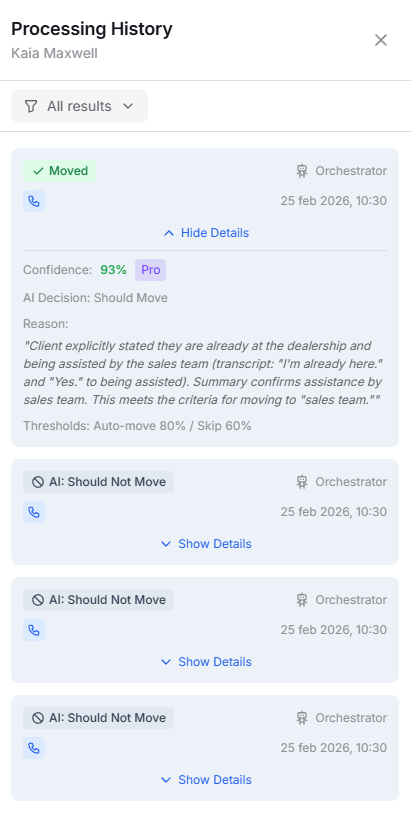
Every transition evaluation, including the ones that decided **not** to move.
 ## The possible results
Every evaluation ends with one of these eight results:
| Result | What it means |
| ------------------------- | ---------------------------------------------------------------------------------- |
| **Moved** | The customer changed stage. |
| **Flagged for Review** | The AI had intermediate confidence. The customer carries the amber *Review* badge. |
| **Conditions Not Met** | A static transition was evaluated and its filters didn't match. |
| **Orchestrator Disabled** | There are AI transitions, but the orchestrator is off. |
| **AI: Should Not Move** | The AI evaluated and decided a move isn't warranted. |
| **Low Confidence** | The AI didn't reach the skip threshold. |
| **Evaluation Error** | The call to the AI failed. |
| **Move Failed** | The AI decided to move, but validation prevented it. |
For static transitions the panel shows which criteria were **Met** and which were **Not**, with
the real call values. For AI ones, it shows the **confidence** and the **reasoning**.
***
## Common problems
In order of likelihood:
1. **The input node isn't connected.** If it shows *Not connected*, drag from the node to a
stage.
2. **The node is inactive**, or the **pipeline isn't in Active status**.
3. **The conditions match nobody.** By far the most common case: the *Filter by agent* filter
points at an **agent you deleted**. Check it.
4. **The conversation hasn't ended.** Chat entry happens when the session is resolved, not
when it starts (unless you chose *On start*).
5. **The customer was already** in the pipeline and the re-entry policy blocks them, or
they're still in cooldown.
Remember that a non-match **generates no visible error**. The silence is the symptom.
1. Check the **Processing History**. If there are no entries, the evaluation never ran — the
conversation probably didn't end.
2. If you see **Conditions Not Met**, the panel tells you exactly which criterion failed.
3. If you see **Orchestrator Disabled**, enable it — and remember to tick *Reactivate
transitions*.
4. If you see **Low Confidence** repeatedly, your transition prompt is too vague or too
broad. See [writing good prompts](/en/salesflow/orchestrator).
5. Check the transition is **Active** and that it leaves the stage the customer is in.
**Static transitions are always evaluated before orchestrator ones**, and within each group
**Priority** rules — the first match wins and stops evaluation.
If an overly broad static transition is catching every case, tighten its conditions or lower
its priority.
1. **Was it a bulk move?** Bulk moves **do not trigger** *On departure* or *On arrival*
events. Only individual dragging does.
2. **Did they enter via a call?** Call entries don't trigger *On arrival* events.
3. **Was the Execution limit used up?** It defaults to 1 per customer, for their whole stay in
the pipeline.
4. **Are you using conditional sequences with no default branch?** If no branch matches,
nothing runs.
5. **Do the event conditions include a time range** that doesn't cover the moment it fired?
When an action fails, **the whole sequence fails** and the rest is cancelled. There's no
automatic retry.
Open **View Activity** on the customer, find the failed execution, and use **Retry from
failure** (continues from where it broke) or **Retry all** (starts over).
Common causes: the customer has no phone number for a call, an invalid webhook URL, or a
WhatsApp template that stopped being approved.
This is known behavior: **deleting a contact does not remove them from pipelines**. Their
card stays on the board, counts toward the column total, and remains eligible for timers and
sequences.
In the meantime, remove them from the pipeline explicitly with **Remove from Stage** in
addition to deleting the contact.
Correct, and expected: **pausing the pipeline does not stop transitions**. It only stops
input nodes and idle timers.
To stop AI movement, disable the **Orchestrator Agent**. To stop static ones, deactivate them
individually.
## What doesn't exist yet
To save you the search:
* **There are no per-stage conversion, time-in-stage, or drop-off reports.** The dashboard widget
shows the per-stage count and one global conversion rate.
* **A stage's Idle alert doesn't send notifications.** Use an *Idle timer* event instead.
* **There's no campaign integration.** A stage can place a single call, but not launch a
campaign.
* **Stage moves don't appear in the Conversations timeline**; they're in the customer's activity
inside Salesflow.
## The possible results
Every evaluation ends with one of these eight results:
| Result | What it means |
| ------------------------- | ---------------------------------------------------------------------------------- |
| **Moved** | The customer changed stage. |
| **Flagged for Review** | The AI had intermediate confidence. The customer carries the amber *Review* badge. |
| **Conditions Not Met** | A static transition was evaluated and its filters didn't match. |
| **Orchestrator Disabled** | There are AI transitions, but the orchestrator is off. |
| **AI: Should Not Move** | The AI evaluated and decided a move isn't warranted. |
| **Low Confidence** | The AI didn't reach the skip threshold. |
| **Evaluation Error** | The call to the AI failed. |
| **Move Failed** | The AI decided to move, but validation prevented it. |
For static transitions the panel shows which criteria were **Met** and which were **Not**, with
the real call values. For AI ones, it shows the **confidence** and the **reasoning**.
***
## Common problems
In order of likelihood:
1. **The input node isn't connected.** If it shows *Not connected*, drag from the node to a
stage.
2. **The node is inactive**, or the **pipeline isn't in Active status**.
3. **The conditions match nobody.** By far the most common case: the *Filter by agent* filter
points at an **agent you deleted**. Check it.
4. **The conversation hasn't ended.** Chat entry happens when the session is resolved, not
when it starts (unless you chose *On start*).
5. **The customer was already** in the pipeline and the re-entry policy blocks them, or
they're still in cooldown.
Remember that a non-match **generates no visible error**. The silence is the symptom.
1. Check the **Processing History**. If there are no entries, the evaluation never ran — the
conversation probably didn't end.
2. If you see **Conditions Not Met**, the panel tells you exactly which criterion failed.
3. If you see **Orchestrator Disabled**, enable it — and remember to tick *Reactivate
transitions*.
4. If you see **Low Confidence** repeatedly, your transition prompt is too vague or too
broad. See [writing good prompts](/en/salesflow/orchestrator).
5. Check the transition is **Active** and that it leaves the stage the customer is in.
**Static transitions are always evaluated before orchestrator ones**, and within each group
**Priority** rules — the first match wins and stops evaluation.
If an overly broad static transition is catching every case, tighten its conditions or lower
its priority.
1. **Was it a bulk move?** Bulk moves **do not trigger** *On departure* or *On arrival*
events. Only individual dragging does.
2. **Did they enter via a call?** Call entries don't trigger *On arrival* events.
3. **Was the Execution limit used up?** It defaults to 1 per customer, for their whole stay in
the pipeline.
4. **Are you using conditional sequences with no default branch?** If no branch matches,
nothing runs.
5. **Do the event conditions include a time range** that doesn't cover the moment it fired?
When an action fails, **the whole sequence fails** and the rest is cancelled. There's no
automatic retry.
Open **View Activity** on the customer, find the failed execution, and use **Retry from
failure** (continues from where it broke) or **Retry all** (starts over).
Common causes: the customer has no phone number for a call, an invalid webhook URL, or a
WhatsApp template that stopped being approved.
This is known behavior: **deleting a contact does not remove them from pipelines**. Their
card stays on the board, counts toward the column total, and remains eligible for timers and
sequences.
In the meantime, remove them from the pipeline explicitly with **Remove from Stage** in
addition to deleting the contact.
Correct, and expected: **pausing the pipeline does not stop transitions**. It only stops
input nodes and idle timers.
To stop AI movement, disable the **Orchestrator Agent**. To stop static ones, deactivate them
individually.
## What doesn't exist yet
To save you the search:
* **There are no per-stage conversion, time-in-stage, or drop-off reports.** The dashboard widget
shows the per-stage count and one global conversion rate.
* **A stage's Idle alert doesn't send notifications.** Use an *Idle timer* event instead.
* **There's no campaign integration.** A stage can place a single call, but not launch a
campaign.
* **Stage moves don't appear in the Conversations timeline**; they're in the customer's activity
inside Salesflow.