> ## Documentation Index
> Fetch the complete documentation index at: https://docs.dialtu.com/llms.txt
> Use this file to discover all available pages before exploring further.
# Input nodes
> How customers enter the pipeline and with which filters
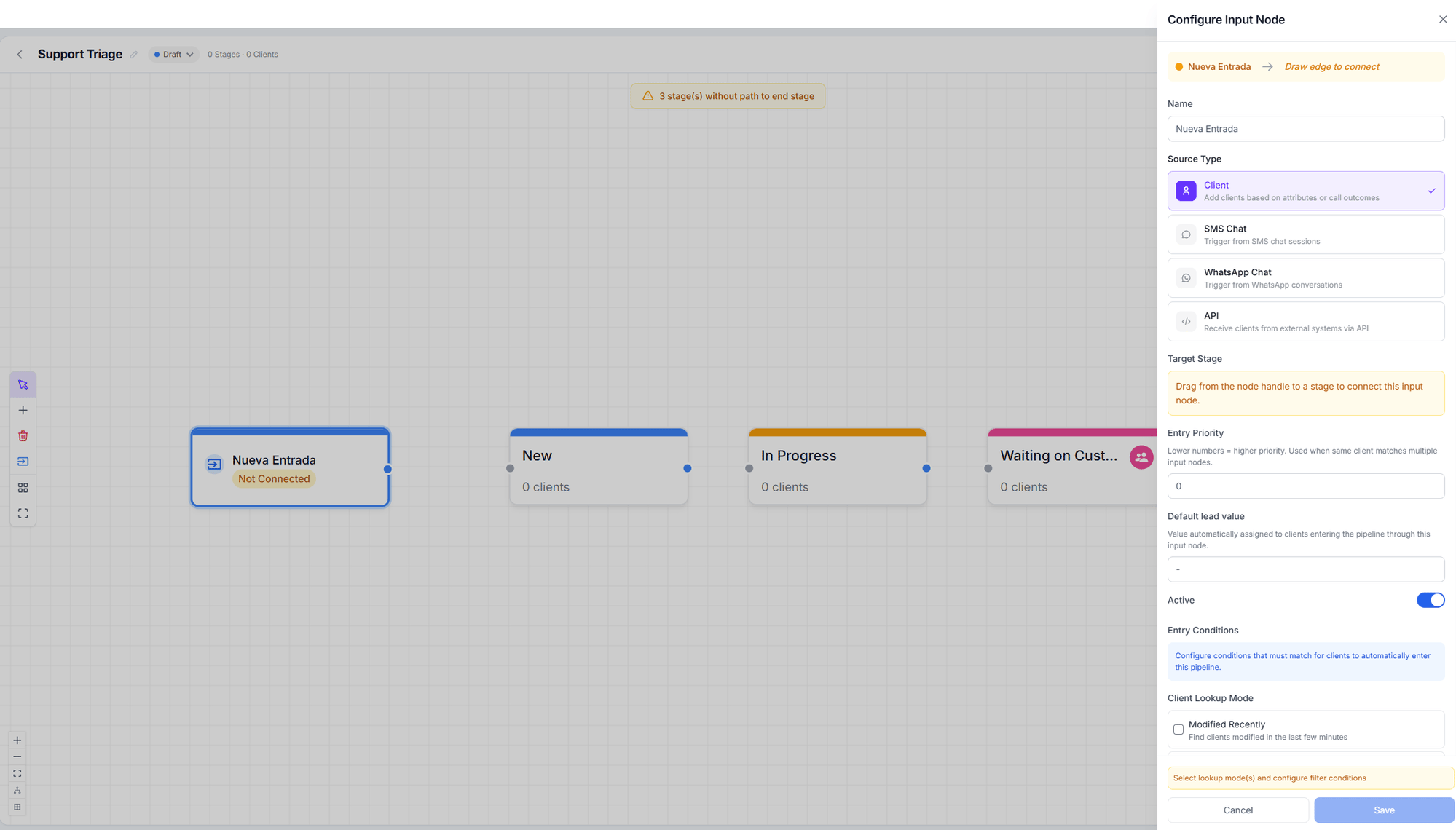
An input node is your pipeline's doorway. It defines **where** customers come from, **which
conditions** they must match, and **which stage** they land in.
You create one from the **Flow** view with **Add Input Node**, and you must **drag from the
node to a stage** to connect it. An unconnected node shows the **Not connected** badge and
does absolutely nothing.
 ## The five sources
| Source type | When it's evaluated |
| ----------------- | ---------------------------------------------------------------------------------- |
| **WhatsApp Chat** | When a WhatsApp conversation starts or is resolved |
| **SMS Chat** | When an SMS session starts or is resolved |
| **Client** | A sweep every \~2 minutes over contacts created or modified in the last 10 minutes |
| **API** | When an external system posts to the node's endpoint |
| **Call outcome** | When a voice call ends |
Chat and call nodes are evaluated **when the conversation ends**, not on every message.
Processing runs every minute, so the card can take up to \~1 minute to appear on the board.
## Entry conditions by source
* **Trigger mode** — *On conversation start* or *On conversation resolved*.
* **Filter by agent** — "Only enter customers when the chat is handled by these agents
(leave empty for all)".
These are the **only** filters available for WhatsApp. There is no disposition-tag or
keyword filter on this source.
* **Trigger mode** — on start or on resolve.
* **Filter by agent**.
* **Keyword filters**.
* **Disposition tags**.
* **Match mode** — all filters (AND) or any (OR).
First you choose the **Lookup mode**: *Recently created*, *Recently modified*, or both.
Then a **Filter mode**, which are mutually exclusive:
* **Insight agent** — the customer was processed by any of the data-extraction agents you
pick.
* **Client properties** — **Client tags** (with *has at least one* or *has all*), **Email**
(any / required / no email), and **Client name**.
No conditions: what you send, enters. The panel shows you the **Endpoint**, how to
authenticate with your API key, and the **Request body** with every accepted field
(`phone_number`, `client_id`, `first_name`, `last_name`, `email`, `company`, `timezone`,
`area_code`, `data`, `update`).
If the node is inactive, the API rejects requests.
The same conditions as a static call transition: disposition tags, answered by, status,
duration, requires follow-up, who ended the call, and direction.
**Two ways to get this wrong, both silent:**
If you leave the conditions **empty**, everyone enters.
If the conditions **match nobody**, nobody enters and you'll see no error, no warning, and
no history entry. This is the most common cause of "my pipeline isn't getting leads".
The classic case: **you deleted a WhatsApp agent** that was still listed under *Filter by
agent*. The filter keeps pointing at an agent that no longer exists and rejects every
customer. Review the selected agents every time you delete one.
## Entry priority
When the same customer matches several nodes, the lowest number wins:
**lower priority number = higher priority**.
Within one pipeline a customer enters through **one node only**. But a customer can enter
**several pipelines** in the same pass.
## Re-entry policy
Controls what happens to someone who was already in the pipeline:
* **Allow removed clients to re-enter** — the ones you took out by hand.
* **Allow completed clients to re-enter** — the ones who reached the end.
* **Cooldown** — how long they must wait before coming back.
On re-entry, the customer **restarts in that node's target stage**, and Salesflow keeps count
of how many times they've entered.
On WhatsApp and SMS nodes, the labels in this block **appear in English** even in the Spanish
interface, due to a translation bug. They work the same.
## Default lead value
**Default lead value** assigns an amount to customers entering through this node. It only
applies **if the customer has no value yet** — it never overwrites an existing one.
## Overriding assignment
By default the pipeline's assignment strategy is used. With **Assignment override** you can
give this node its own strategy, and with **Team assignment** restrict distribution to certain
members. See [Lead assignment](/en/salesflow/assignment).
## Next step
Customers are coming in. Now define how they move.
## The five sources
| Source type | When it's evaluated |
| ----------------- | ---------------------------------------------------------------------------------- |
| **WhatsApp Chat** | When a WhatsApp conversation starts or is resolved |
| **SMS Chat** | When an SMS session starts or is resolved |
| **Client** | A sweep every \~2 minutes over contacts created or modified in the last 10 minutes |
| **API** | When an external system posts to the node's endpoint |
| **Call outcome** | When a voice call ends |
Chat and call nodes are evaluated **when the conversation ends**, not on every message.
Processing runs every minute, so the card can take up to \~1 minute to appear on the board.
## Entry conditions by source
* **Trigger mode** — *On conversation start* or *On conversation resolved*.
* **Filter by agent** — "Only enter customers when the chat is handled by these agents
(leave empty for all)".
These are the **only** filters available for WhatsApp. There is no disposition-tag or
keyword filter on this source.
* **Trigger mode** — on start or on resolve.
* **Filter by agent**.
* **Keyword filters**.
* **Disposition tags**.
* **Match mode** — all filters (AND) or any (OR).
First you choose the **Lookup mode**: *Recently created*, *Recently modified*, or both.
Then a **Filter mode**, which are mutually exclusive:
* **Insight agent** — the customer was processed by any of the data-extraction agents you
pick.
* **Client properties** — **Client tags** (with *has at least one* or *has all*), **Email**
(any / required / no email), and **Client name**.
No conditions: what you send, enters. The panel shows you the **Endpoint**, how to
authenticate with your API key, and the **Request body** with every accepted field
(`phone_number`, `client_id`, `first_name`, `last_name`, `email`, `company`, `timezone`,
`area_code`, `data`, `update`).
If the node is inactive, the API rejects requests.
The same conditions as a static call transition: disposition tags, answered by, status,
duration, requires follow-up, who ended the call, and direction.
**Two ways to get this wrong, both silent:**
If you leave the conditions **empty**, everyone enters.
If the conditions **match nobody**, nobody enters and you'll see no error, no warning, and
no history entry. This is the most common cause of "my pipeline isn't getting leads".
The classic case: **you deleted a WhatsApp agent** that was still listed under *Filter by
agent*. The filter keeps pointing at an agent that no longer exists and rejects every
customer. Review the selected agents every time you delete one.
## Entry priority
When the same customer matches several nodes, the lowest number wins:
**lower priority number = higher priority**.
Within one pipeline a customer enters through **one node only**. But a customer can enter
**several pipelines** in the same pass.
## Re-entry policy
Controls what happens to someone who was already in the pipeline:
* **Allow removed clients to re-enter** — the ones you took out by hand.
* **Allow completed clients to re-enter** — the ones who reached the end.
* **Cooldown** — how long they must wait before coming back.
On re-entry, the customer **restarts in that node's target stage**, and Salesflow keeps count
of how many times they've entered.
On WhatsApp and SMS nodes, the labels in this block **appear in English** even in the Spanish
interface, due to a translation bug. They work the same.
## Default lead value
**Default lead value** assigns an amount to customers entering through this node. It only
applies **if the customer has no value yet** — it never overwrites an existing one.
## Overriding assignment
By default the pipeline's assignment strategy is used. With **Assignment override** you can
give this node its own strategy, and with **Team assignment** restrict distribution to certain
members. See [Lead assignment](/en/salesflow/assignment).
## Next step
Customers are coming in. Now define how they move.