> ## Documentation Index
> Fetch the complete documentation index at: https://docs.dialtu.com/llms.txt
> Use this file to discover all available pages before exploring further.
# The orchestrator
> The AI that reads every conversation and moves leads for you
The orchestrator is what makes Salesflow a CRM that updates itself. When a conversation ends,
it reads what happened and decides whether the customer should change stage — with a
**confidence level** you control.
The orchestrator **is not an agent running all the time**. It wakes up when a conversation
ends, evaluates that customer, and goes back to sleep. It consumes nothing while there's no
activity.
## When it runs
It fires when a conversation **ends** on any of the three channels:
| Channel | Exact moment |
| -------- | ----------------------------------------------- |
| Voice | When the call ends and is analyzed |
| WhatsApp | When the session is **resolved** or **expires** |
| SMS | When the session ends |
Evaluations are processed every minute, so roughly **up to 1 minute** passes between the end
of the conversation and the card moving.
**It does not evaluate message by message.** While the conversation is still open, the
orchestrator doesn't intervene. If your WhatsApp sessions never get resolved, they never get
evaluated.
## How it decides
For each customer, the orchestrator takes **all** the orchestrator transitions leaving their
current stage and evaluates them **in a single query**, picking the best one — or none.
What the AI sees:
* The **name and description of the pipeline** and of the source and target stages.
* **Each transition's prompt** as the criterion to evaluate.
* The **conversation data**: for chat, the **last 20 messages**, plus summary, sentiment,
status, and disposition; for voice, the full transcript and \~27 call fields.
* The **customer**: name, company, and their tags.
* Their **recent journey**: the last 5 stage moves.
In chat conversations, the AI only sees the **last 20 messages**. If your criterion depends
on something said early in a very long conversation, it won't be evaluated reliably.
The orchestrator is designed to be **conservative**: its default answer is *don't move*. It
only moves when there's concrete evidence in the conversation, and it's explicitly instructed
not to invent or infer data that isn't there. An unanswered call or a voicemail is almost
never enough to move anyone.
## Enabling and configuring it
The orchestrator is enabled **per pipeline**, from **Orchestrator Agent** in the top bar.
**Disabling it deactivates all your orchestrator transitions.** When you turn it off, Dialtu
tells you how many transitions are about to be deactivated.
When you turn it back on **they don't reactivate themselves**: you have to tick the
*"Reactivate N orchestrator transition(s)"* checkbox. If you miss it, the transitions are
still there but inert, and the pipeline looks broken for no apparent reason.
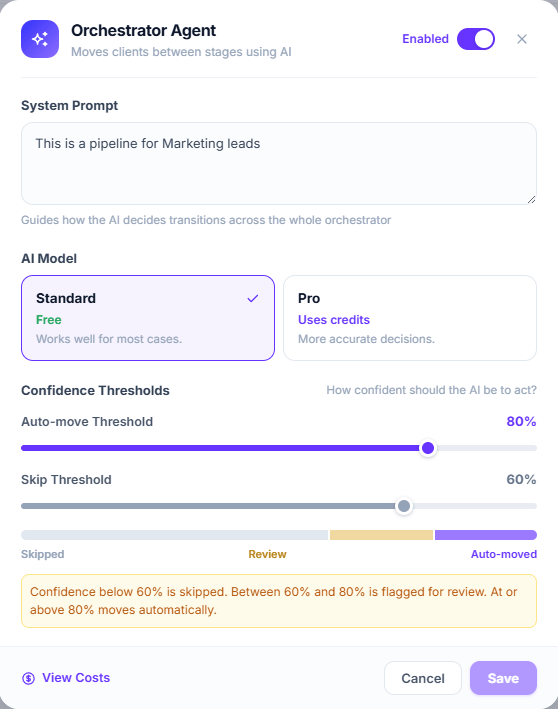 ### System prompt
Instructions that apply to **all** transitions in this pipeline. This is the place for the
business context that doesn't change:
```text theme={null}
We sell practice-management software to dental clinics in Spain and Mexico.
A lead is qualified only if they are the owner or the practice manager —
not a receptionist asking for information.
Treat any mention of "I'll have to check with my partner" as a signal
that they are not qualified yet.
```
### AI model
| Tier | Cost | When to use it |
| ------------ | ------------ | ------------------------------------------------------------------------ |
| **Standard** | **Free** | The default. Works well for most cases. |
| **Pro** | Uses credits | More accurate decisions, for subtle criteria or ambiguous conversations. |
### Confidence thresholds
The AI returns a confidence from 0 to 100%. Two thresholds split it into three zones:
| Zone | What happens |
| --------------------------------- | -------------------------------------------------------- |
| Below the **Skip threshold** | **Skipped** — nothing happens. |
| Between the two thresholds | **Review** — the customer gets the amber *Review* badge. |
| Above the **Auto-move threshold** | **Moves automatically**. |
Defaults: skip 60%, auto-move 80%.
**The Review zone currently only works for voice calls.** On WhatsApp and SMS, an evaluation
landing in the middle band **does not flag the customer for review** — it behaves the same as
a skip. The interface presents all three zones as universal, but review flagging is only
generated from the voice channel.
## What it costs
* **Standard is genuinely free.** No credits are deducted and no transaction is created.
* **Pro consumes credits**, and **only when the customer actually moves**. A Pro evaluation
that decides *don't move* is not charged.
* Before each Pro evaluation your balance is checked. Without enough credits, the evaluation is
logged as *Insufficient credits* and doesn't run.
You can review spending with **View Costs** in the orchestrator configuration.
The costs modal is labeled **"Last 30 days"**, but it actually shows the **complete history**
since you enabled the orchestrator.
## Writing good transition prompts
A transition's prompt describes **the criterion for that specific jump**. Some rules that
work:
**Bad:** `Move if the customer is interested.`
**Good:** `Move if the customer asked for a demo, gave a date to meet, or asked about
specific pricing for their case.`
The orchestrator is conservative by default, but explicit exclusions prevent the most
expensive false positives:
`Do not move if they only asked for the catalog, or if they said they'd get back in touch
later.`
If a prompt tries to cover three different situations, confidence drops and the customer
ends up in the skip zone. Create separate transitions.
Tone, business context, and shared definitions go once in the system prompt, not repeated
in every transition.
An orchestrator transition **with an empty prompt is still evaluated**: the AI receives it as
*"no criteria specified"*. It doesn't error and it isn't skipped.
## Things worth knowing
Input nodes and idle timers respect the pipeline status, but **transitions don't**. A paused
pipeline — or even a deleted one — keeps evaluating and moving customers, and on the Pro
tier keeps spending credits.
To genuinely stop AI-driven movement, disable the **Orchestrator Agent**.
If a static transition matches, the orchestrator doesn't even run. This is the most common
reason for "the AI did nothing".
Unlike static transitions, orchestrator ones **cannot be limited to certain agents**. Any
conversation that ends, from any agent, triggers evaluation. Pausing an agent doesn't
prevent it either.
The lead's owner is assigned **on entering the pipeline** and doesn't change when the
orchestrator moves them. A lead the AI pushes all the way to a closing stage keeps whoever
was assigned at the start, or nobody.
Provider errors aren't shown raw: you'll see *Evaluation Error* in the history. On WhatsApp
and SMS the event is retried automatically; **on voice there is no retry**, even though the
message says otherwise.
## Seeing what it decided and why
Every evaluation is logged, whether the customer moved or not. From the card, under
**Processing History**, you'll see the result, the confidence, and the reasoning in plain text.
How to read the history and what to do when a lead doesn't move.
### System prompt
Instructions that apply to **all** transitions in this pipeline. This is the place for the
business context that doesn't change:
```text theme={null}
We sell practice-management software to dental clinics in Spain and Mexico.
A lead is qualified only if they are the owner or the practice manager —
not a receptionist asking for information.
Treat any mention of "I'll have to check with my partner" as a signal
that they are not qualified yet.
```
### AI model
| Tier | Cost | When to use it |
| ------------ | ------------ | ------------------------------------------------------------------------ |
| **Standard** | **Free** | The default. Works well for most cases. |
| **Pro** | Uses credits | More accurate decisions, for subtle criteria or ambiguous conversations. |
### Confidence thresholds
The AI returns a confidence from 0 to 100%. Two thresholds split it into three zones:
| Zone | What happens |
| --------------------------------- | -------------------------------------------------------- |
| Below the **Skip threshold** | **Skipped** — nothing happens. |
| Between the two thresholds | **Review** — the customer gets the amber *Review* badge. |
| Above the **Auto-move threshold** | **Moves automatically**. |
Defaults: skip 60%, auto-move 80%.
**The Review zone currently only works for voice calls.** On WhatsApp and SMS, an evaluation
landing in the middle band **does not flag the customer for review** — it behaves the same as
a skip. The interface presents all three zones as universal, but review flagging is only
generated from the voice channel.
## What it costs
* **Standard is genuinely free.** No credits are deducted and no transaction is created.
* **Pro consumes credits**, and **only when the customer actually moves**. A Pro evaluation
that decides *don't move* is not charged.
* Before each Pro evaluation your balance is checked. Without enough credits, the evaluation is
logged as *Insufficient credits* and doesn't run.
You can review spending with **View Costs** in the orchestrator configuration.
The costs modal is labeled **"Last 30 days"**, but it actually shows the **complete history**
since you enabled the orchestrator.
## Writing good transition prompts
A transition's prompt describes **the criterion for that specific jump**. Some rules that
work:
**Bad:** `Move if the customer is interested.`
**Good:** `Move if the customer asked for a demo, gave a date to meet, or asked about
specific pricing for their case.`
The orchestrator is conservative by default, but explicit exclusions prevent the most
expensive false positives:
`Do not move if they only asked for the catalog, or if they said they'd get back in touch
later.`
If a prompt tries to cover three different situations, confidence drops and the customer
ends up in the skip zone. Create separate transitions.
Tone, business context, and shared definitions go once in the system prompt, not repeated
in every transition.
An orchestrator transition **with an empty prompt is still evaluated**: the AI receives it as
*"no criteria specified"*. It doesn't error and it isn't skipped.
## Things worth knowing
Input nodes and idle timers respect the pipeline status, but **transitions don't**. A paused
pipeline — or even a deleted one — keeps evaluating and moving customers, and on the Pro
tier keeps spending credits.
To genuinely stop AI-driven movement, disable the **Orchestrator Agent**.
If a static transition matches, the orchestrator doesn't even run. This is the most common
reason for "the AI did nothing".
Unlike static transitions, orchestrator ones **cannot be limited to certain agents**. Any
conversation that ends, from any agent, triggers evaluation. Pausing an agent doesn't
prevent it either.
The lead's owner is assigned **on entering the pipeline** and doesn't change when the
orchestrator moves them. A lead the AI pushes all the way to a closing stage keeps whoever
was assigned at the start, or nobody.
Provider errors aren't shown raw: you'll see *Evaluation Error* in the history. On WhatsApp
and SMS the event is retried automatically; **on voice there is no retry**, even though the
message says otherwise.
## Seeing what it decided and why
Every evaluation is logged, whether the customer moved or not. From the card, under
**Processing History**, you'll see the result, the confidence, and the reasoning in plain text.
How to read the history and what to do when a lead doesn't move.