> ## Documentation Index
> Fetch the complete documentation index at: https://docs.dialtu.com/llms.txt
> Use this file to discover all available pages before exploring further.
# The Conversations inbox
> Follow SMS threads live, take over from the AI, hand back, and close
Every SMS conversation shows up under **CRM → Conversations**, message by message, as it
happens. Opening the page needs clients read; the SMS tab of the composer needs SMS write. The
SMS tab is selected automatically when the contact has an active SMS session.
 ## Reading a thread
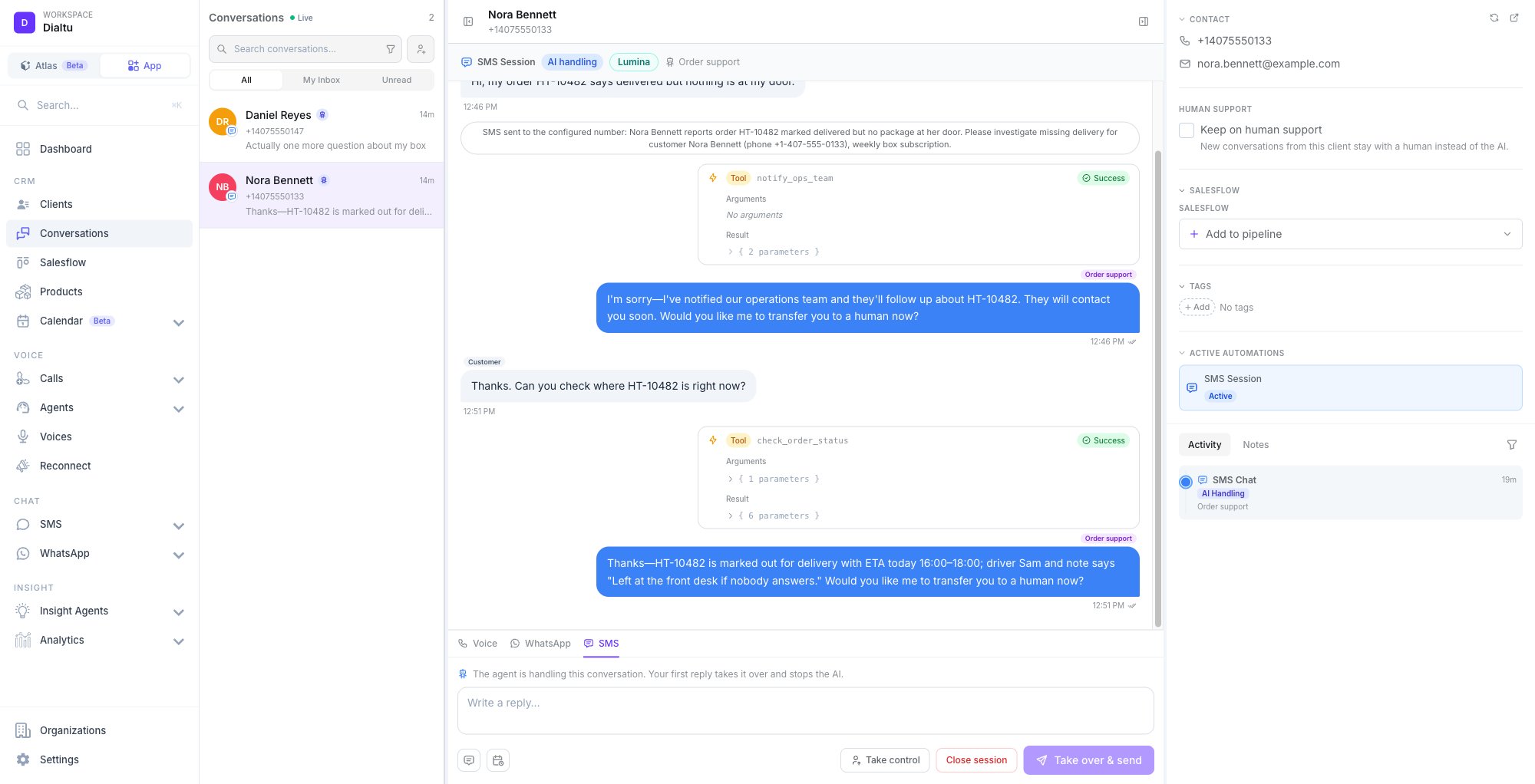
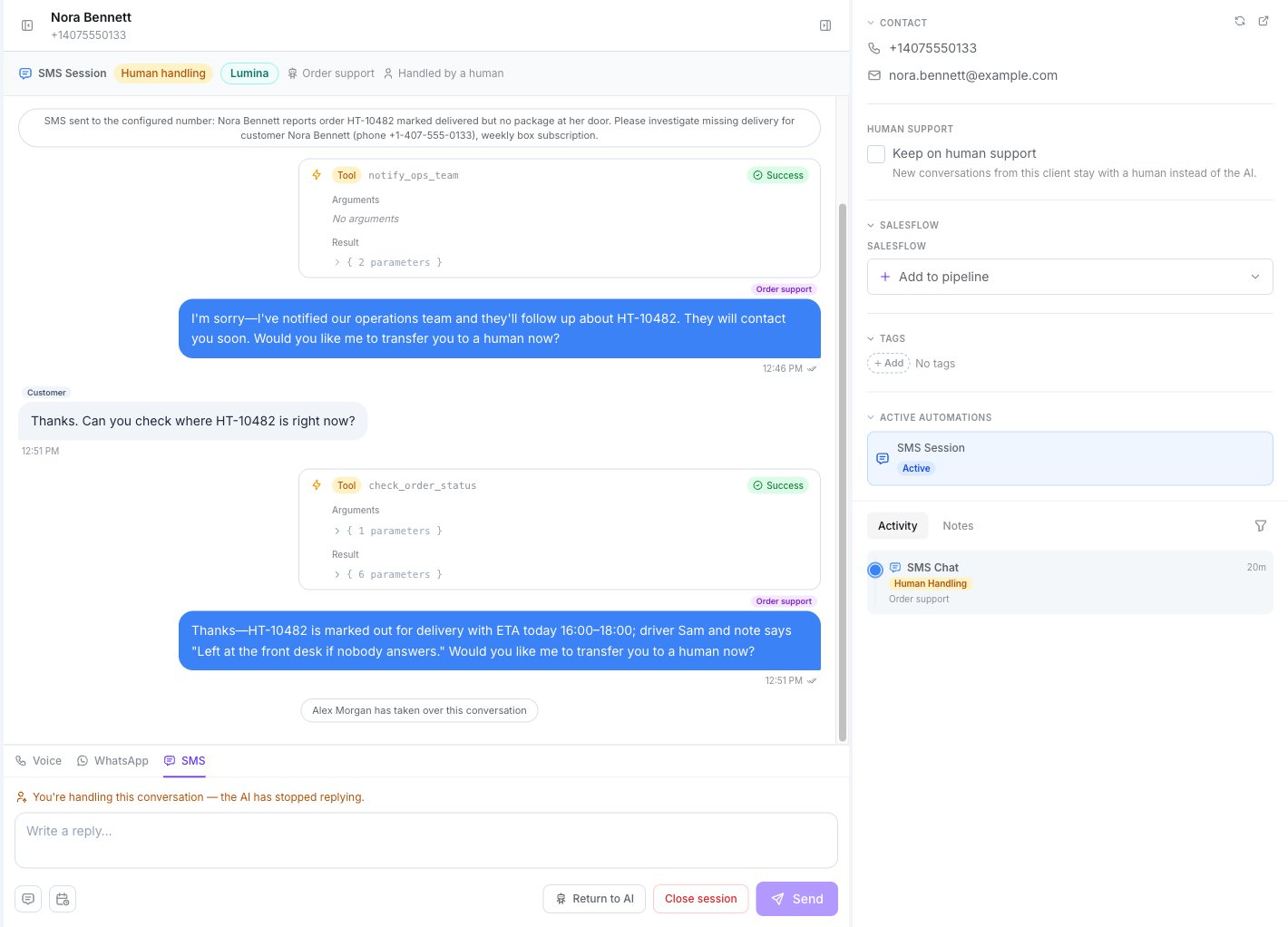
The header shows **SMS Session**, a status pill, the engine badge, the agent's name and —
when a person has stepped in — **Handled by a human**.
| Status | Meaning |
| ------------------------ | ---------------------------------------------------------------------------------------- |
| **New** / **Active** | The session is open |
| **AI handling** | The agent is replying |
| **Human handling** | A person is replying; the AI has stopped |
| **Ended** / **Resolved** | Closed |
| **Expired** | Closed by the 24-hour backstop |
| **Error** | The opening SMS was refused. See [Outbound chats](/en/sms-agents/outbound-and-salesflow) |
Bubbles are labelled **Customer** on the left, and on the right either the agent's name or
**Human agent**. Outbound rows carry a delivery icon; a failure shows **Failed to send** or
**Not delivered**, and there's no retry. Tool executions render as their own bubbles.
System notes appear as centred pills:
* *The AI handed this conversation to the team*
* *X has taken over this conversation*
* *Conversation auto-assigned to Y (round-robin)*
* `SMS sent to : ` and `SMS to was NOT sent (): ` — from
the [Send SMS tool](/en/sms-agents/send-sms-tool)
Keyword confirmations and auto-close notes display in English, even in the Spanish interface.
## When the AI asks for help
A **Handoff** tool moves the session to **Human handling**, shows **Transfer** ("Needs human
attention") on the row in the list, assigns someone round-robin from the tool's pool, and
writes an internal AI summary for the team.
How the trigger, the pool and the summary are set up.
## Taking over
Press **Take control**, or write a reply and press **Take over & send**. Either way:
* The AI stops **immediately** — you'll see *Conversation taken over — the AI has stopped.*
* Your replies leave from the agent's number.
* Texts the customer sends while a person is handling are stored but not answered by the AI.
* A reply without taking over is refused: the first reply is what takes the conversation.
## Reading a thread
The header shows **SMS Session**, a status pill, the engine badge, the agent's name and —
when a person has stepped in — **Handled by a human**.
| Status | Meaning |
| ------------------------ | ---------------------------------------------------------------------------------------- |
| **New** / **Active** | The session is open |
| **AI handling** | The agent is replying |
| **Human handling** | A person is replying; the AI has stopped |
| **Ended** / **Resolved** | Closed |
| **Expired** | Closed by the 24-hour backstop |
| **Error** | The opening SMS was refused. See [Outbound chats](/en/sms-agents/outbound-and-salesflow) |
Bubbles are labelled **Customer** on the left, and on the right either the agent's name or
**Human agent**. Outbound rows carry a delivery icon; a failure shows **Failed to send** or
**Not delivered**, and there's no retry. Tool executions render as their own bubbles.
System notes appear as centred pills:
* *The AI handed this conversation to the team*
* *X has taken over this conversation*
* *Conversation auto-assigned to Y (round-robin)*
* `SMS sent to : ` and `SMS to was NOT sent (): ` — from
the [Send SMS tool](/en/sms-agents/send-sms-tool)
Keyword confirmations and auto-close notes display in English, even in the Spanish interface.
## When the AI asks for help
A **Handoff** tool moves the session to **Human handling**, shows **Transfer** ("Needs human
attention") on the row in the list, assigns someone round-robin from the tool's pool, and
writes an internal AI summary for the team.
How the trigger, the pool and the summary are set up.
## Taking over
Press **Take control**, or write a reply and press **Take over & send**. Either way:
* The AI stops **immediately** — you'll see *Conversation taken over — the AI has stopped.*
* Your replies leave from the agent's number.
* Texts the customer sends while a person is handling are stored but not answered by the AI.
* A reply without taking over is refused: the first reply is what takes the conversation.
 ## Returning to the AI
**Return to AI** resumes the same agent on the same session — *Returned to the AI agent*.
**There's no per-contact hold on SMS.** The contact panel shows a **Keep on human support**
checkbox ("New conversations from this client stay with a human instead of the AI"), but it
only applies to **WhatsApp** conversations — on SMS it has no effect. Nothing stops the AI from
handling this customer's **next** SMS conversation.
## Closing
**Close session** ends the thread — *SMS session closed*. Sessions also close on their own:
* from the **inactivity timeout** (AI-handled sessions),
* from the **24-hour backstop** (any session, human-handled included),
* from the **End Chat** tool,
* from a **STOP** keyword.
If a customer texts again after STOP, a **new** session opens but every reply is blocked: the
thread shows *"Message not sent: this contact has opted out of SMS messages from this number."*
See [Compliance](/en/sms-agents/compliance).
When a session closes, several things happen at once: credits settle, the disposition tag is
classified, sentiment and a summary are produced, contact memory is extracted, and Salesflow
fires — *on resolved* entries and the **SMS Chat Completed** stage trigger. Sessions closed by
STOP skip the analysis.
The footer then reads *"This session has ended"*.
## What doesn't exist
* **Retrying** a failed send.
* **Editing or deleting** messages.
* **A hold** that keeps future SMS conversations with a person (the checkbox in the contact
panel is WhatsApp-only).
## Next step
Now the agent texts first.
## Returning to the AI
**Return to AI** resumes the same agent on the same session — *Returned to the AI agent*.
**There's no per-contact hold on SMS.** The contact panel shows a **Keep on human support**
checkbox ("New conversations from this client stay with a human instead of the AI"), but it
only applies to **WhatsApp** conversations — on SMS it has no effect. Nothing stops the AI from
handling this customer's **next** SMS conversation.
## Closing
**Close session** ends the thread — *SMS session closed*. Sessions also close on their own:
* from the **inactivity timeout** (AI-handled sessions),
* from the **24-hour backstop** (any session, human-handled included),
* from the **End Chat** tool,
* from a **STOP** keyword.
If a customer texts again after STOP, a **new** session opens but every reply is blocked: the
thread shows *"Message not sent: this contact has opted out of SMS messages from this number."*
See [Compliance](/en/sms-agents/compliance).
When a session closes, several things happen at once: credits settle, the disposition tag is
classified, sentiment and a summary are produced, contact memory is extracted, and Salesflow
fires — *on resolved* entries and the **SMS Chat Completed** stage trigger. Sessions closed by
STOP skip the analysis.
The footer then reads *"This session has ended"*.
## What doesn't exist
* **Retrying** a failed send.
* **Editing or deleting** messages.
* **A hold** that keeps future SMS conversations with a person (the checkbox in the contact
panel is WhatsApp-only).
## Next step
Now the agent texts first.