> ## Documentation Index
> Fetch the complete documentation index at: https://docs.dialtu.com/llms.txt
> Use this file to discover all available pages before exploring further.
# Outbound chats and Salesflow
> Start SMS chats by hand, schedule them, or trigger them from a pipeline
There are three ways to have an agent text first: by hand from the inbox, on a schedule, or
from a Salesflow sequence. All three need the same things:
The agent is **Active**.
Its **Agent Type** is **Outbound**.
It has a **First Message**.
It has a **phone number** bound.
The contact has a usable phone number.
Your plan and credit balance allow SMS chat.
## Start an SMS chat by hand
Open the contact under **CRM → Conversations** and pick the SMS tab. With no open session, the
composer shows an opening-message box, a **Schedule** button and **Start SMS Chat**.
 **Start SMS Chat** opens a window with the **Client**, the **SMS Agent** picker — outbound,
active agents, shown as "Name (+number)" — an optional **Disposition Tag**, and **Start Chat**.
Whatever you typed in the box overrides the agent's **First Message** for this run. The First
Message must still exist on the agent.
**Start SMS Chat** opens a window with the **Client**, the **SMS Agent** picker — outbound,
active agents, shown as "Name (+number)" — an optional **Disposition Tag**, and **Start Chat**.
Whatever you typed in the box overrides the agent's **First Message** for this run. The First
Message must still exist on the agent.
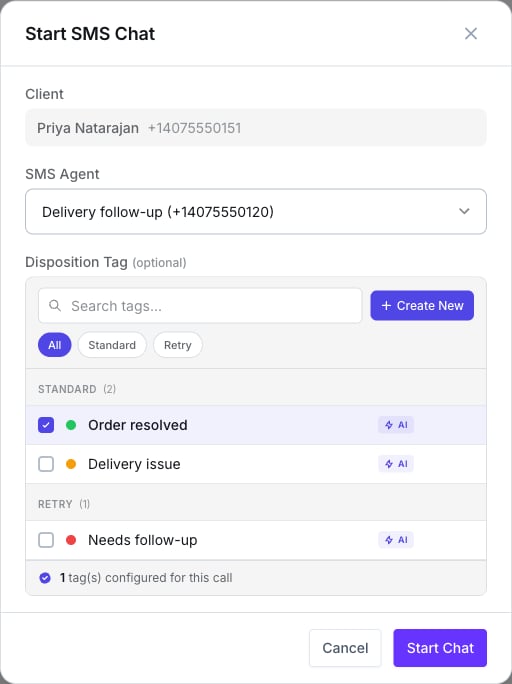 The picker lists every outbound SMS agent on the account, not only Lumina ones. Pick yours by
name.
## Why a start can fail
| Message | Cause |
| ------------------------------------------------------------------------------------- | ------------------------------------------------------------------ |
| No active billing plan / SMS chat not enabled on plan | Your plan |
| Insufficient credits | Your balance |
| Daily SMS session limit | Your plan's daily cap |
| "…already has an open SMS thread on that number. End it before starting another." | One open session per contact per number |
| "This contact has opted out of SMS messages. Release them from the suppression list…" | Opt-out. See [Compliance](/en/sms-agents/compliance) |
| "The opening SMS was not sent: …" | The carrier refused the opener. The session is parked in **Error** |
## Replies come back to the same agent
The open session owns the customer-and-number pair. A reply reaches **this** agent even outside
its hours, and even if the number has no inbound agent at all.
## Schedule an SMS chat
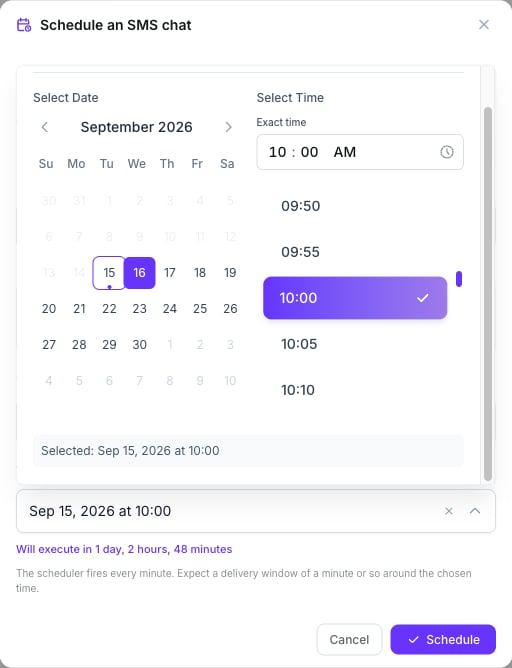
**Schedule** opens **Schedule an SMS chat**: the client, the **SMS Agent**, an **Opening
message**, a **Timezone**, and **When should the chat start?** — a date and time picker with a
countdown ("Will execute in 1 day, 2 hours"). The scheduler fires every minute, so expect a
delivery window of about a minute around the chosen time.
* The time must be at least **5 minutes** ahead.
* The contact must have a phone number.
* At fire time the same checks as a manual start run, and the chat fails if the contact has any
open SMS session by then.
* Pending chats can be rescheduled or cancelled from the **Scheduled SMS chats** button in the
composer.
The picker lists every outbound SMS agent on the account, not only Lumina ones. Pick yours by
name.
## Why a start can fail
| Message | Cause |
| ------------------------------------------------------------------------------------- | ------------------------------------------------------------------ |
| No active billing plan / SMS chat not enabled on plan | Your plan |
| Insufficient credits | Your balance |
| Daily SMS session limit | Your plan's daily cap |
| "…already has an open SMS thread on that number. End it before starting another." | One open session per contact per number |
| "This contact has opted out of SMS messages. Release them from the suppression list…" | Opt-out. See [Compliance](/en/sms-agents/compliance) |
| "The opening SMS was not sent: …" | The carrier refused the opener. The session is parked in **Error** |
## Replies come back to the same agent
The open session owns the customer-and-number pair. A reply reaches **this** agent even outside
its hours, and even if the number has no inbound agent at all.
## Schedule an SMS chat
**Schedule** opens **Schedule an SMS chat**: the client, the **SMS Agent**, an **Opening
message**, a **Timezone**, and **When should the chat start?** — a date and time picker with a
countdown ("Will execute in 1 day, 2 hours"). The scheduler fires every minute, so expect a
delivery window of about a minute around the chosen time.
* The time must be at least **5 minutes** ahead.
* The contact must have a phone number.
* At fire time the same checks as a manual start run, and the chat fails if the contact has any
open SMS session by then.
* Pending chats can be rescheduled or cancelled from the **Scheduled SMS chats** button in the
composer.
 ## From Salesflow: the Send SMS Chat action
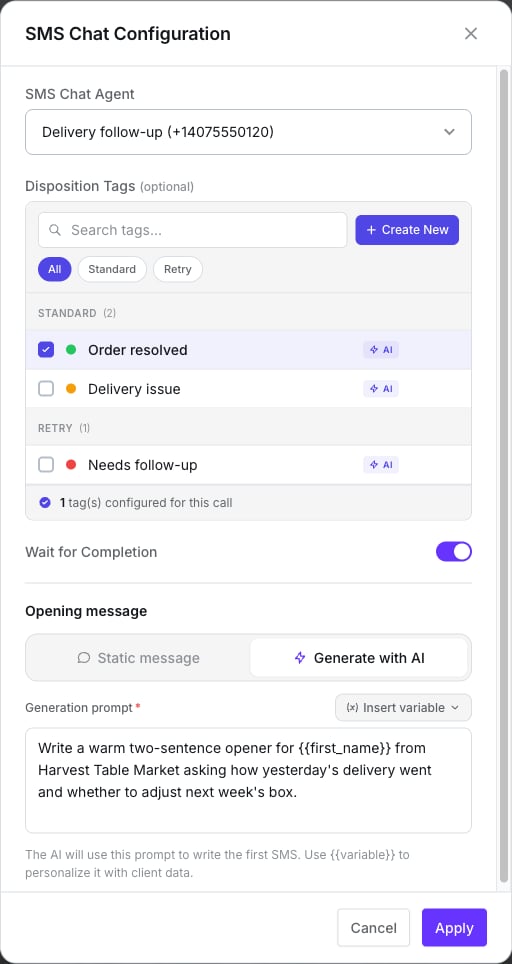
Add a **Send SMS Chat** action to a sequence and press **Configure SMS Chat**.
## From Salesflow: the Send SMS Chat action
Add a **Send SMS Chat** action to a sequence and press **Configure SMS Chat**.
 | Field | What it does |
| ----------------------- | ---------------------------------------------------------------------------------------------------------------------------------------------------------------------------------------------------------------------------------------------------------------------------------------------------------------------------------------------- |
| **SMS Chat Agent** | Outbound, active agents |
| **Disposition Tags** | Attached to the session |
| **Wait for Completion** | On by default. The sequence waits until the session ends or resolves; a session that ends in **Error** fails the action |
| **Opening message** | **Static message** — text with variables (`client_name`, `first_name`, `last_name`, `phone_number`, `email`, `company_name`, `area_code` and custom fields); leave it empty to send the agent's First Message. **Generate with AI** — you write a generation prompt and the AI drafts an opener of up to 320 characters; this consumes credits |
**There's no retry block.** The failures are the same as for a manual start, and after three
failed runs the event stops firing for that contact.
The conversation's credits are charged when the session **closes**, not when the action runs.
Every action a sequence can run.
## Salesflow entries and stage triggers
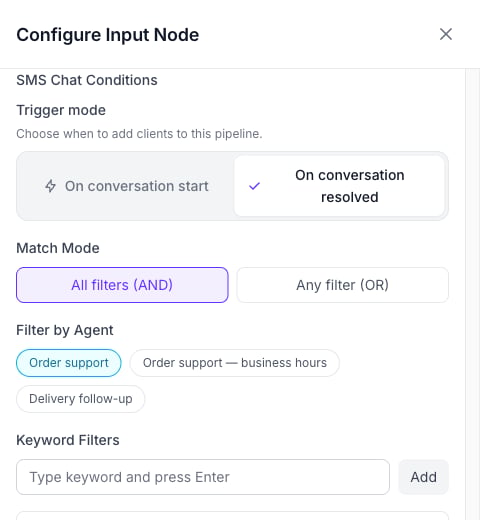
A pipeline can also **react** to SMS conversations. The input-node source **SMS Chat** enters a
contact:
* **on start** — any new session, inbound or outbound;
* **on resolved** — when a session closes.
Both modes take a **Filter by Agent** (which SMS agents count) and optional **Keyword Filters**,
combined with **All filters (AND)** or **Any filter (OR)**.
The **SMS Chat Completed** stage trigger fires when a session closes.
| Field | What it does |
| ----------------------- | ---------------------------------------------------------------------------------------------------------------------------------------------------------------------------------------------------------------------------------------------------------------------------------------------------------------------------------------------- |
| **SMS Chat Agent** | Outbound, active agents |
| **Disposition Tags** | Attached to the session |
| **Wait for Completion** | On by default. The sequence waits until the session ends or resolves; a session that ends in **Error** fails the action |
| **Opening message** | **Static message** — text with variables (`client_name`, `first_name`, `last_name`, `phone_number`, `email`, `company_name`, `area_code` and custom fields); leave it empty to send the agent's First Message. **Generate with AI** — you write a generation prompt and the AI drafts an opener of up to 320 characters; this consumes credits |
**There's no retry block.** The failures are the same as for a manual start, and after three
failed runs the event stops firing for that contact.
The conversation's credits are charged when the session **closes**, not when the action runs.
Every action a sequence can run.
## Salesflow entries and stage triggers
A pipeline can also **react** to SMS conversations. The input-node source **SMS Chat** enters a
contact:
* **on start** — any new session, inbound or outbound;
* **on resolved** — when a session closes.
Both modes take a **Filter by Agent** (which SMS agents count) and optional **Keyword Filters**,
combined with **All filters (AND)** or **Any filter (OR)**.
The **SMS Chat Completed** stage trigger fires when a session closes.
 How contacts enter a pipeline.
## What doesn't exist
* **A bulk or campaign send screen** for Lumina — use a pipeline.
* **A retry setting** on the action.
* **Starting a chat from the client page** — it's done from Conversations.
## Next step
Before you text anyone: opt-outs and registration.
How contacts enter a pipeline.
## What doesn't exist
* **A bulk or campaign send screen** for Lumina — use a pipeline.
* **A retry setting** on the action.
* **Starting a chat from the client page** — it's done from Conversations.
## Next step
Before you text anyone: opt-outs and registration.