> ## Documentation Index
> Fetch the complete documentation index at: https://docs.dialtu.com/llms.txt
> Use this file to discover all available pages before exploring further.
# The prompt, FAQs and variables
> How you instruct the agent, what it actually receives, and how to personalise it
The prompt is **a single document** in the centre column, and the only required content field.
Everything goes there: who the agent is, how it opens, what it should achieve, and what it must
not do.
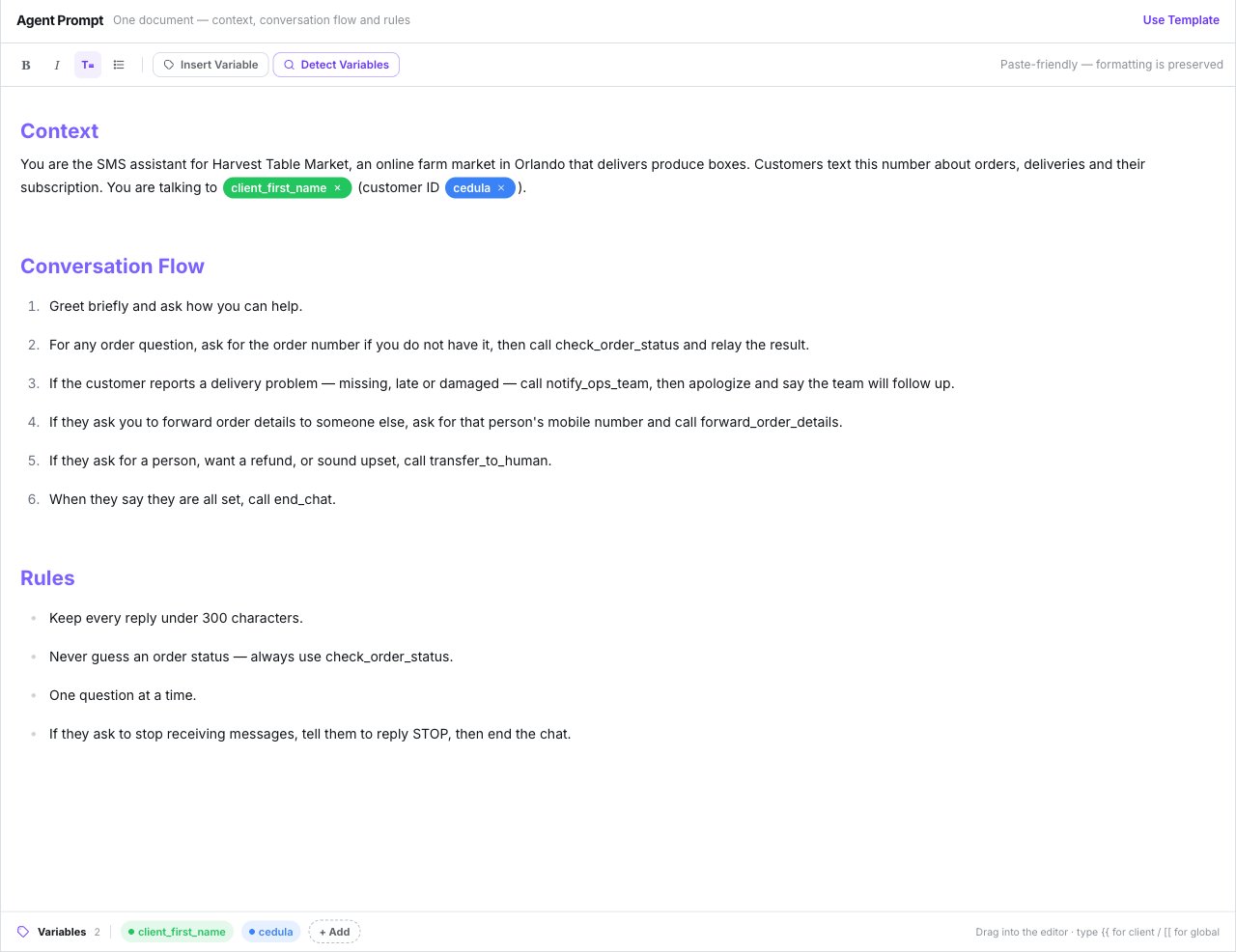 The toolbar gives you **Bold**, **Italic**, **Heading** and **Bullet list**, plus **Insert
Variable**, **Detect Variables** and a find bar. Pasting from a document keeps its formatting.
## How to structure it
```markdown theme={null}
## Context
You are Mila, the assistant for [your business]. We sell [product] to [customer type].
We're open Monday to Friday, 9 to 6. You reply over SMS, so be very brief.
## Conversation flow
1. Greet them and ask what they need.
2. Identify whether they want [case A] or [case B].
3. Ask only for essential details, one at a time.
4. Confirm before closing.
## Rules
- Two sentences per message, maximum.
- Always reply in Spanish, whatever language the customer writes in.
- Never invent prices or delivery dates. If you don't know, say so.
- If they ask to stop receiving messages, tell them to reply STOP, then end the conversation.
- If they ask for a person, or get angry, hand the conversation over.
```
## The template
**Use Template** fills the document with a starter script under `## Context`,
`## Conversation Flow` and `## Rules`. If you've already written something, it asks *Replace
the current prompt?* first. The template follows the interface language.
It's a starting script, not a set of safeguards. Add your own rules.
## What the model actually receives
Your document isn't the whole prompt. On every turn the model is given, in this order:
1. **Your document.**
2. **The FAQ**, appended as fallback answers.
3. A **Customer Information** block with the contact's fields.
4. **The contact's memory**, if **Use memory** is on.
5. **The date and time**, in the agent's timezone.
6. **An SMS style block**: short, plain text, no markdown, no emoji, full links.
Headings and bold in the document are for you. Replies go out as plain text.
## The Language setting
**The Language field does not force the reply language.** Lumina always detects and mirrors
the customer's language. The setting only changes the language of the handoff summary and of
calendar labels.
To force a language, add a rule to the prompt: *"Always reply in Spanish."*
The field's help text is written for calls. On SMS it means what's described above.
## How a turn works
* Inbound texts are **debounced for 5 seconds**: a burst of short messages gets one reply.
* The model sees the **last 20 turns** of the conversation.
* At most **3 tool calls per turn**.
* MMS attachments are stored (up to 10 per message), but the model only sees
`[The customer sent a attachment]`.
* A reply longer than **1600 characters** is split into several sends, each billed. See
[What SMS costs](/en/sms-agents/billing).
## Variables
The tray under the editor lists every variable the document uses. **Clean unused** drops any
that no longer appear in the text.
Written as `{{name}}` and replaced with the contact's real data: `{{client_name}}`,
`{{client_first_name}}`, `{{client_last_name}}`, `{{client_email}}`, `{{client_phone}}`
and `{{client_company}}`.
Their aliases resolve too:
| Resolves to | Aliases |
| ----------- | ----------------------------------------------------------------------- |
| First name | `first_name`, `firstname`, `primer_nombre`, `nombre` |
| Last name | `last_name`, `lastname`, `apellido`, `apellidos` |
| Full name | `name`, `full_name`, `contact_name`, `customer_name`, `nombre_completo` |
| Email | `email`, `correo`, `correo_electronico` |
| Phone | `phone`, `phone_number`, `telefono`, `celular` |
| Company | `company`, `company_name`, `empresa` |
Every custom field on the contact resolves by its own name, case- and accent-insensitive:
`{{Cedula}}` matches a field called "Cédula".
Written as `[[name]]`.
**They aren't substituted with any value.** There's nowhere to define their content — they
reach the model exactly as written. Use them as notes to yourself, not as data.
Nine `{{memory_...}}` tokens that insert what the agent remembers about the contact. They
only apply when memory is in **Variables** mode.
See [Contact memory](/en/whatsapp-agents/memory).
| Where | A blank value becomes |
| ------------------------------------------------------------------------------------------------------ | --------------------------------------------------------------------------------------------------------------------------------------------------------------------------------------------------------- |
| **In the prompt** | A neutral stand-in — "the customer", "(not on file)", "their company". Tokens that can't be resolved at all are stripped and listed under *Unavailable Customer Details*, so the model never invents them |
| **In customer-facing text** — First Message, Auto Close Message, Salesflow openers, Send SMS templates | Simply left out |
Unlike WhatsApp, variables **do** resolve in the **First Message** and the **Auto Close
Message**.
## Creating variables
There are no preset chips. Either type the token straight into the document, or use **Insert
Variable → New variable…** and choose **Client Variable** or **Global Variable**, a name, a
colour and an optional description.
* **Detect Variables** registers any `{{…}}` or `[[…]]` already in the text.
* **Clean unused** removes chips no longer referenced.
* Typing `{{` in the editor opens an autocomplete of the agent's variables.
## FAQs
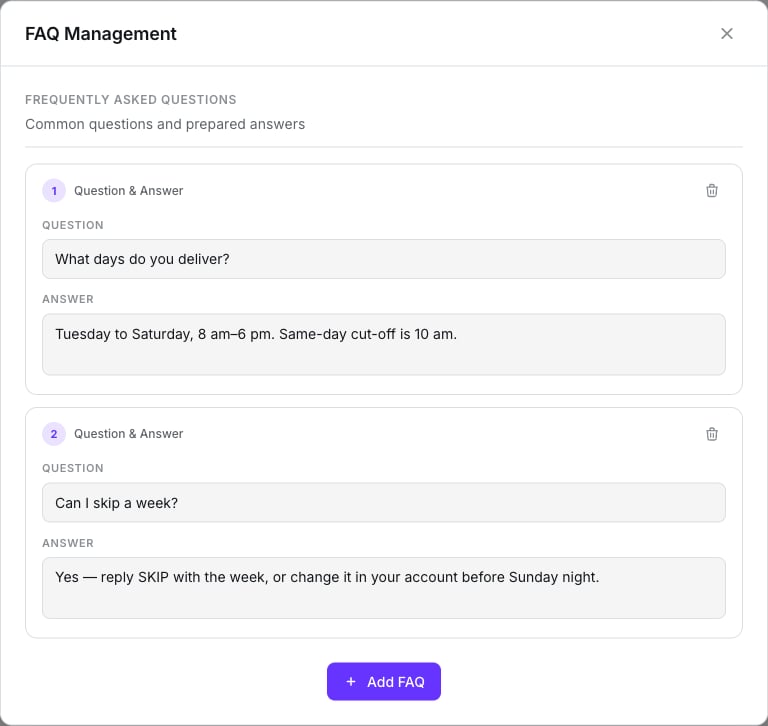
The **FAQ** button in the top bar opens **FAQ Management**. Press **Add FAQ** for each
question and answer. They're appended **after the prompt**, as fallback answers.
**There is no knowledge base.** You can't upload documents or PDFs — FAQs are simply more
prompt text. Keep them short.
The toolbar gives you **Bold**, **Italic**, **Heading** and **Bullet list**, plus **Insert
Variable**, **Detect Variables** and a find bar. Pasting from a document keeps its formatting.
## How to structure it
```markdown theme={null}
## Context
You are Mila, the assistant for [your business]. We sell [product] to [customer type].
We're open Monday to Friday, 9 to 6. You reply over SMS, so be very brief.
## Conversation flow
1. Greet them and ask what they need.
2. Identify whether they want [case A] or [case B].
3. Ask only for essential details, one at a time.
4. Confirm before closing.
## Rules
- Two sentences per message, maximum.
- Always reply in Spanish, whatever language the customer writes in.
- Never invent prices or delivery dates. If you don't know, say so.
- If they ask to stop receiving messages, tell them to reply STOP, then end the conversation.
- If they ask for a person, or get angry, hand the conversation over.
```
## The template
**Use Template** fills the document with a starter script under `## Context`,
`## Conversation Flow` and `## Rules`. If you've already written something, it asks *Replace
the current prompt?* first. The template follows the interface language.
It's a starting script, not a set of safeguards. Add your own rules.
## What the model actually receives
Your document isn't the whole prompt. On every turn the model is given, in this order:
1. **Your document.**
2. **The FAQ**, appended as fallback answers.
3. A **Customer Information** block with the contact's fields.
4. **The contact's memory**, if **Use memory** is on.
5. **The date and time**, in the agent's timezone.
6. **An SMS style block**: short, plain text, no markdown, no emoji, full links.
Headings and bold in the document are for you. Replies go out as plain text.
## The Language setting
**The Language field does not force the reply language.** Lumina always detects and mirrors
the customer's language. The setting only changes the language of the handoff summary and of
calendar labels.
To force a language, add a rule to the prompt: *"Always reply in Spanish."*
The field's help text is written for calls. On SMS it means what's described above.
## How a turn works
* Inbound texts are **debounced for 5 seconds**: a burst of short messages gets one reply.
* The model sees the **last 20 turns** of the conversation.
* At most **3 tool calls per turn**.
* MMS attachments are stored (up to 10 per message), but the model only sees
`[The customer sent a attachment]`.
* A reply longer than **1600 characters** is split into several sends, each billed. See
[What SMS costs](/en/sms-agents/billing).
## Variables
The tray under the editor lists every variable the document uses. **Clean unused** drops any
that no longer appear in the text.
Written as `{{name}}` and replaced with the contact's real data: `{{client_name}}`,
`{{client_first_name}}`, `{{client_last_name}}`, `{{client_email}}`, `{{client_phone}}`
and `{{client_company}}`.
Their aliases resolve too:
| Resolves to | Aliases |
| ----------- | ----------------------------------------------------------------------- |
| First name | `first_name`, `firstname`, `primer_nombre`, `nombre` |
| Last name | `last_name`, `lastname`, `apellido`, `apellidos` |
| Full name | `name`, `full_name`, `contact_name`, `customer_name`, `nombre_completo` |
| Email | `email`, `correo`, `correo_electronico` |
| Phone | `phone`, `phone_number`, `telefono`, `celular` |
| Company | `company`, `company_name`, `empresa` |
Every custom field on the contact resolves by its own name, case- and accent-insensitive:
`{{Cedula}}` matches a field called "Cédula".
Written as `[[name]]`.
**They aren't substituted with any value.** There's nowhere to define their content — they
reach the model exactly as written. Use them as notes to yourself, not as data.
Nine `{{memory_...}}` tokens that insert what the agent remembers about the contact. They
only apply when memory is in **Variables** mode.
See [Contact memory](/en/whatsapp-agents/memory).
| Where | A blank value becomes |
| ------------------------------------------------------------------------------------------------------ | --------------------------------------------------------------------------------------------------------------------------------------------------------------------------------------------------------- |
| **In the prompt** | A neutral stand-in — "the customer", "(not on file)", "their company". Tokens that can't be resolved at all are stripped and listed under *Unavailable Customer Details*, so the model never invents them |
| **In customer-facing text** — First Message, Auto Close Message, Salesflow openers, Send SMS templates | Simply left out |
Unlike WhatsApp, variables **do** resolve in the **First Message** and the **Auto Close
Message**.
## Creating variables
There are no preset chips. Either type the token straight into the document, or use **Insert
Variable → New variable…** and choose **Client Variable** or **Global Variable**, a name, a
colour and an optional description.
* **Detect Variables** registers any `{{…}}` or `[[…]]` already in the text.
* **Clean unused** removes chips no longer referenced.
* Typing `{{` in the editor opens an autocomplete of the agent's variables.
## FAQs
The **FAQ** button in the top bar opens **FAQ Management**. Press **Add FAQ** for each
question and answer. They're appended **after the prompt**, as fallback answers.
**There is no knowledge base.** You can't upload documents or PDFs — FAQs are simply more
prompt text. Keep them short.
 ## What doesn't exist
* **Temperature, length, style or batching controls** — write the behaviour into the prompt.
* **A knowledge base** or document upload.
* **A language enforcer** — the Language field doesn't do it; a prompt rule does.
## Next step
Which number, who answers when, and how a session ends.
## What doesn't exist
* **Temperature, length, style or batching controls** — write the behaviour into the prompt.
* **A knowledge base** or document upload.
* **A language enforcer** — the Language field doesn't do it; a prompt rule does.
## Next step
Which number, who answers when, and how a session ends.