> ## Documentation Index
> Fetch the complete documentation index at: https://docs.dialtu.com/llms.txt
> Use this file to discover all available pages before exploring further.
# The Send SMS tool
> Let the agent text the customer or a third party mid-conversation
The **Send SMS Tool** lets the agent send a text in the middle of a conversation — to the
customer it's talking to, or to someone else entirely: a teammate, a driver, a delivery
contact.
It always leaves from **the agent's own number**. There's no "Sent from" field on SMS.
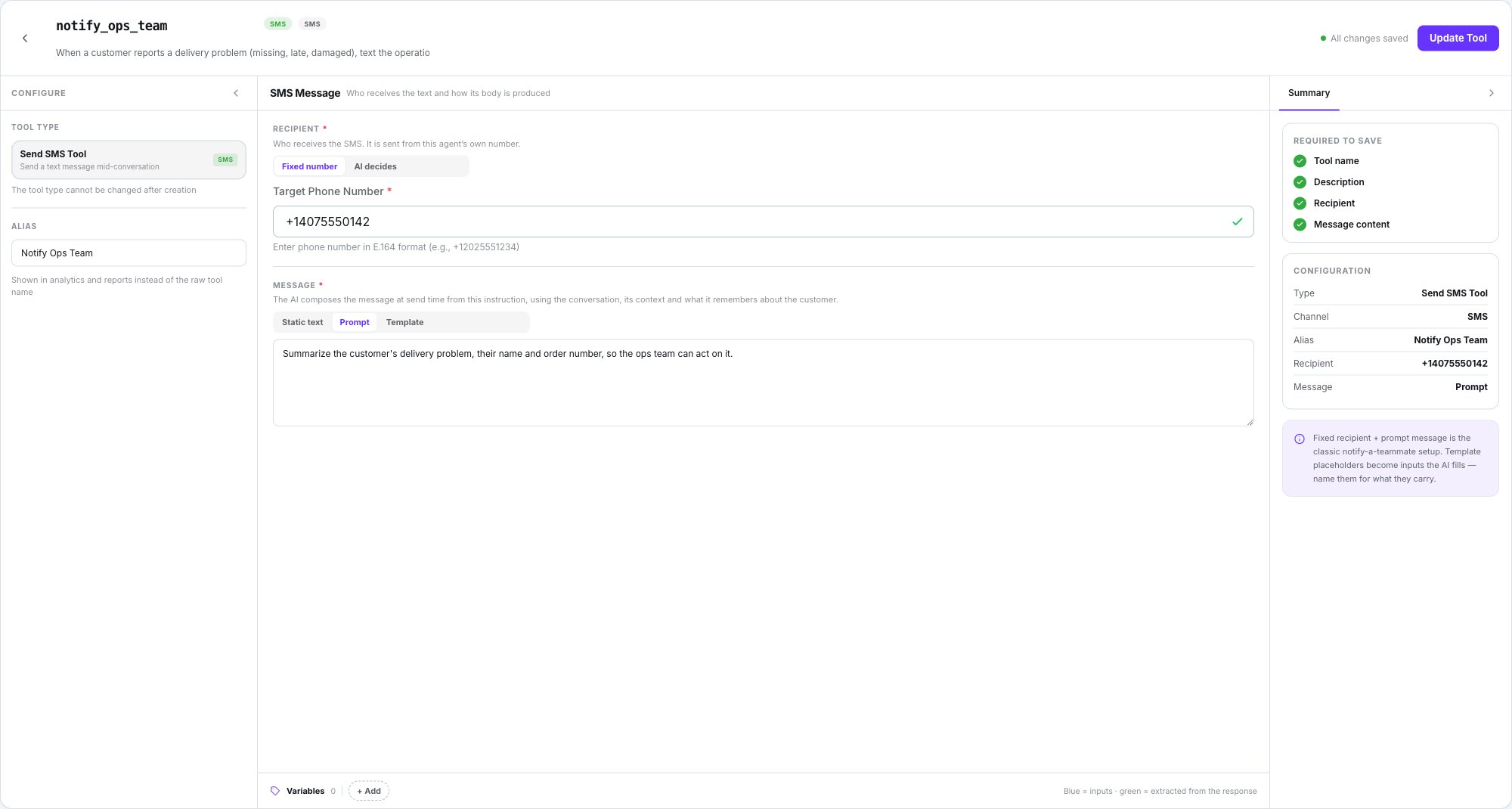
In the builder, the centre pane is **SMS Message** — *"Who receives the text and how its body
is produced"*.
 ## Recipient
| Option | What it means |
| ---------------- | ------------------------------------------------------------------------------------------------ |
| **Fixed number** | A number you type, in strict international format. The model never sees it and can't override it |
| **AI decides** | The model passes the number when it runs the tool |
With **AI decides**, say in the trigger prompt where that number comes from — for example
*"ask the customer for the delivery contact"*. National numbers are parsed in the country of
the agent's own number.
## Message
| Mode | What goes out |
| --------------- | ------------------------------------------------------------------------------------------------------------------------------------------------------------------------------------------- |
| **Static text** | Exactly what you wrote, every time the tool runs |
| **Prompt** | The AI composes the message at send time from the conversation, its context and what it remembers about the customer — up to 300 tokens |
| **Template** | Fixed wording with `{{placeholder}}`s. Each placeholder becomes a required input the AI fills; describe them in the variables strip. Client variables such as `{{client_name}}` resolve too |
## Recipient
| Option | What it means |
| ---------------- | ------------------------------------------------------------------------------------------------ |
| **Fixed number** | A number you type, in strict international format. The model never sees it and can't override it |
| **AI decides** | The model passes the number when it runs the tool |
With **AI decides**, say in the trigger prompt where that number comes from — for example
*"ask the customer for the delivery contact"*. National numbers are parsed in the country of
the agent's own number.
## Message
| Mode | What goes out |
| --------------- | ------------------------------------------------------------------------------------------------------------------------------------------------------------------------------------------- |
| **Static text** | Exactly what you wrote, every time the tool runs |
| **Prompt** | The AI composes the message at send time from the conversation, its context and what it remembers about the customer — up to 300 tokens |
| **Template** | Fixed wording with `{{placeholder}}`s. Each placeholder becomes a required input the AI fills; describe them in the variables strip. Client variables such as `{{client_name}}` resolve too |
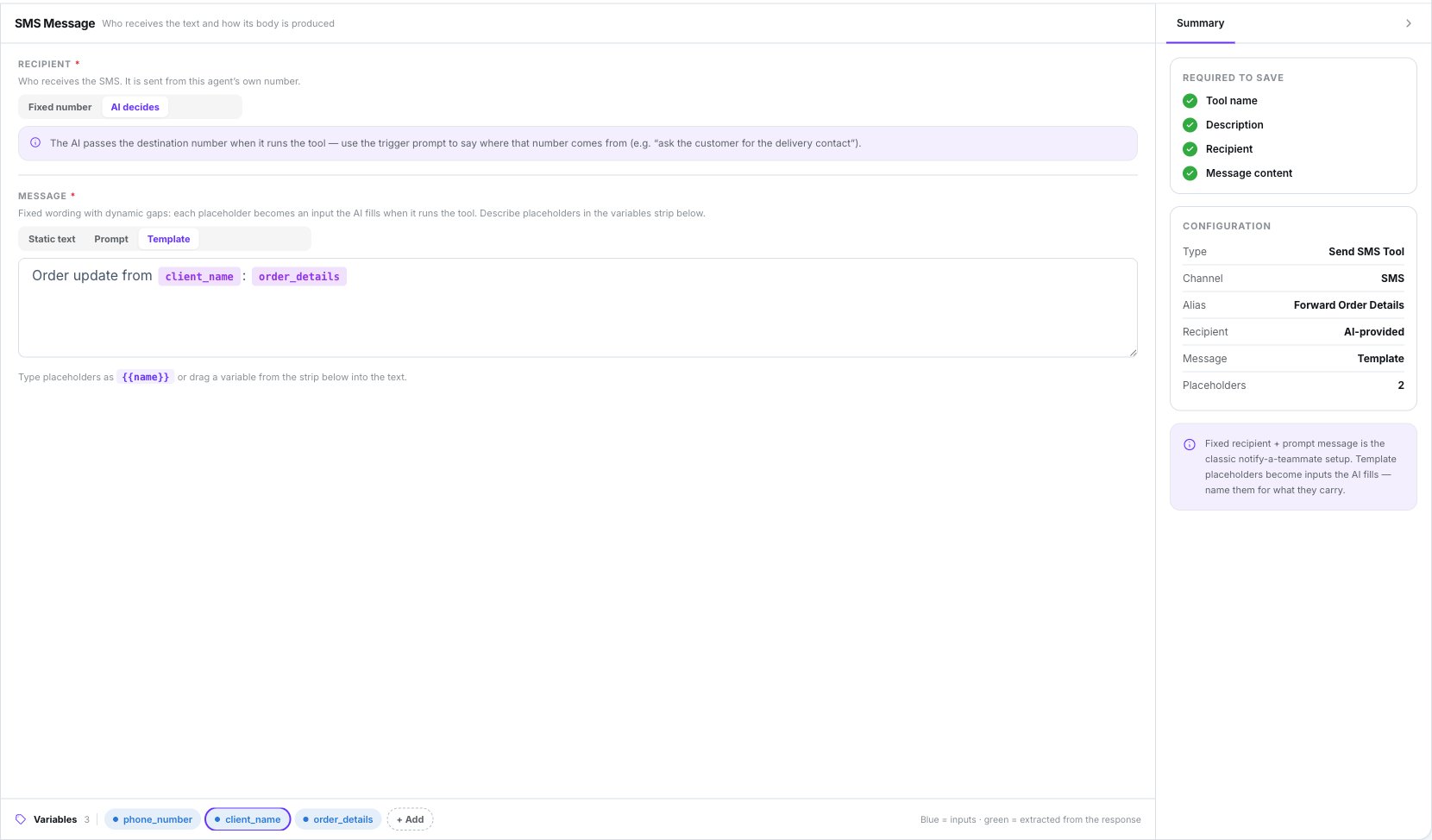 **Fixed number** plus **Prompt** is the classic "notify a teammate" setup: the AI summarises
the request and what was agreed, and a person picks it up.
## Where the message ends up
| Recipient | What happens |
| ------------------------------- | ------------------------------------------------------------------------------------------------------------------------------------------------------------------------------------------------------------------------------------------------------------------------------------------------------------------------------ |
| **The conversation's customer** | Appears in the thread, is part of the AI's history, and is billed like a reply |
| **Anyone else** | Leaves the agent's number. The thread shows a system note — `SMS sent to : ` or `SMS to was NOT sent (): `. With a **Fixed number** the note reads *"SMS sent to the configured number: …"* instead — the number is never shown to the model. Not billed, and not part of the AI's history |
## Limits and refusals
* At most **3 real sends per turn**.
* The body is at most **1600 characters**.
* The tool refuses **invalid numbers**, **premium numbers**, **any Dialtu platform number** and
**opted-out recipients**. See [Compliance](/en/sms-agents/compliance).
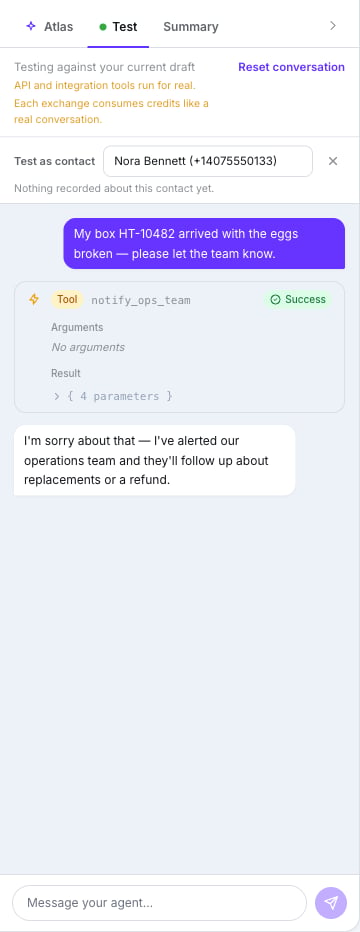
## In the test panel
The send is **simulated**: the tool bubble reads *"Test chat: no real SMS was sent."* Nothing
leaves the platform.
**Fixed number** plus **Prompt** is the classic "notify a teammate" setup: the AI summarises
the request and what was agreed, and a person picks it up.
## Where the message ends up
| Recipient | What happens |
| ------------------------------- | ------------------------------------------------------------------------------------------------------------------------------------------------------------------------------------------------------------------------------------------------------------------------------------------------------------------------------ |
| **The conversation's customer** | Appears in the thread, is part of the AI's history, and is billed like a reply |
| **Anyone else** | Leaves the agent's number. The thread shows a system note — `SMS sent to : ` or `SMS to was NOT sent (): `. With a **Fixed number** the note reads *"SMS sent to the configured number: …"* instead — the number is never shown to the model. Not billed, and not part of the AI's history |
## Limits and refusals
* At most **3 real sends per turn**.
* The body is at most **1600 characters**.
* The tool refuses **invalid numbers**, **premium numbers**, **any Dialtu platform number** and
**opted-out recipients**. See [Compliance](/en/sms-agents/compliance).
## In the test panel
The send is **simulated**: the tool bubble reads *"Test chat: no real SMS was sent."* Nothing
leaves the platform.
 ## What doesn't exist
* **Attachments** — text only.
* **Scheduling** a send from the tool.
* Running on another engine — only **Lumina** agents execute this tool.
## Next step
Try it before anyone else does.
## What doesn't exist
* **Attachments** — text only.
* **Scheduling** a send from the tool.
* Running on another engine — only **Lumina** agents execute this tool.
## Next step
Try it before anyone else does.