> ## Documentation Index
> Fetch the complete documentation index at: https://docs.dialtu.com/llms.txt
> Use this file to discover all available pages before exploring further.
# Tools
> The actions a Lumina agent can run: API, End chat, Handoff, Integration and Calendar
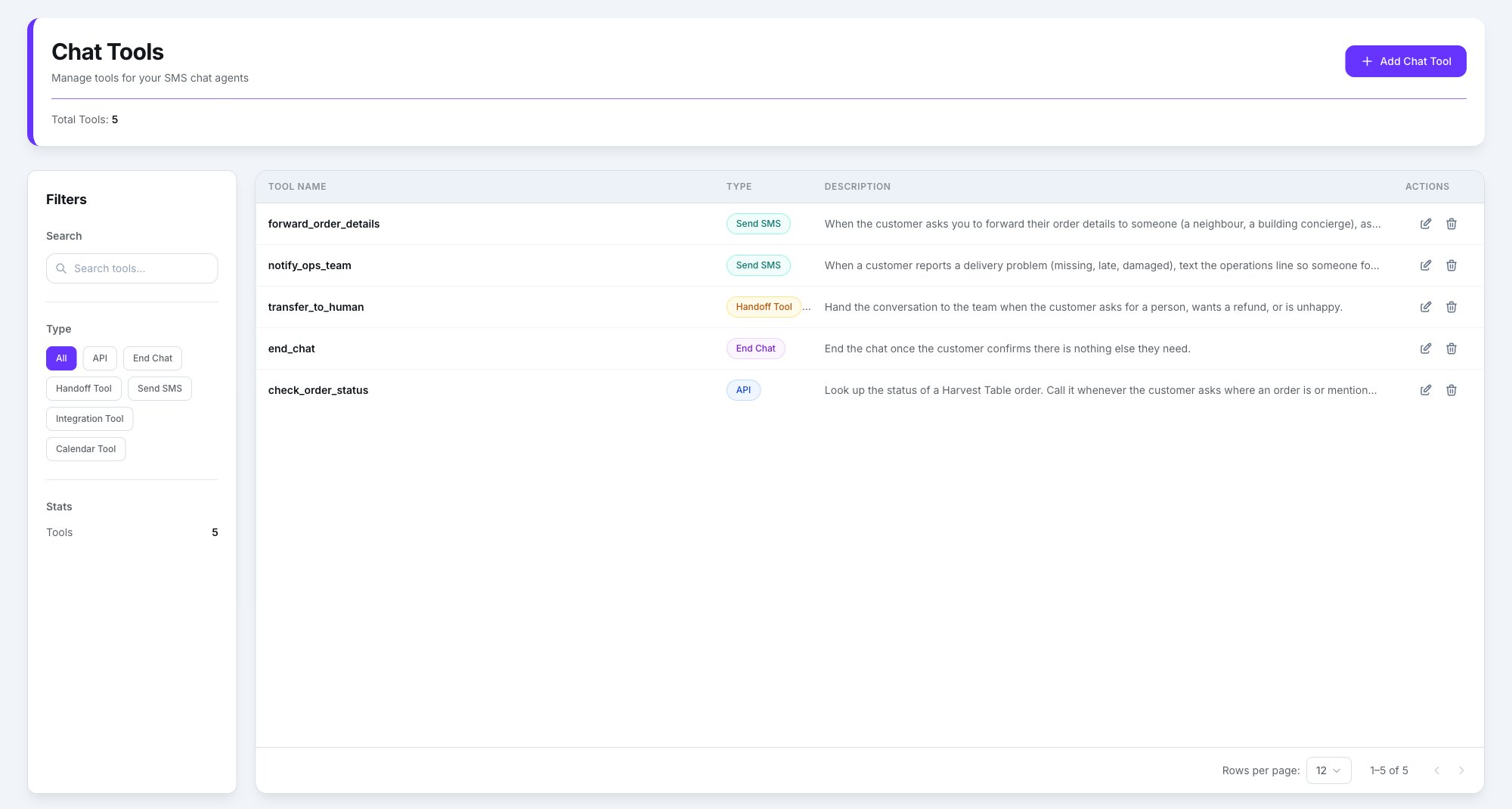
A tool is an **action the agent can run during the chat**. They're an **account-wide
library**: created once under **Chat → SMS → Tools** (the **Chat Tools** page, **Add Chat
Tool**), then attached to whichever agents need them.
 The **Tools** button in the agent's top bar opens the library: search, filter by **All Types**,
**API**, **End Chat** or **Send SMS**, tick the ones this agent should have, and press
**Done**. The counter at the bottom tracks the selection.
The **Tools** button in the agent's top bar opens the library: search, filter by **All Types**,
**API**, **End Chat** or **Send SMS**, tick the ones this agent should have, and press
**Done**. The counter at the bottom tracks the selection.
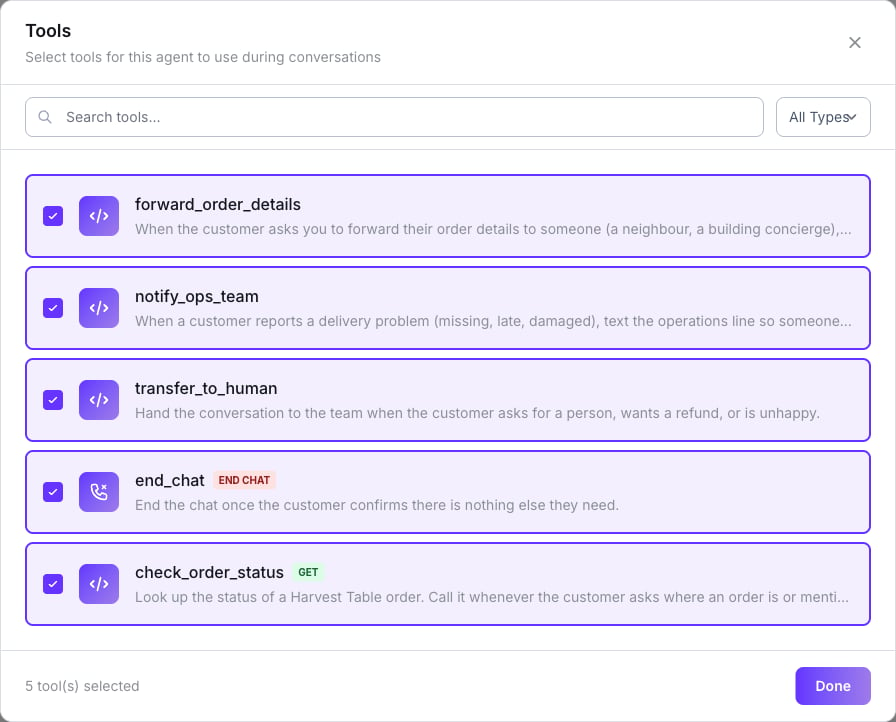 The window lists every SMS tool on the account, with no engine filter.
Saving the agent sends the full list of attached tools. If you open the window and untick one
by accident, it's detached on save.
## Types available on Lumina
| Type | What it does |
| --------------- | ------------------------------------------------------------------------------------------ |
| **API** | Calls an external HTTP API. `{{token}}`s in the request become inputs |
| **End Chat** | Closes the conversation |
| **Handoff** | Passes the chat to a person |
| **Send SMS** | Texts the customer or a third party. See [The Send SMS tool](/en/sms-agents/send-sms-tool) |
| **Integration** | Reads and manages a connected system — AgendaPro, connected by the Dialtu team |
| **Calendar** | Checks availability and books. Only on accounts where Dialtu enabled the calendar |
There are no WhatsApp templates or catalog here. **Transfer**, **end call** and **agent swap**
are voice-only; the chat equivalent of a transfer is **Handoff**.
## The builder
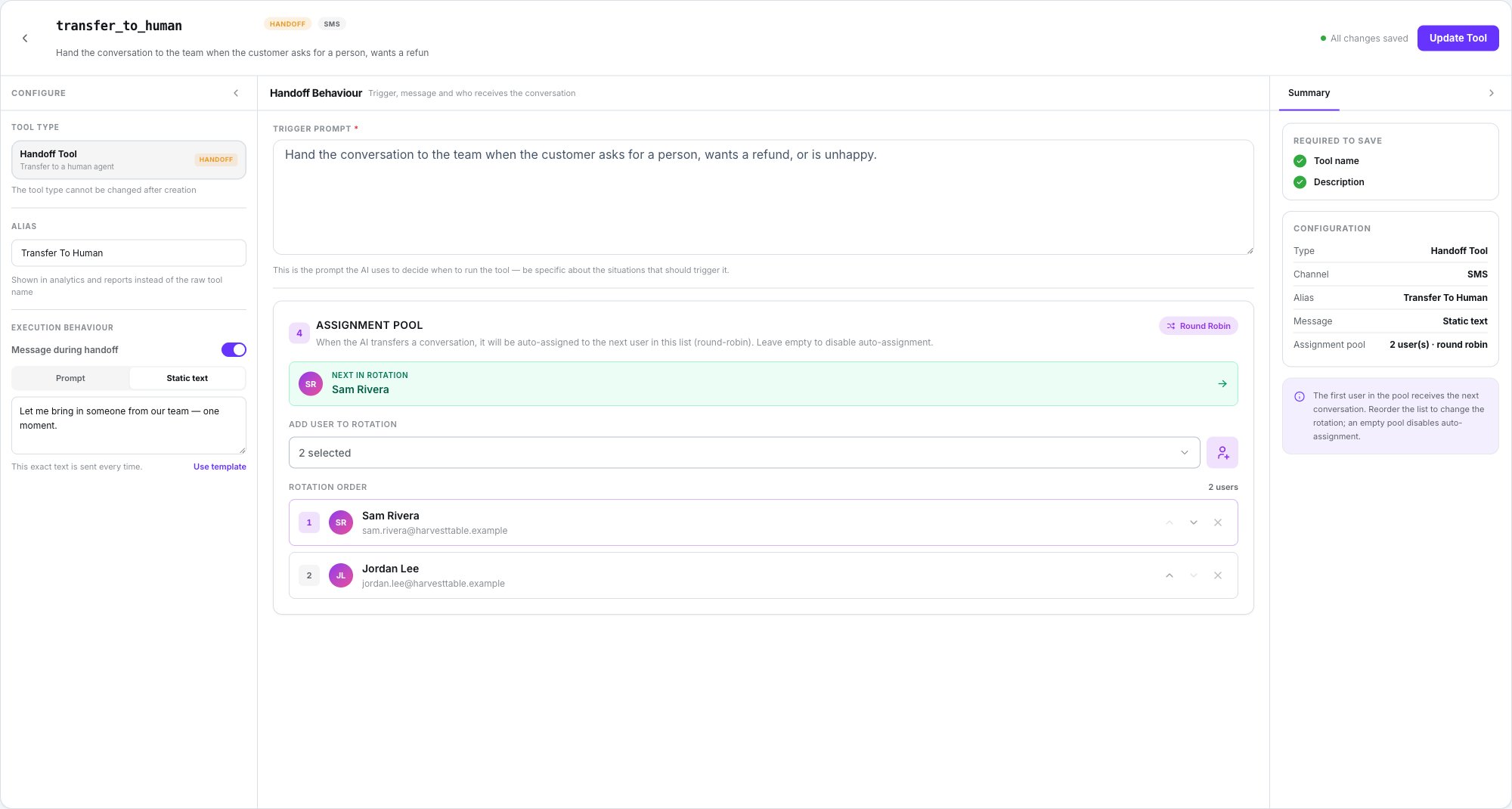
Three columns, like the agent editor:
* **Configure** rail on the left — the **Tool type** cards, an **Alias** (shown in analytics
and reports instead of the raw tool name), and a section specific to the type.
* The **centre pane** for the tool's content.
* **Summary** on the right — a checklist of what's missing, a recap (including **Channel:
SMS**), and a tip.
For an **API** tool the description is the trigger. **End Chat** and **Handoff** have their own
**Trigger prompt** field.
**The AI decides when to use a tool by reading its trigger.** Don't describe what the tool
does; describe **when it should be used**, and when it shouldn't.
The window lists every SMS tool on the account, with no engine filter.
Saving the agent sends the full list of attached tools. If you open the window and untick one
by accident, it's detached on save.
## Types available on Lumina
| Type | What it does |
| --------------- | ------------------------------------------------------------------------------------------ |
| **API** | Calls an external HTTP API. `{{token}}`s in the request become inputs |
| **End Chat** | Closes the conversation |
| **Handoff** | Passes the chat to a person |
| **Send SMS** | Texts the customer or a third party. See [The Send SMS tool](/en/sms-agents/send-sms-tool) |
| **Integration** | Reads and manages a connected system — AgendaPro, connected by the Dialtu team |
| **Calendar** | Checks availability and books. Only on accounts where Dialtu enabled the calendar |
There are no WhatsApp templates or catalog here. **Transfer**, **end call** and **agent swap**
are voice-only; the chat equivalent of a transfer is **Handoff**.
## The builder
Three columns, like the agent editor:
* **Configure** rail on the left — the **Tool type** cards, an **Alias** (shown in analytics
and reports instead of the raw tool name), and a section specific to the type.
* The **centre pane** for the tool's content.
* **Summary** on the right — a checklist of what's missing, a recap (including **Channel:
SMS**), and a tip.
For an **API** tool the description is the trigger. **End Chat** and **Handoff** have their own
**Trigger prompt** field.
**The AI decides when to use a tool by reading its trigger.** Don't describe what the tool
does; describe **when it should be used**, and when it shouldn't.
 ## End Chat
The **Trigger prompt** says when the conversation should end. What the customer reads, in
order of preference:
1. The model's own goodbye.
2. The agent's **Auto Close Message**, if set.
3. A generated goodbye.
4. The fallback: *"Thanks for getting in touch! If you need anything else, just text us back."*
The session becomes **Resolved**.
Keep the trigger narrow — ending too eagerly cuts customers off mid-thought. *"Customer
confirms resolved"* beats *"conversation seems done"*.
## Handoff
The **Trigger prompt** says when to hand over. The customer sees the model's handover sentence,
or a generated one.
What happens behind the scenes:
* The assignee is picked **round-robin** from the tool's assignment pool. Inactive users are
skipped; an empty pool leaves the conversation unassigned.
* A system note is written on the thread.
* The session becomes **Human handling** and is flagged **Transfer** in Conversations.
* An internal AI summary is written for the team. It's never sent to the customer.
Where the handed-over thread lands, and how to reply.
## API
`{{token}}`s in the URL, params, headers or body become inputs the AI fills. The **HTTP
timeout** goes from 1,000 to 600,000 ms. The variables strip under the pane shows inputs in
**blue** and values extracted from the response in **green**.
API tools **run for real in the test panel**. Use test data.
## Integration and Calendar
There's one integration provider, **AgendaPro**, and the Dialtu team makes the connection —
there's no self-serve screen. Ask your Dialtu contact before going live.
* Integration results are summarised for the customer in **one short sentence**, never a list.
* Calendar labels follow the agent's **Language** setting.
## Fields Lumina ignores
The builder's **Message during execution**, **Message before ending** and **Message during
handoff** fields are **ignored by Lumina**. What the customer reads comes from the model — or,
for End Chat, from the **Auto Close Message**.
## Limits
* At most **3 tool calls per turn**.
* With **Use memory** and **Deep recall** on, the agent also gets a built-in
previous-conversations search on top of the tools you attach.
## What doesn't exist
* **WhatsApp templates** or a **catalog**.
* **An engine filter or warning** in the Tools window.
* **Changing a tool's type** — the builder says so under the type card: *"The tool type cannot be
changed after creation."* Create a new tool instead.
## Next step
The one tool that's SMS-only.
## End Chat
The **Trigger prompt** says when the conversation should end. What the customer reads, in
order of preference:
1. The model's own goodbye.
2. The agent's **Auto Close Message**, if set.
3. A generated goodbye.
4. The fallback: *"Thanks for getting in touch! If you need anything else, just text us back."*
The session becomes **Resolved**.
Keep the trigger narrow — ending too eagerly cuts customers off mid-thought. *"Customer
confirms resolved"* beats *"conversation seems done"*.
## Handoff
The **Trigger prompt** says when to hand over. The customer sees the model's handover sentence,
or a generated one.
What happens behind the scenes:
* The assignee is picked **round-robin** from the tool's assignment pool. Inactive users are
skipped; an empty pool leaves the conversation unassigned.
* A system note is written on the thread.
* The session becomes **Human handling** and is flagged **Transfer** in Conversations.
* An internal AI summary is written for the team. It's never sent to the customer.
Where the handed-over thread lands, and how to reply.
## API
`{{token}}`s in the URL, params, headers or body become inputs the AI fills. The **HTTP
timeout** goes from 1,000 to 600,000 ms. The variables strip under the pane shows inputs in
**blue** and values extracted from the response in **green**.
API tools **run for real in the test panel**. Use test data.
## Integration and Calendar
There's one integration provider, **AgendaPro**, and the Dialtu team makes the connection —
there's no self-serve screen. Ask your Dialtu contact before going live.
* Integration results are summarised for the customer in **one short sentence**, never a list.
* Calendar labels follow the agent's **Language** setting.
## Fields Lumina ignores
The builder's **Message during execution**, **Message before ending** and **Message during
handoff** fields are **ignored by Lumina**. What the customer reads comes from the model — or,
for End Chat, from the **Auto Close Message**.
## Limits
* At most **3 tool calls per turn**.
* With **Use memory** and **Deep recall** on, the agent also gets a built-in
previous-conversations search on top of the tools you attach.
## What doesn't exist
* **WhatsApp templates** or a **catalog**.
* **An engine filter or warning** in the Tools window.
* **Changing a tool's type** — the builder says so under the type card: *"The tool type cannot be
changed after creation."* Create a new tool instead.
## Next step
The one tool that's SMS-only.