

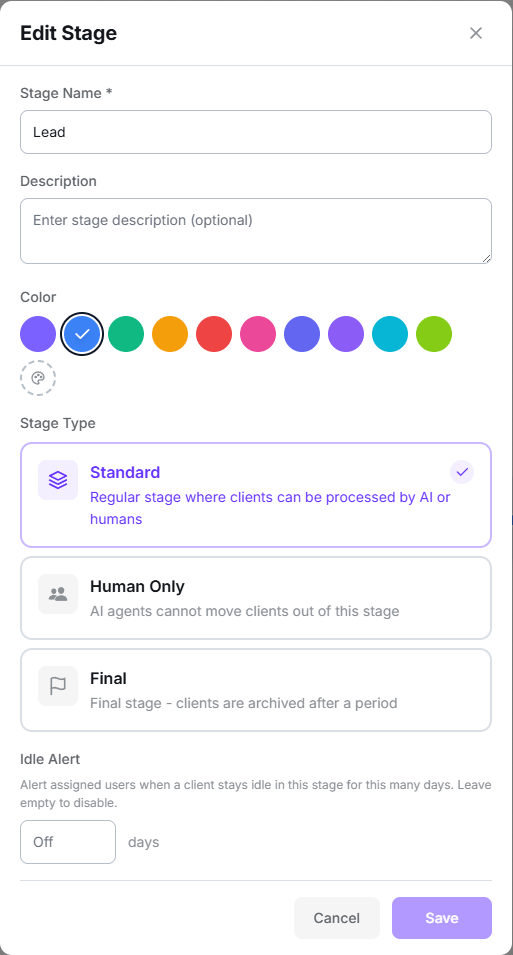
Stage configuration
The three types
Standard
A regular stage where customers can be handled by AI or humans.
Human only
Transitions leaving this stage are forced to manual.
Final
Closes the deal as won or lost. Cannot have outgoing transitions.
Final stages: won, lost, and archived
Marking a stage as Final reveals two settings:
A customer reaching a final stage does not disappear immediately: they stay visible and
active for the number of days you configure. After that, an automatic process marks them
completed and they stop counting as active.
Idle alert
The Idle alert field promises to notify assigned users when a customer has sat in the stage too many days.Order, color, and position
- The order of columns in the Board is changed by dragging the column, or from the Position field when creating the stage.
- The position in the Flow diagram is independent of the Board order. Moving a stage in the diagram does not reorder the columns.
- The color is picked from eight presets or via Custom color. It’s purely visual, but it helps a lot when scanning the board.
Deleting a stage
When deleting a stage that contains customers, Salesflow forces you to decide what happens to them:- Move customers to another stage, or
- Remove all customers from the pipeline — they’re marked as removed, not deleted.
Warning: dead ends
The Flow view shows an amber warning when a stage has no path to a final stage. Clicking it makes the affected stages flash. It’s worth keeping at zero: a stage with no exit is a place where leads get stuck forever.Next step
Input nodes
Define how customers reach these stages.