

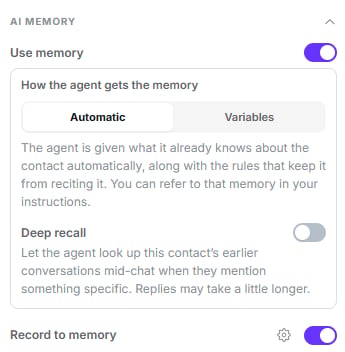
Use memory on, in Automatic mode, with Record to memory below
Reading: what the agent knows
Use memory
Off by default. Turning it on gives the agent what’s already known about the contact: facts, preferences and open items gathered from WhatsApp, calls, SMS and notes.How the agent gets the memory
In Variables mode the nine tokens appear as chips under the selector. Clicking one drops it
into the prompt at the cursor.
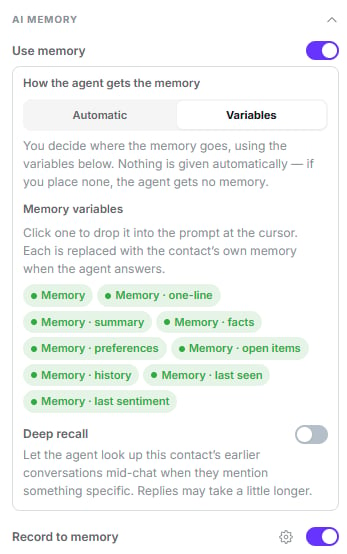
Variables mode: the nine memory tokens, ready to drop into the prompt
Deep recall
Off by default, nested under Use memory. Lets the agent look up earlier conversations mid-chat when the customer mentions something specific.- Searches WhatsApp, voice and SMS history, up to 18 months back.
- Costs no extra credits, but replies take a little longer.
Turning off Use memory also turns off deep recall, and re-enabling it doesn’t restore
it.
Writing: what the agent contributes
The Record to memory toggle (on by default) and its Configure link open the What this agent records modal.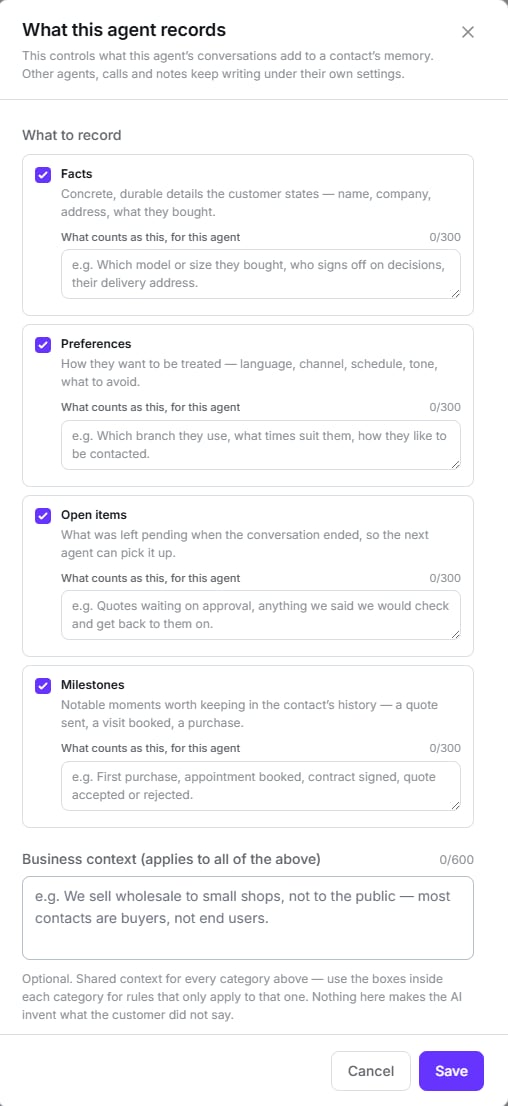
The four categories, each with its own instruction box
What to record
Four categories, all on by default:
Each one takes its own instruction (max 300 characters) explaining what counts as that, for
this agent.
Context and exclusions
- Business context (max 600 characters) — shared context for every category. For example: “We sell wholesale to shops, not to the public.”
- Never record (max 600) — a hard exclusion: nothing matching it is stored, even if the customer states it outright. This is where card numbers, national IDs and health data go.
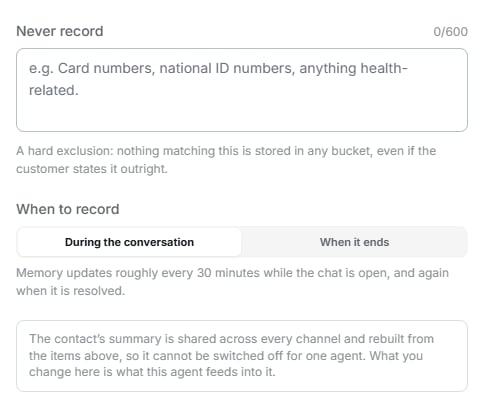
Further down the same modal: the hard exclusion and when memory is written
When to record
During the conversation means 30 minutes of inactivity, not every 30 minutes. A
continuously busy chat writes nothing until it goes quiet or is closed.
Things worth knowing
The agent can't see what it learned in the current conversation
The agent can't see what it learned in the current conversation
Memory is read at the start. For the session’s 24 hours, whatever the customer says
doesn’t appear in that agent’s own memory. It looks like a bug in the test panel, but
it’s deliberate.
Turning off writing also turns off sentiment
Turning off writing also turns off sentiment
Conversation sentiment lives on the same record. Switching off Record to memory stops it
being captured — and the interface doesn’t mention it.
Calls and notes ignore this configuration
Calls and notes ignore this configuration
These settings apply to this WhatsApp agent only. Extraction from voice calls and client
notes always happens, under its own rules.
Old data gets trimmed
Old data gets trimmed
Memory has a size budget and a maximum age. “The agent forgot something I can see on the
contact’s memory page” is expected behaviour, not a fault.
Next step
Follow-up, reminders and closing
What happens when the customer stops replying.