

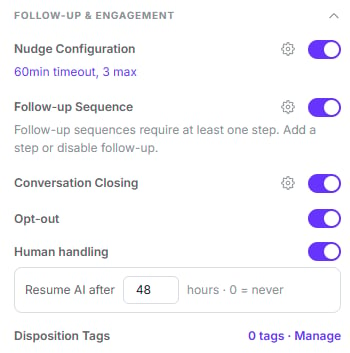
Each behaviour is a toggle; the gear opens its configuration
Reminders appear here as Nudge Configuration, with a summary of the current cadence
underneath. Disposition tags live at the bottom of this same group.
Reminders
These re-contact a customer who didn’t reply.Simple mode
One message and cadence for the whole sequence: how many reminders (1–10, default 3) and how often (default 60 minutes).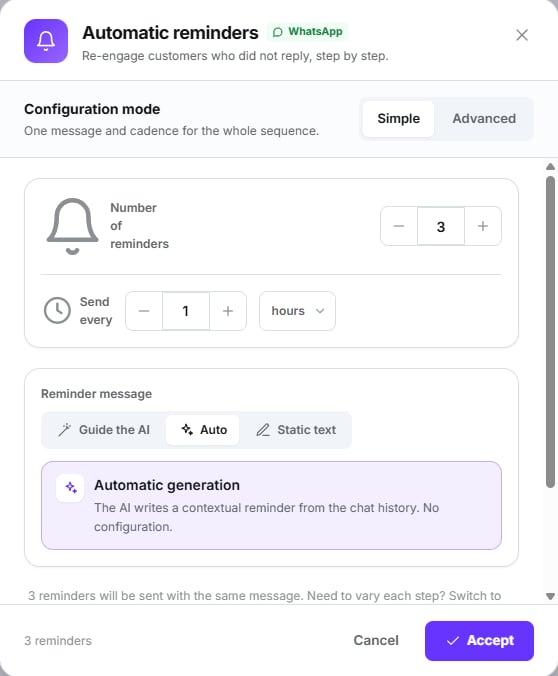
Simple mode: one count, one interval, one message strategy
Advanced mode
Up to 5 steps, each with its own delay and message. A new step starts at 1 day.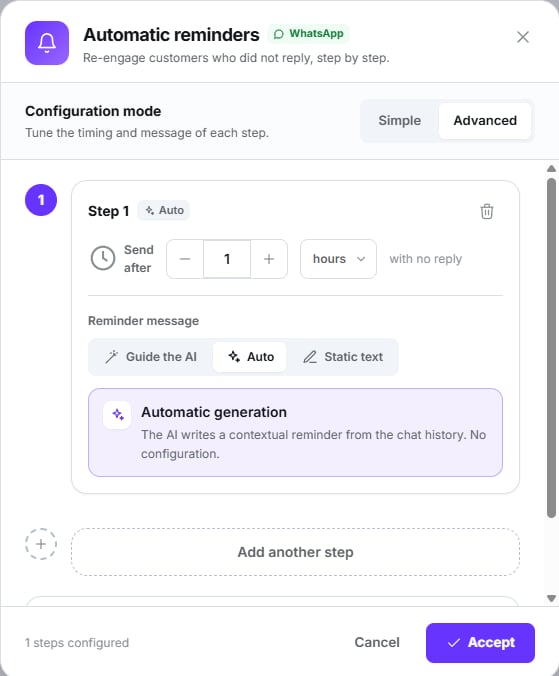
Advanced mode: per-step delay and per-step message
In advanced mode the maximum reminder count is ignored: the cap is the number of steps.
The message
Switching to Automatic clears any text you’d written.
Auto-resolve at the end
Optional: closes the conversation once all reminders are sent, with an AI-generated or static message.How they actually behave
The clock runs from the last message, whoever sent it
The clock runs from the last message, whoever sent it
Including the agent’s own reminder. It does not count from the customer’s last message.
Outside the 24-hour window nothing is sent
Outside the 24-hour window nothing is sent
WhatsApp only allows free-form messages for 24 hours after the customer’s last message. Past
that, the reminder is silently skipped — there’s no template fallback. An internal note
is left on the thread that the customer never sees.This is the most common cause of “I set up reminders and they never arrive”.
A paused agent still sends reminders
A paused agent still sends reminders
The process that sends them doesn’t check whether the agent is active. Pausing an agent
doesn’t stop its reminders.
Any customer reply resets the count
Any customer reply resets the count
And cancels active follow-ups.
Every reminder is billed
Every reminder is billed
Like any AI-generated message.
Follow-up sequence
Different from reminders: it fires after the conversation is resolved, and sends approved Meta templates.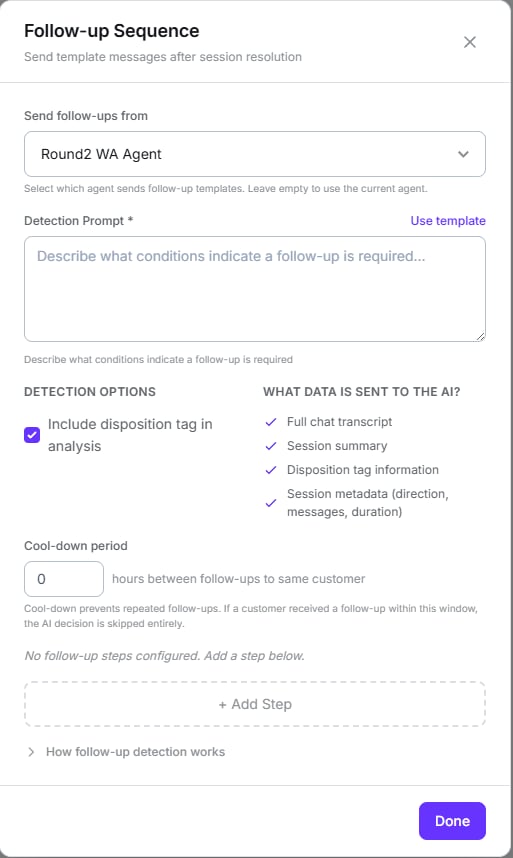
The sending agent, the detection prompt, and what the AI sees when it decides
Unticking Include disposition tag in analysis strikes that item out of the list on the
right — it’s how you see what’s actually being sent to the model.
- Every step needs an approved template — there’s no free-form follow-up.
- Minimum 24-hour delay per step. It’s a validation: less than that won’t save.
- A cool-down period prevents repeat follow-ups to the same customer.
- An inbound agent can’t send itself follow-ups: you must pick an outbound or omnichannel agent on the same number.
Variables are not substituted in follow-up template values. A
{{client_name}} would
arrive written literally.Follow-up templates don’t consume Dialtu credits — Meta bills your account directly. The
interface’s note about a “separate billing charge” refers to Meta’s conversation window, not
your credits.
Conversation closing
Closes sessions after a period of inactivity, with an AI-generated or static message.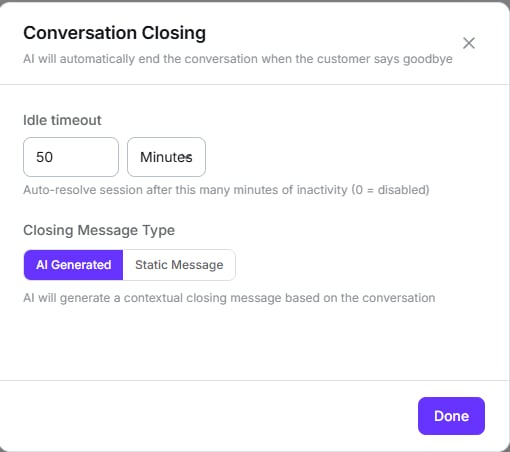
Idle timeout in minutes, and how the goodbye is written
An idle timeout of
0 disables the auto-close.This option’s helper text renders in English even in the Spanish interface — a known
translation bug.Variables are also not substituted in the closing message.
Closing messages are not billed.
Opt-out
When a customer asks to stop receiving messages, the AI closes that conversation and doesn’t write to them again.Opt-out persists. It isn’t just for that conversation: it’s recorded per contact and
blocks AI replies, reminders, follow-ups and reconnect campaigns. Releasing it is done
manually from settings.
WhatsApp does not automatically recognise the word “STOP”. Unlike
SMS, there are no keywords here: the AI detects the intent and
performs the opt-out. Make this explicit in your
prompt so it recognises it reliably.
Human handling
When someone on your team steps into a chat, that customer’s future conversations stay with a person instead of restarting the AI. Resume AI after sets how many hours that hold lasts. Default 48;0 means never.
Next step
Tools and testing
Give it real actions and test before going live.