

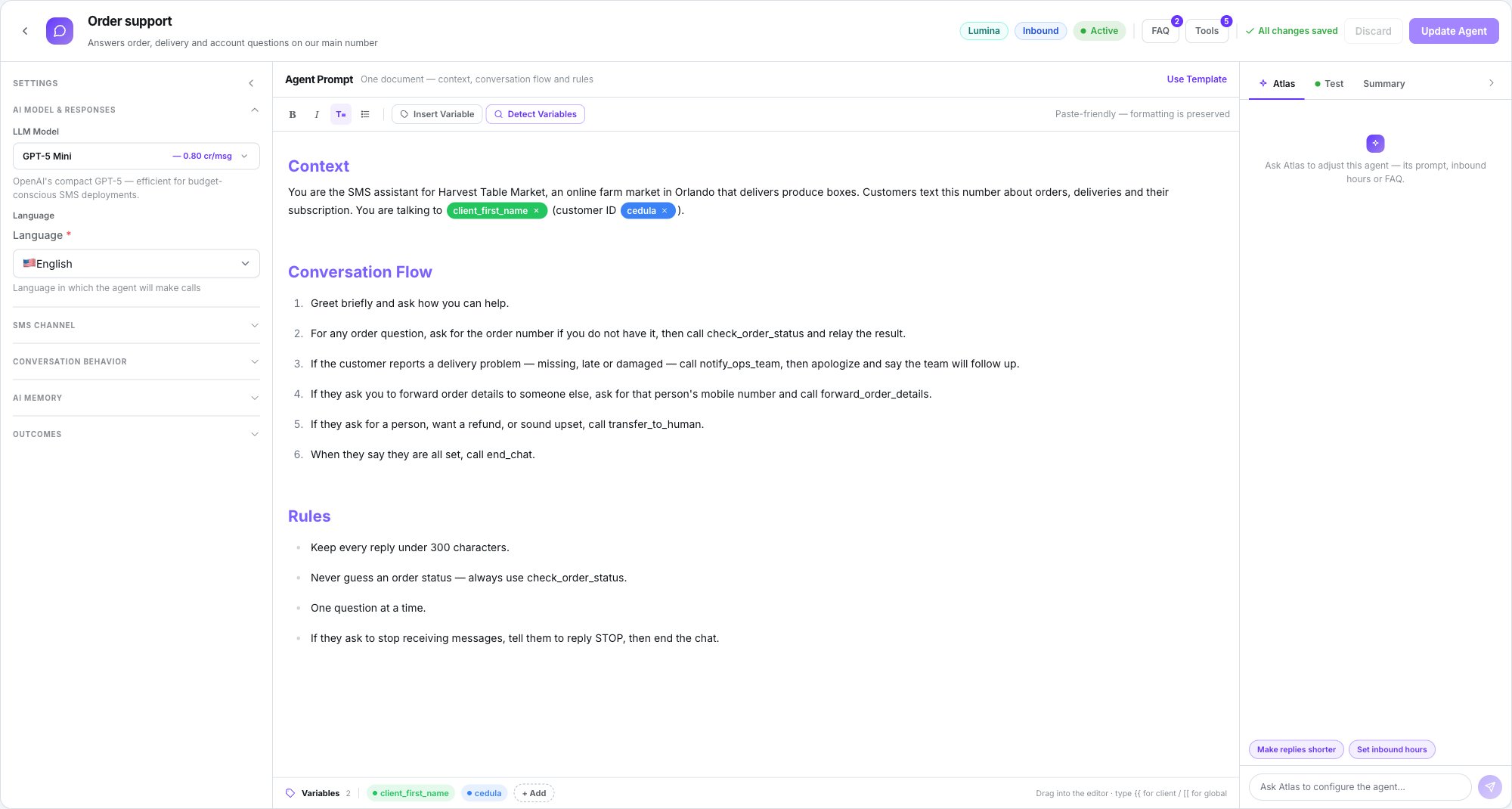
The whole agent on one screen: settings, prompt and the right panel
What Lumina is
Lumina is Dialtu’s SMS engine. Dialtu runs the whole conversation end to end — the prompt, the model turn, the tools and the history. The carrier only transports the message. The engine picker offers two engines — choose Lumina; everything in this section describes it, and the engine can’t be changed afterwards.What an SMS agent can do
Answer texts on a schedule
Weekly hours per agent, or the number’s default agent for everything else.
Start conversations
By hand from the inbox, on a schedule, or from a Salesflow sequence.
Run tools
API, End Chat, Handoff, Send SMS, Integration and Calendar.
Hand to a person
A live inbox where your team takes over — and hands back to the AI.
Contact memory
Reads and writes the memory shared with calls and WhatsApp.
Opt-out keywords
STOP, HELP and START are handled before the model ever sees the text.
The editor at a glance
A single screen with three columns. There’s no step-by-step wizard.
The top bar holds the name and description, the Lumina badge, the Inbound / Outbound
pill, the Active / Paused toggle, the FAQ and Tools buttons, and the save state:
Draft saved, Unsaved changes or All changes saved.
One agent, one direction
Agent Type is Inbound or Outbound. There’s no omnichannel type on SMS.- An inbound agent never texts first.
- An outbound agent never picks up a stray inbound text on its number — but a customer replying to a conversation it started always reaches that same agent.
Who can see the SMS section
You need the SMS feature on your plan and SMS read and write permissions. Admin and Super Admin have them; a custom role must add the SMS module.If SMS isn’t in the menu, it’s either the plan or the role.
What SMS does NOT have
Worth saying early, because these are real differences from WhatsApp:What’s in this section
Create an SMS agent
The minimum fields to get it replying.
The prompt, FAQs and variables
How you instruct it, what it actually receives, and how to personalise it.
Channel, routing and behaviour
Number, agent type, who answers an inbound text, timeouts, memory and outcome tags.
Tools
API, End Chat, Handoff, Integration and Calendar.
The Send SMS tool
Let the agent text the customer or a third party mid-conversation.
Atlas, testing and going live
Build with Atlas, test the draft, check the summary, activate.
The Conversations inbox
Follow threads live, take over from the AI, hand back, and close.
Outbound chats and Salesflow
Start chats by hand, schedule them, or trigger them from a pipeline.
Compliance and opt-outs
STOP, HELP, START, the suppression list and A2P 10DLC registration.
What SMS costs
How conversations, tests, Atlas and the Send SMS tool consume credits.
Phone numbers
How to get the number the agent needs.
Two things that surprise people
Next step
Create an SMS agent
The minimum fields to get it replying.