

Tools
A tool is an action the agent can run during the chat. They’re an account-wide library: created once under Chat → WhatsApp → Tools, then attached to whichever agents need them. The Tools button in the top bar opens the library. Tick the ones this agent should have; the counter at the bottom tracks the selection.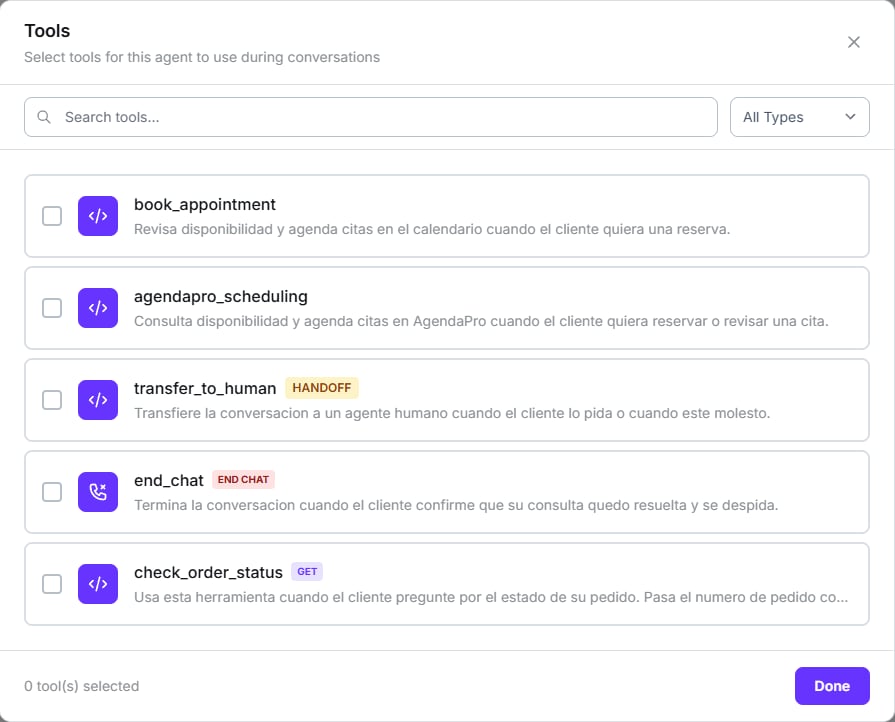
The account's tool library — tick what this agent needs
HANDOFF, END CHAT, or the HTTP method for an API tool. The search box and the
All Types filter matter once the library grows.
Types available on WhatsApp
Transfer, end call and agent swap are voice-only and don’t appear here. The chat
equivalent of a transfer is handoff.
The description is the trigger
The AI decides when to use a tool by reading its description. Don’t describe what it does; describe when it should be used, and when it shouldn’t.Integrations
There’s currently one provider available: AgendaPro.Saving the agent sends the full list of attached tools. If you open the modal and remove one
by accident, it’s detached on save.
Testing
The second tab of the right panel. You type as if you were the customer.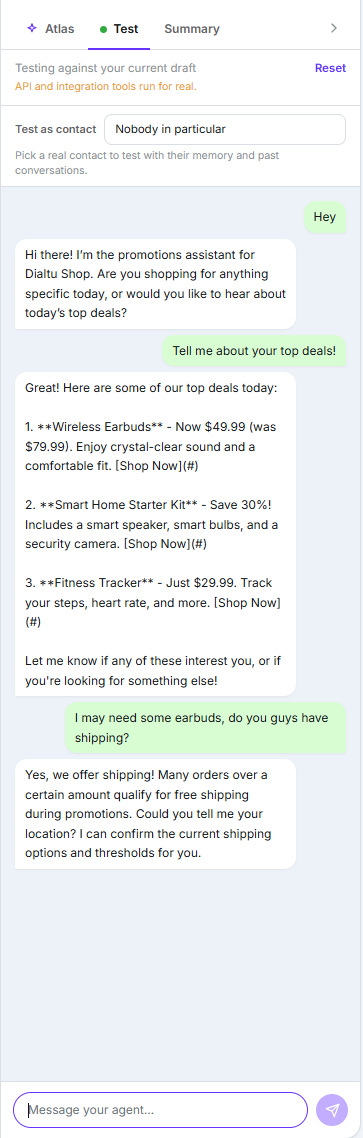
Testing the draft on screen, with the real-tools warning at the top
It’s free. The test panel consumes no credits, and unlike the voice one it works before you save: it tests the draft on your screen.
Summary
The third tab. The Required to create checklist — name, prompt, number and routing — plus a recap of the configuration, including the AI Memory row.Going live
The only control is the Active / Paused indicator in the top bar.What doesn’t exist
- Version history or rollback.
- Knowledge base or document upload.
- Analytics inside the agent — they’re under Analytics, filtered by that agent.
- Bulk actions on the agent list.
Back to the start
Introduction to WhatsApp agents
The full path through this section.