

SMS channel
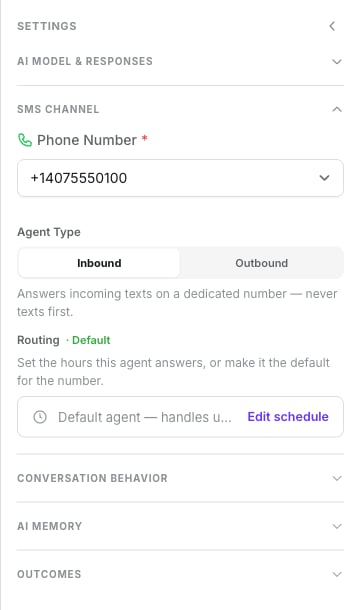
Number, agent type and routing
Phone number
Required for an inbound agent. An outbound agent must have one bound too — it’s the number it sends from. See Phone numbers.Agent type
First message
Outbound only, and required. Variables resolve here; blank values are left out. A per-run opening text — what you type before Start SMS Chat, or a Salesflow static opener — overrides it for that run, but the field must still be filled.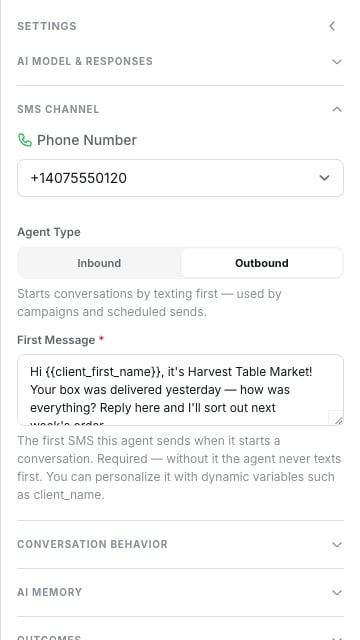
Outbound: the First Message the agent opens with
Who answers an inbound text
When a text arrives on a number, Dialtu picks the agent in this order:- If there’s an open session between this customer and this number, its agent replies — even outside its hours, even on an outbound-only number.
- Otherwise, the first agent whose weekly schedule covers now, in that agent’s timezone.
- Otherwise, the number’s default agent.
- Otherwise nobody: the text is acknowledged and dropped. Nothing is sent back.
STOP, HELP and START are handled before any of this, so they work with no agent on duty.
See Compliance.
Time-based routing
Inbound agents only. Edit schedule opens the Time-Based Routing window:- Timezone — “Time ranges are evaluated in this timezone”.
- Default Agent toggle — handles messages when no other agent’s time range matches.
- Quick presets — they replace the current schedule rather than adding to it.
- Weekly hours — a checkbox per day, up to 4 ranges per day with Add range, an “ends next day” marker, and Copy to all active days.
- Clear schedule.
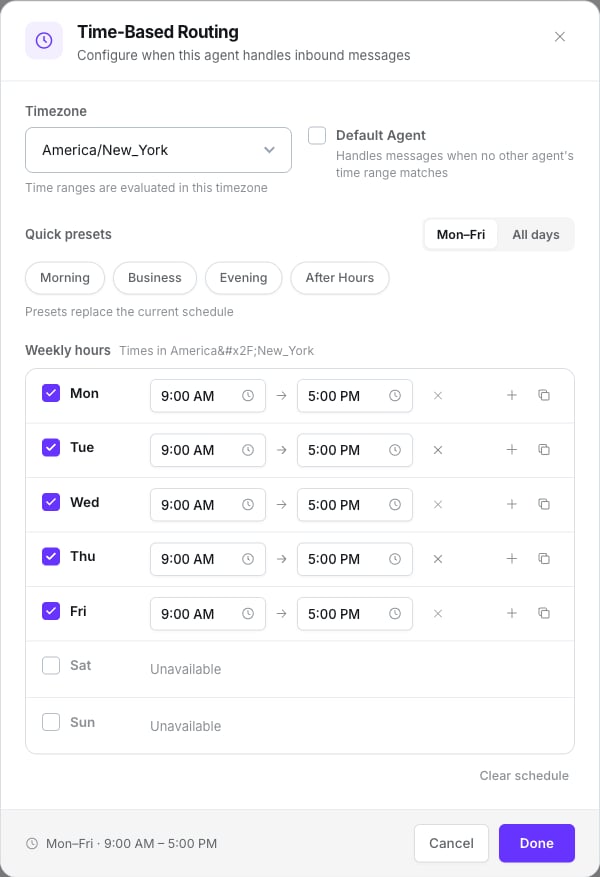
Timezone, the default toggle, presets and one row per day
- Windows are half-open: at exactly 17:00, a 09:00–17:00 agent is off and a 17:00–21:00 agent is on. Adjacent windows tile the week without overlapping.
- A range that ends before it starts wraps past midnight.
- An overlap — with your own ranges, or with another agent on the same number — blocks the save: “Overlaps with agent “X” on this number.”
- The default agent is excluded from conflict checks.
Conversation behaviour
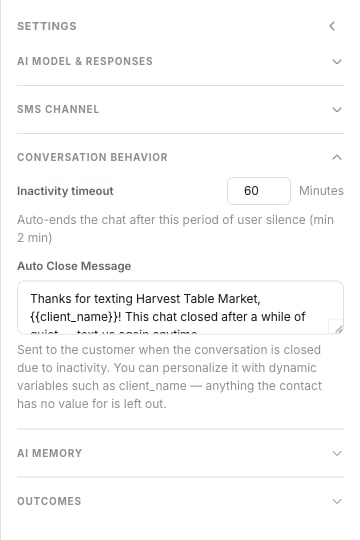
Two controls: inactivity timeout and the auto-close message
- A 24-hour backstop closes any open session, human-handled ones included.
- The auto-close text is only sent if you set one. Variables resolve; tokens that can’t be resolved are dropped. If the whole message resolves to nothing, nothing is sent.
- When it’s sent, it’s a billed message.
There is no response length control, no conversation style, no message batching
and no reply-delay setting. All of that is defined by writing it into the prompt.
AI memory
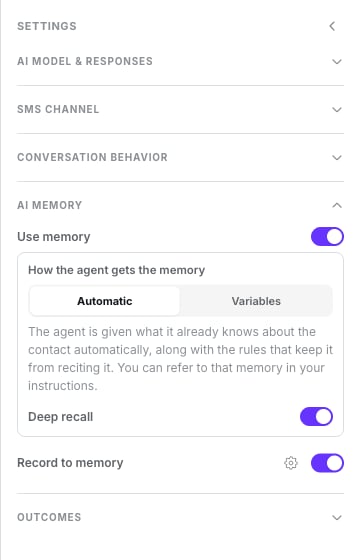
The AI Memory group with reading and recording switched on
Lumina does receive memory. Automatic injects it into the prompt; Variables mode
places it wherever you put the
{{memory_...}} tokens. Deep recall adds a built-in
“search previous conversations” ability the agent can use mid-chat.
Contact memory
The full explanation. It applies equally to SMS.
Duplicating an agent copies neither the LLM model nor the memory settings. Set them again on
the copy.
Outcomes: disposition tags
Outcomes → Disposition Tags → Manage opens the tags window. When a session closes, the conversation is classified against each attached tag’s Analysis Prompt — the criteria sent to the model. Tags are account-wide templates: they save instantly and affect every agent. Ticking one in this window is what attaches it to this agent.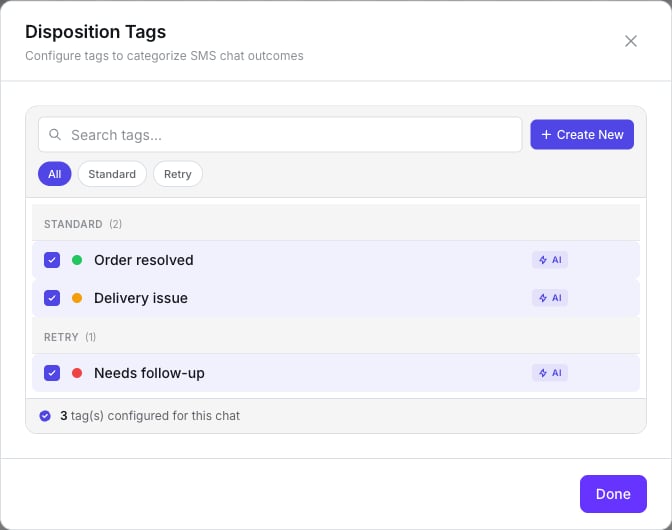
Tick the tags this agent can classify a conversation with
The Analysis Prompt field carries a badge naming the other engine. Ignore it — Lumina
uses the criteria.
Sessions closed by the STOP keyword skip classification.
What doesn’t exist
- Tag audiences.
- Reminders and follow-up sequences.
- Style, length or batching controls.
- A “resume AI after” hold — handing back to the AI is immediate.
- Analytics inside the agent — they’re under Analytics → SMS Statistics.
Next step
Tools
Give it real actions.