

Atlas
The first tab. Ask for changes in plain language and Atlas applies them to the agent.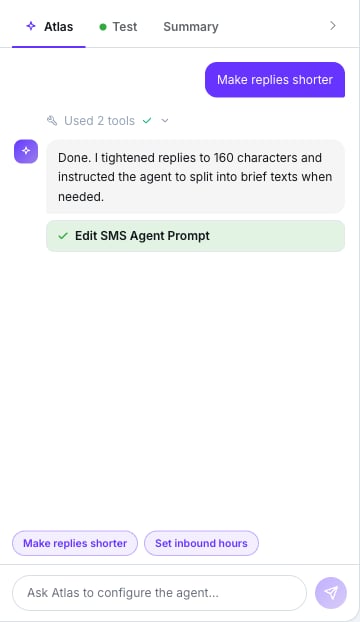
Quick actions and a completed change
- In create mode it builds the agent from your description and drops you on its page.
- In edit mode it updates the name, description, language, model, active state, agent type, first message, phone number, timezone, schedule, default-agent status (displacing the current default), auto close message, inactivity timeout, FAQ, variables, prompt text, attached tools, tags, disposition tags and memory settings.
- The Make replies shorter and Set inbound hours pills prefill common requests.
- It may ask clarifying questions before acting.
Test
The second tab. You type as if you were the customer.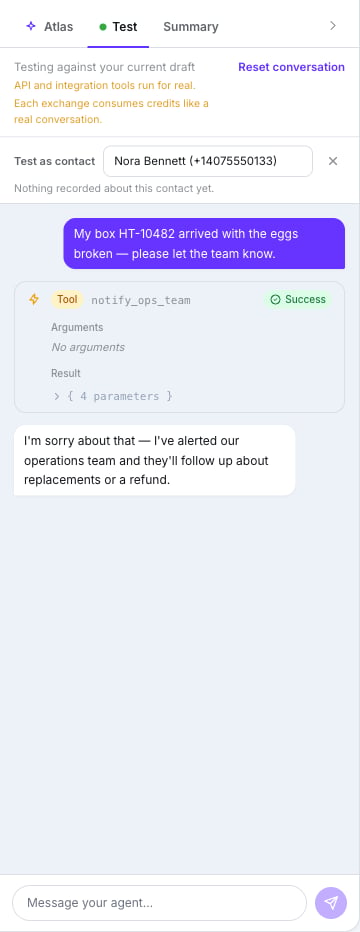
Testing the draft, with the two notices at the top
Testing here is free, like on every other channel. Each user can send up to 300 test turns
per hour; past that, the panel pauses and shows when you can carry on. See
What SMS costs.
- Test as contact — pick a real contact to test with their memory and past conversations. The row then reads “Memory: …” or “Nothing recorded about this contact yet.” It only appears if you can read clients and their notes.
- Send SMS is simulated: no real text leaves.
- When the agent ends or hands over, a pill marks the spot — “The agent ended the conversation here.” or “The agent handed the conversation to a human here.” — and the composer reads “This conversation has ended — the agent has no way back from here. Reset to test again.” Press Reset conversation to start over.
Summary
The third tab. The checklist — Required to create or Required to save — lists Name, Agent Prompt (with its character count) and, for an outbound agent, First Message. Below it, a Configuration recap: Engine (Lumina), LLM Model, Language, Phone Number, Agent Type, Routing, Inactivity timeout, AI Memory, Status, Tools, FAQ and Disposition Tags.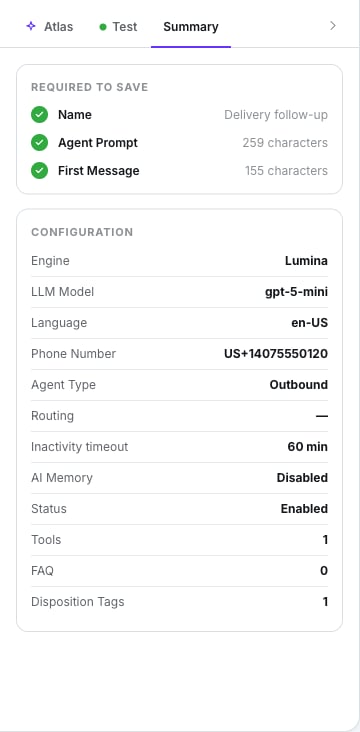
What's missing, and the configuration at a glance
Going live
The control is the Active / Paused toggle in the top bar. A paused agent isn’t picked for new inbound texts and can’t start chats. Duplicate lives on the agent list, not in the editor. It asks for a New Agent Name, a Phone Number (required if the source is inbound) and, for inbound copies, Default Agent or Time-Based Routing. Delete, also on the list, warns you: “This action cannot be undone.”What doesn’t exist
- Version history or rollback.
- Knowledge base or document upload.
- Analytics inside the editor — they’re under Analytics → SMS Statistics.
- Bulk actions on the agent list.
- Changing the engine.
Next step
The Conversations inbox
Where you watch it work — and step in.