

What happens in one transfer
The agent picks a destination
On each customer message, the agent is offered only the destinations that are valid right now for this conversation. It picks one by reading each destination’s “when”.
Dialtu checks the destination again
Same line, active, not deleted, not itself, the right direction, the client’s tags, and the limits. Anything can have changed since the turn started.
The topic check
A small AI check reads the customer’s latest messages and the destination’s “when”. If they don’t match, there’s no transfer.
The conversation moves
The conversation now belongs to the new agent, and a note is written.
The new agent answers the same message
In the same turn, without a greeting and without mentioning any transfer. The customer receives one reply.
Who can receive a transfer
Every destination must be active, not deleted, not the agent that’s transferring, and in the same workspace. On top of that, per channel:Invalid destinations are simply not offered. If a destination is switched off, on another line or outside the customer’s tags, the agent doesn’t see it that turn — so there’s usually no note, just no transfer. A failure note only appears when something changes between the offer and the transfer, or when a limit or the topic check stops it.
Limits
The topic check
Before anything is committed, a small AI check answers one question: is what the customer asked for in their latest messages covered by the destination’s “when”? It reads up to the last 6 messages of the conversation and judges the customer’s words, not the agent’s reason.- It matches → the transfer goes ahead.
- It doesn’t match → no transfer. The current agent answers the customer itself. A note says the customer’s topic does not match that agent’s scope.
- The check fails or times out → the transfer goes ahead anyway. A broken check never blocks a legitimate transfer.
Silent handover
The receiving agent gets a hidden instruction: it’s continuing a conversation that was handed to it internally, it must not greet or introduce itself again, must not mention any transfer or other agent, and must answer the customer’s latest message directly. What the customer sees: one reply, from the new agent, to the message they just sent.When the new agent fails: revert
If the receiving agent errors — or finishes its turn without sending the customer anything — before replying:- The conversation goes back to the original agent.
- The original agent answers the customer.
- A red note says the transfer was undone.
Topics nobody handles
When the agent can’t transfer — no valid destination this turn, the limit was reached, or the topic check said no — Dialtu tells it to:- Try to help with what it can.
- If it genuinely can’t, say so and ask whether the customer wants to talk to a human advisor.
- Hand off to a person (with its Handoff tool, if it has one) only if the customer says yes.
There’s no automatic return
The conversation stays with the new agent until something else moves it: another transfer, a person taking over, or the session closing. To let agents send customers back, attach the same transfer tool to all of them.The notes in Conversations
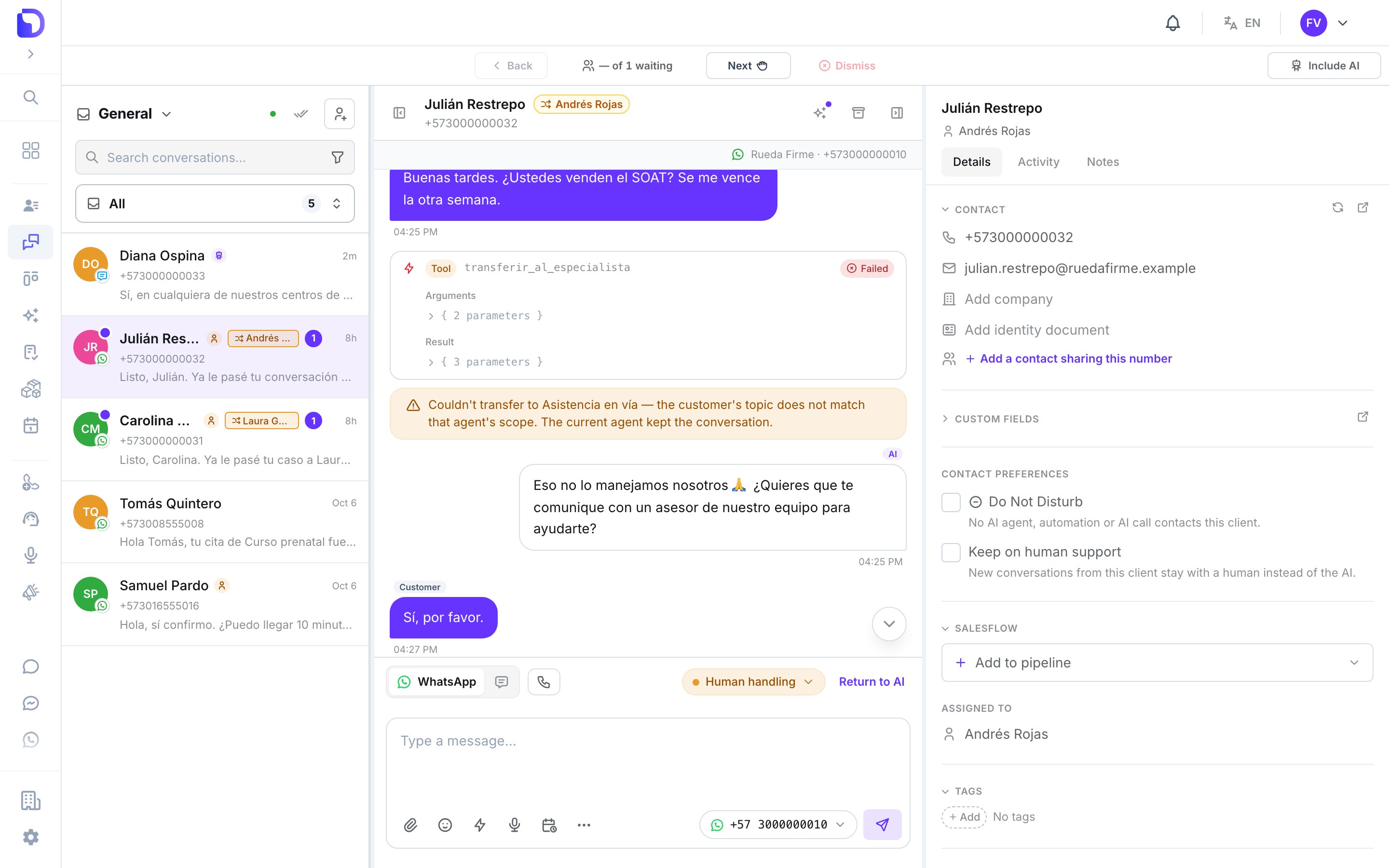
A failed transfer: amber note, and the current agent keeps answering
The reason in a failure note is one of these:
What it costs
One billed AI message per customer message, however many steps the turn took. The transferring agent’s decision, the topic check and the new agent’s reply are folded into the single message the customer receives. A reverted transfer is billed the same way: one message, from the agent that actually answered. The transfer tool itself has no extra price.What doesn’t exist
- A transfer across lines, numbers or Pages.
- A per-agent limit — the limits are per message and per conversation.
- Changing the limits — 1 and 5 are fixed.
- Automatic return to the first agent.
Next step
Transfers in Salesflow
React to a transfer in a pipeline.