

If you want a person to be notified when the AI hands a conversation to them, see Human handoff notices.
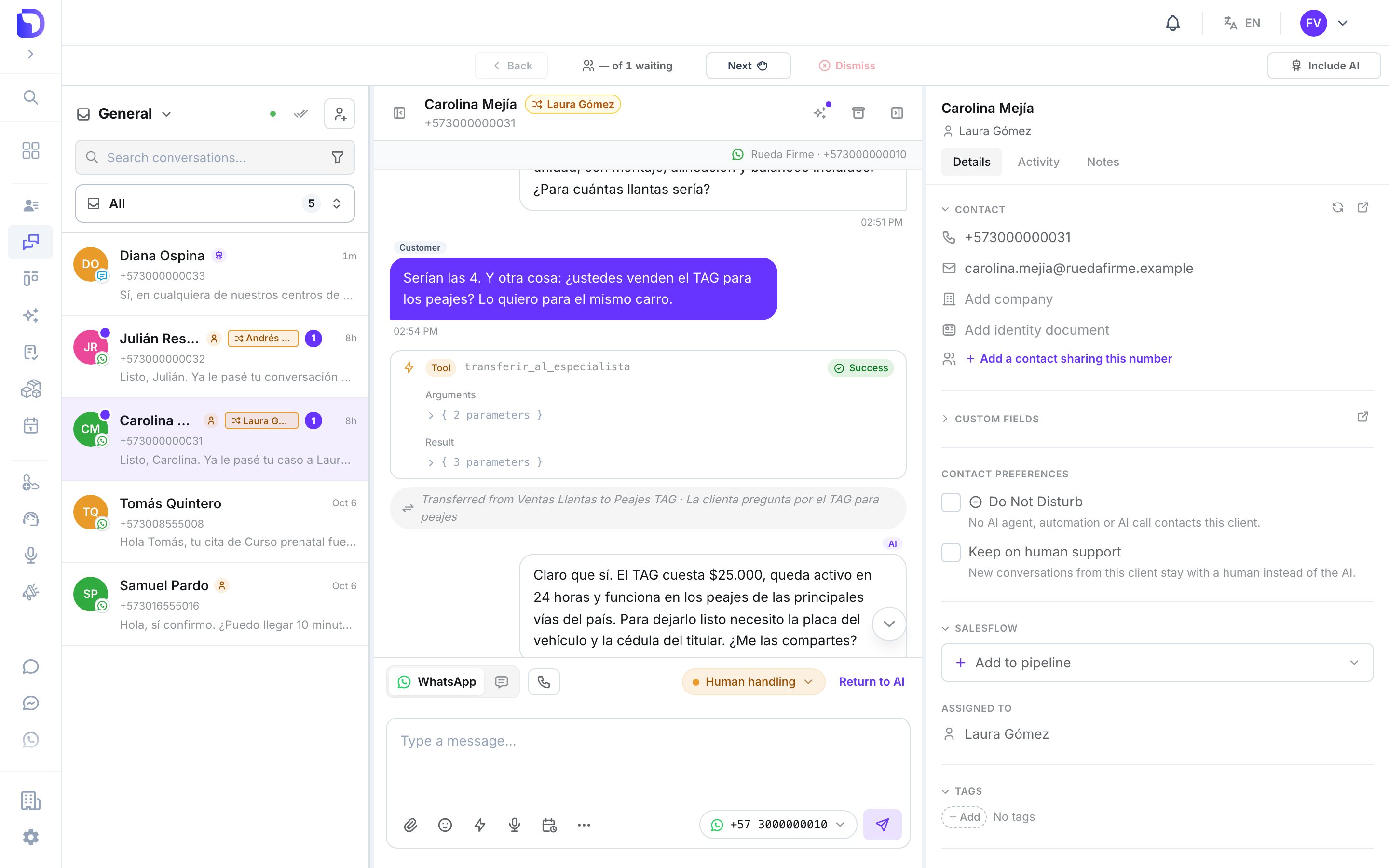
A transfer in Conversations: one reply to the customer, and a note for your team
Where it works
What it can do
Split one line between specialists
A tyres agent and a toll-tag agent on the same number, each handing over the other’s topics.
Hand over silently
The new agent answers the same message without greeting and without mentioning the transfer. The customer gets exactly one reply.
Check the topic first
A small AI check confirms the customer’s message matches the destination’s “when” before anything changes.
Undo itself on failure
If the new agent fails before replying, the conversation goes back and the original agent answers.
Move a customer in Salesflow
An Agent transferred event on transitions, filterable by From agent and To agent.
What it does NOT have
What’s in this section
Create the transfer tool
Destinations, “when” texts, attaching it, and the prompt block that keeps it honest.
How transfers work
Who can receive a transfer, limits, the topic check, reverts and every Conversations note.
Transfers in Salesflow
The Agent transferred event and why agent filters keep matching after a transfer.
Troubleshooting
It didn’t transfer, it transferred too much, the customer never goes back.
One thing that surprises people
Next step
Create the transfer tool
From two agents on one line to a working transfer.