A phone number with SMS capability. See Phone numbers.
SMS write permission.
A2P 10DLC registration under way if you text US numbers. See Compliance — it takes days to weeks, so start early.
Default roles don’t include SMS access. Only Admin and Super Admin have it. If someone on
your team can’t see the SMS section in the menu, they need a custom role with the SMS module.
Chat → SMS → Agents, then press Create Agent. The Conversation engine window
opens: pick Lumina.
The engine can’t be changed later. As the window itself says: “An agent’s engine is
chosen at creation and cannot be changed afterwards.”
Choose Lumina — the engine is fixed once the agent exists
Name and description
In the top bar. Only your team sees the description.
Model and language
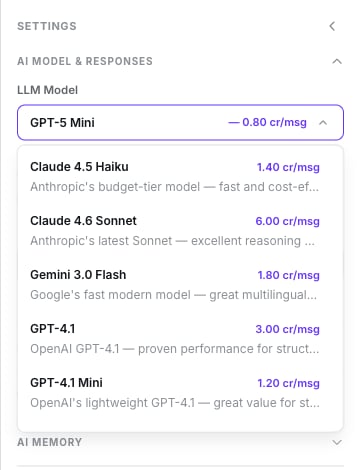
First settings group, AI Model & Responses. It’s the only one that starts open.
LLM Model — every option shows its price per message. The default is GPT-5
Mini. There is no temperature control.
Language — English, Español (Latinoamérica), Español (España) or
Multilingual.
Language does not force the reply language. Lumina detects the customer’s language
and mirrors it. This setting only changes the language of the handoff summary and of
calendar labels. To force a language, write it as a rule in the prompt — see
The Language setting.
The language selector prints its heading twice and its help text talks about calls.
Ignore both — it’s the same field.
The model group open, the rest collapsed
Every model is priced per message
Channel: number, type and first message
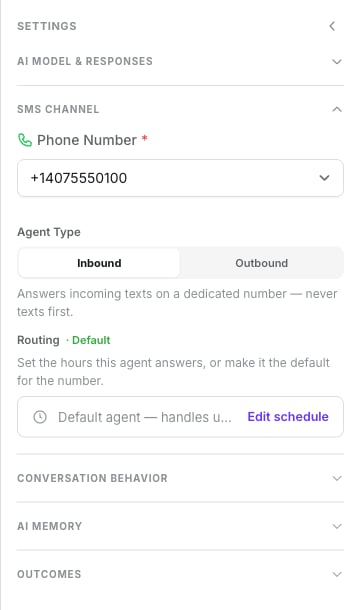
SMS Channel group.
Phone Number — required for an inbound agent. An outbound agent also needs one, to
send from.
Agent Type — Inbound or Outbound. The default is Outbound, so choose
deliberately.
Inbound shows Routing: a weekly schedule, or Default Agent for the number.
Outbound shows First Message, which is required.
For a first agent, choose Inbound and make it the number’s default agent, so no text
goes unanswered.
Inbound: number, type and routing
Write the prompt
The centre column: a single document with context, conversation flow and rules. It’s
the only required content field.
## ContextYou are the assistant for [your business]. You reply over SMS, so be very brief.## Conversation flow1. Greet them and identify what they need.2. Ask only for essential details, one at a time.3. Confirm before closing.## Rules- Two sentences per message, maximum.- Always reply in Spanish, whatever language the customer writes in.- Never invent prices or delivery dates.- If they ask to stop receiving messages, tell them to reply STOP, then end the conversation.
SMS is billed per message and read on a small screen. One idea per message.
The prompt, FAQs and variables
How to structure and personalise it.
Check the Summary and save
The Summary tab lists what’s missing under Required to create: Name, Agent
Prompt, and First Message for an outbound agent.Press Create Agent. The agent is live immediately — you’ll see SMS agent created
successfully and land back on the agent list.
Text the number from your phone. You should get a reply within seconds and see the thread under
CRM → Conversations with the Lumina badge.If nothing comes back, check in this order:
The agent is Active.
Its schedule covers now in the agent’s timezone, or the number has a default agent.
Otherwise the text is dropped silently — nothing is sent back.